Table of Contents
- The 6.6x Bandwidth Gap
- Why Does Bandwidth Beat Capacity?
- Apple Silicon vs NVIDIA: Specs
- How Many Tokens per Second?
- Multi-User Scaling Problem
- CUDA vs Metal for AI
- When Mac mini Makes Sense
- BIZON Workstations for Local LLMs
- Entry Level - Up to Dual-GPU Workstations
- Mid-Range - Up to Quad-GPU Workstations
- Professional - 7-GPU Water-Cooled
- Enterprise - 8-GPU SXM Data Center Server
- Mac vs NVIDIA Final Pick
Mac Studio / Mac mini vs NVIDIA GPUs for Local LLMs
Last verified: May 2026. Bandwidth specs, benchmark sources, and BIZON product configurations confirmed against NVIDIA's official product pages, Apple Silicon datasheets, Olares and Hardware-Corner benchmarks, and bizon-tech.com.
A single NVIDIA RTX 5090 delivers 1,792 GB/s of memory bandwidth, 6.6x the Mac mini M4 Pro and 3.3x the Mac Studio M4 Max. That bandwidth gap, not VRAM capacity, is what determines tokens per second on a quantized 70B model. The Mac platform still has a place in capacity-bound workloads where a 256 GB unified pool fits a quantized 405B model in one piece, but on token-generation speed the RTX 5090 stays well ahead. We configure every workstation for the specific inference workload it will run.
Apple's Mac Studio and Mac mini have become the default recommendation for running local LLMs. YouTube videos show creators loading massive models onto Apple Silicon and calling them affordable AI workstations. The pitch is huge unified memory, quiet operation, and a compact form factor. What's not to like?
Plenty, once you look past the capacity numbers. Loading is not running. These machines generate tokens at a fraction of the speed NVIDIA GPUs deliver, and the reason comes down to one spec most buyers overlook. Memory bandwidth.
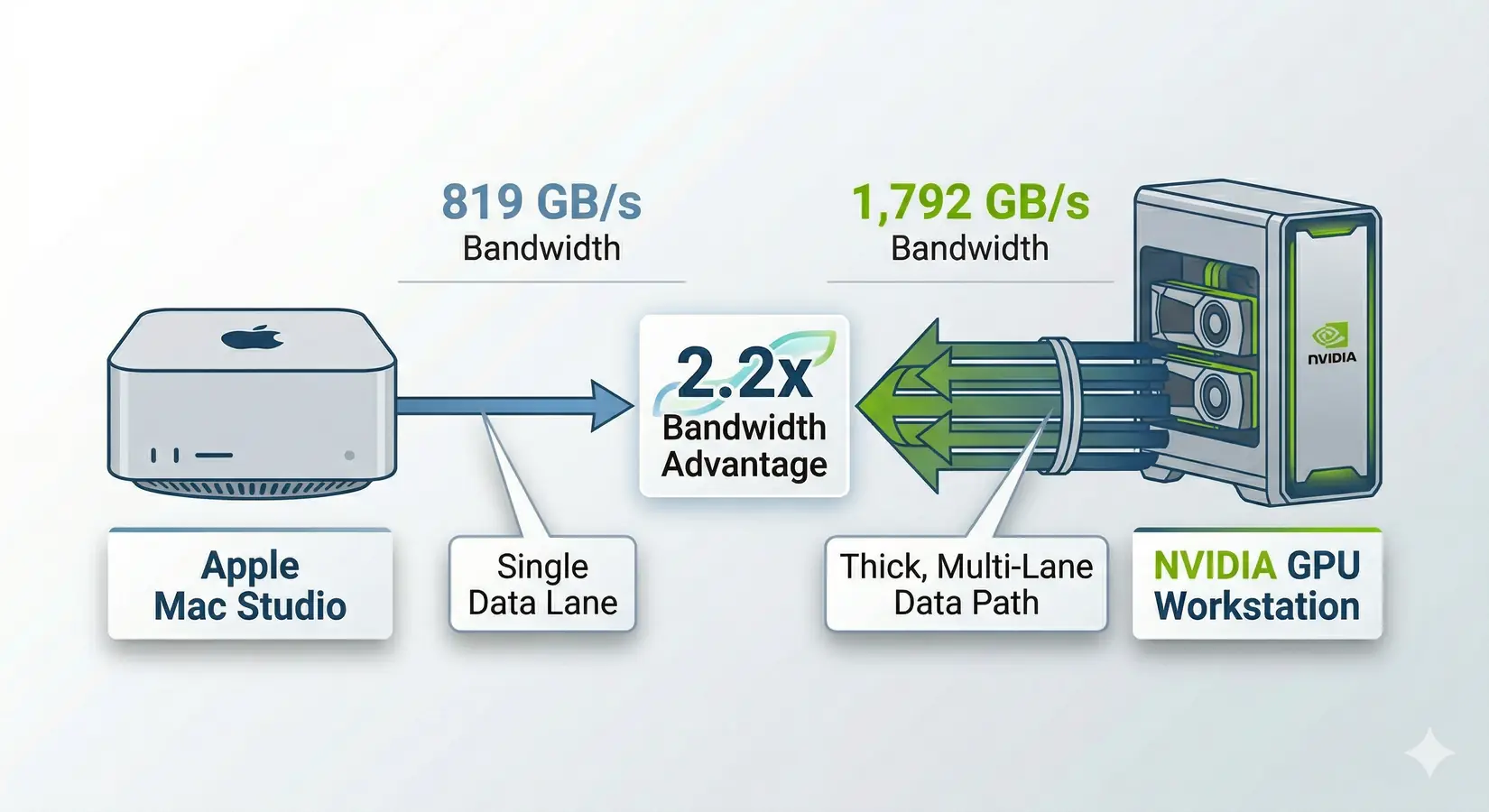
Mac Studio vs NVIDIA GPU workstation. The bandwidth gap tells the real story.
Key Takeaway
The RTX 5090's 32GB hits the price-performance sweet spot for any model that fits Q4 quantization. The Mac Studio M3 Ultra wins only when 256GB unified capacity overrides token throughput, like fitting a quantized 405B model in one piece for exploratory research. For multi-user serving, fine-tuning, or agentic workflows, NVIDIA is the only platform that scales. Pick the bottleneck. Then pick the platform.
Dave Lee (Dave2D) running the DeepSeek R1 671B model on a maxed-out M3 Ultra Mac Studio. Dave2D channel.
Dave2D's Mac Studio video is a good example. Watch him run the DeepSeek R1 671B model on a maxed-out M3 Ultra and clock 16.08 tokens per second on Q4. An RTX 5090 with a fraction of the memory capacity can dramatically outperform Apple Silicon on models that fit within 32 GB of VRAM. Memory size determines what models fit in a given configuration, but bandwidth controls how fast tokens stream out once the model is loaded, and Apple Silicon and NVIDIA GPUs sit on opposite sides of that divide.
Why Does Bandwidth Beat Capacity?
LLM inference repeatedly streams model weights from memory during token generation, which means bandwidth (GB/s), not capacity (GB), sets the speed limit. Think of it like a highway: memory capacity is the parking lot at the end, and memory bandwidth is the number of lanes. Every token reads the full model weights from memory, so bandwidth is the binding constraint, captured in one formula: tokens per second = memory bandwidth / model size in bytes. The 2024 academic paper "LLM Inference Unveiled" (arXiv 2402.16363) confirms LLM inference is fundamentally memory-bandwidth-bound.
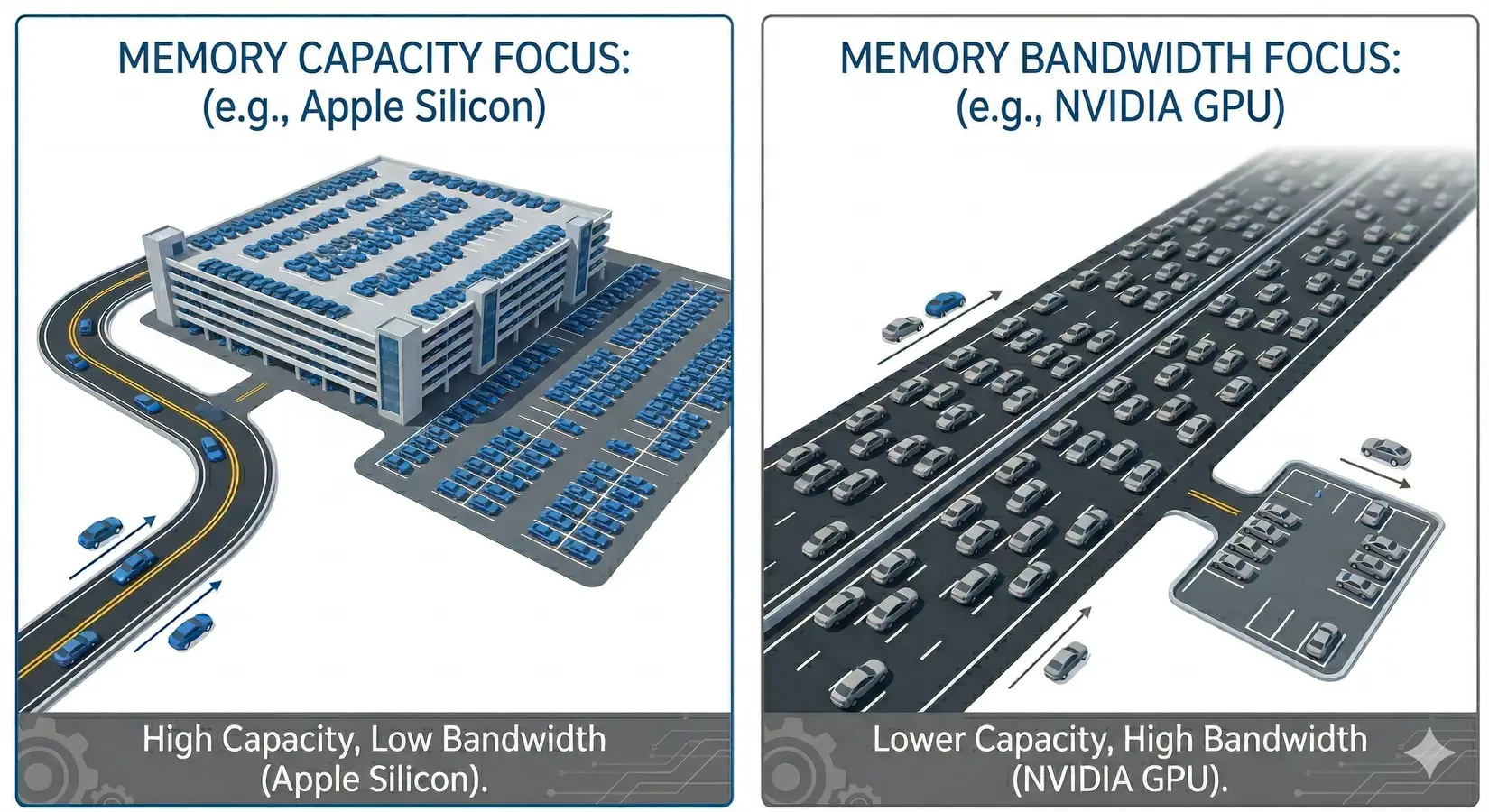
Bandwidth is the highway width. Capacity is the parking lot. More lanes move more tokens.
In practice, actual speeds land at 50-85% of the theoretical max. KV cache overhead, quantization, and framework scheduling eat the rest. Worked example on the M4 Max: the Llama 3.3 70B model at Q4_K_M weighs about 42.5 GB. With 546 GB/s of bandwidth the theoretical ceiling is roughly 12.8 t/s, and at 65% efficiency you get about 8.3 t/s. Real-world benchmarks on comparable configs land between 8-11 t/s. That 65% factor anchors predictions in this article.
Apple Silicon vs NVIDIA: Specs
The bandwidth gap between Apple Silicon's top chip and NVIDIA's consumer ceiling is not subtle. It is roughly 2x at the top of each lineup and widens as you step down Apple's product stack. The compute gap is even wider. Apple's Neural Engine is a general-purpose accelerator, not a matrix-math-first architecture.
Bandwidth and Compute Comparison Table
| Hardware | Memory / VRAM | Bandwidth | AI / Tensor Hardware |
|---|---|---|---|
| Apple M4 Pro (Mac mini) | Up to 64 GB unified | 273 GB/s | 16-core Neural Engine |
| Apple M4 Max (40-core GPU) | Up to 128 GB unified | 546 GB/s | 16-core Neural Engine |
| Apple M3 Ultra | Up to 256 GB unified | 819 GB/s | 32-core Neural Engine |
| NVIDIA RTX 5090 | 32 GB GDDR7 | 1,792 GB/s | 5th Gen Tensor Cores (~209 FP16 TFLOPS) |
| NVIDIA RTX PRO 5000 (48 GB) | 48 GB GDDR7 ECC | 1,344 GB/s | 5th Gen Tensor Cores (~130 FP16 TFLOPS) |
| NVIDIA RTX PRO 5000 (72 GB) | 72 GB GDDR7 ECC | 1,344 GB/s | 5th Gen Tensor Cores (~130 FP16 TFLOPS) |
| NVIDIA RTX PRO 6000 | 96 GB GDDR7 ECC | 1,792 GB/s | 5th Gen Tensor Cores (~250 FP16 TFLOPS) |
Methodology. Bandwidth figures are sourced from Apple Silicon datasheets and NVIDIA's official product pages (verified May 2026). FP16 TFLOPS values for NVIDIA GPUs are non-sparse Tensor Core numbers cross-referenced against waredb.com. Sparsity-enabled figures (which are 2x inflated) are excluded.
Binning note. The M4 Max ships in two variants. Figures above use the top-bin 40-core GPU. The base bin (32-core GPU) drops bandwidth roughly 25 percent, so drop every prediction in this article by the same factor if you're buying the entry-level Mac Studio.
There is no M4 Ultra. The M3 Ultra remains Apple's highest-bandwidth option, capped at 256 GB on the desktop configurator. On the NVIDIA side, Blackwell supports NVLink 5.0 at 1.8 TB/s per GPU, but NVIDIA removed that connector from workstation and consumer cards. The RTX PRO 6000 and RTX 5090 communicate over PCIe Gen 5. NVLink 5.0 is data-center-only. For the full Blackwell roadmap, see our GTC 2026 recap.
Apple and NVIDIA Spec Differences
A single RTX 5090 carries roughly three to six times the bandwidth of any current Apple Silicon desktop chip. A dual-RTX-5090 workstation widens that lead past four times even the top-bin Mac Studio. The compute gap is more dramatic. Per NVIDIA's official spec sheet, the RTX 5090 delivers ~209 TFLOPS of FP16 tensor performance through dedicated Tensor Cores, against Apple's general-purpose Neural Engine.
Apple's advantage is real in one area. Unified memory gives you a single large pool without splitting a model across GPUs, and a 256 GB Mac Studio can hold a quantized 405B parameter model in one piece. An RTX 5090 with 32 GB can't load a 70B Q4 model at all. You'd need two RTX PRO 6000 cards (192 GB total) to match Apple's top-bin capacity, but for the 8B, 27B, and 30B models most people actually use, a single NVIDIA GPU has enough VRAM and runs them dramatically faster.
How Many Tokens per Second?
A single RTX 5090 at 1,792 GB/s generates 238 t/s on Llama 3.1 8B Q4, compared to 36 t/s on a Mac mini M4 Pro. The table below applies that formula across every hardware configuration and model size at 65% efficiency, with Q4_K_M sizes verified against HuggingFace and Ollama repositories. The gap matches the bandwidth ratio between the two platforms within framework overhead. Every row is bandwidth divided by model size.
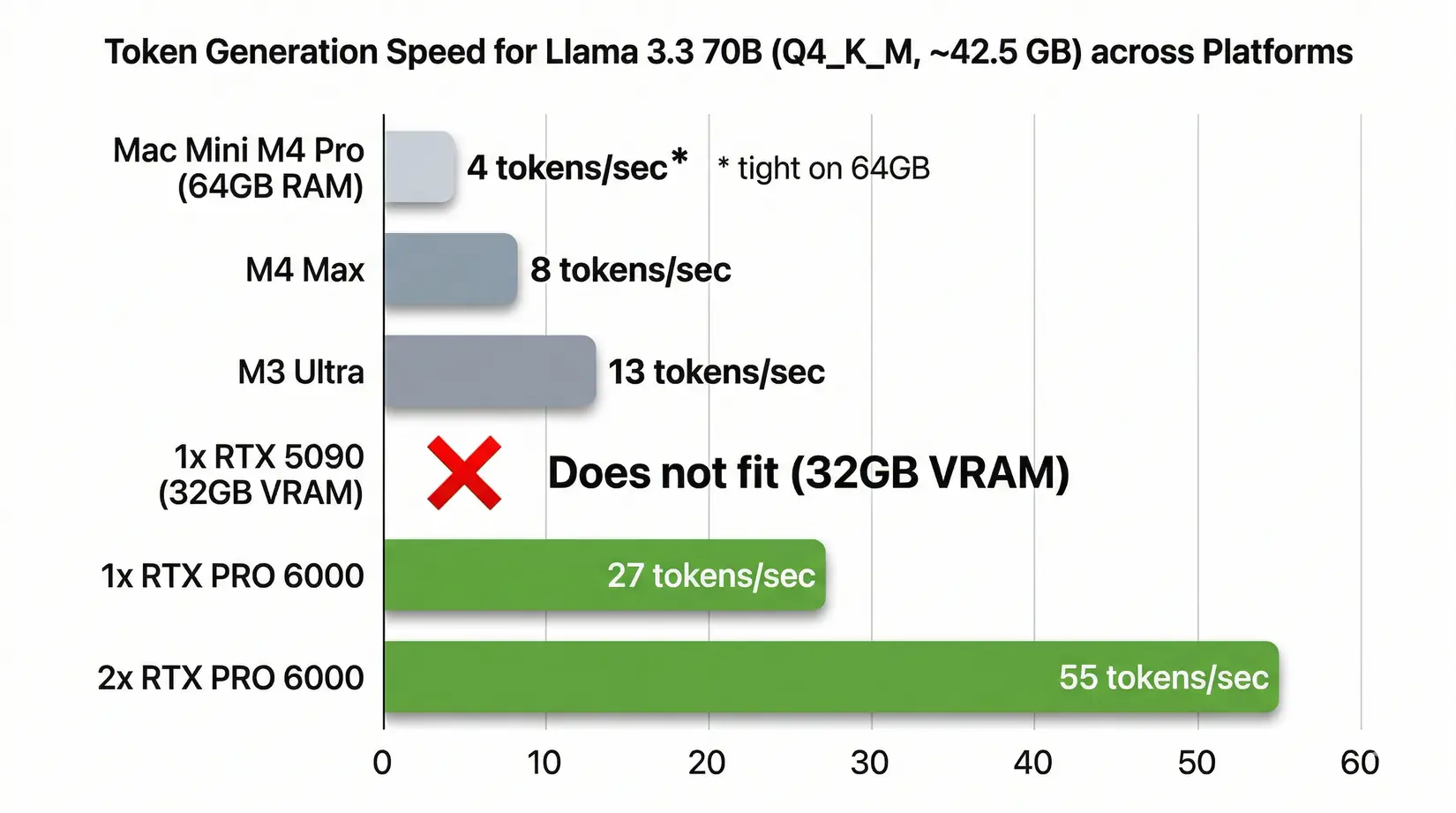
Llama 3.3 70B (Q4_K_M) token generation speed. M4 Max, M3 Ultra, and NVIDIA configurations at 65% efficiency
The full table extends across every model size from 7B to 405B. Each Apple Silicon column reflects the platform's shared memory bandwidth ceiling. The NVIDIA columns separate single-card and dual-card configurations because tensor parallelism scales throughput nearly linearly on models that fit two cards in parallel mode. Read across a row to compare how every platform handles the same model size at the same quantization level.
| Model (Q4_K_M) | Size | M4 Pro Mac mini (273 GB/s) | M4 Max (546 GB/s) | M3 Ultra (819 GB/s) | Single RTX 5090 (1,792 GB/s) | 2x RTX 5090 (3,584 GB/s) | Single RTX PRO 6000 (1,792 GB/s) | 2x RTX PRO 6000 (3,584 GB/s) |
|---|---|---|---|---|---|---|---|---|
| Llama 3.1 8B | ~4.9 GB | ~36 t/s | ~72 t/s | ~109 t/s | ~238 t/s | ~238 t/s** | ~238 t/s | ~238 t/s** |
| Gemma 3 27B | ~16.5 GB | ~11 t/s | ~22 t/s | ~32 t/s | ~71 t/s | ~141 t/s | ~71 t/s | ~141 t/s |
| Qwen3 30B-A3B (MoE) | ~18.6 GB | ~10 t/s | ~19 t/s | ~29 t/s | ~63 t/s | ~125 t/s | ~63 t/s | ~125 t/s |
| Llama 3.3 70B | ~42.5 GB | ~4 t/s* | ~8 t/s | ~13 t/s | Does not fit | ~55 t/s | ~27 t/s | ~55 t/s |
| Qwen3 235B-A22B (MoE) | ~142 GB | Does not fit | Does not fit | ~4 t/s | Does not fit | Does not fit | Does not fit | ~16 t/s |
| Llama 3.1 405B | ~245 GB | Does not fit | Does not fit | ~2 t/s | Does not fit | Does not fit | Does not fit | Does not fit |
| DeepSeek R1 671B (MoE) | ~404 GB | Does not fit | Does not fit | Does not fit | Does not fit | Does not fit | Does not fit | Does not fit |
Small models that fit entirely in a single GPU's VRAM don't benefit from a second GPU. The model runs on one card at full speed.
*Llama 70B Q4 (42.5 GB) technically fits in 64GB but leaves minimal headroom for the KV cache and OS. Expect shorter context windows and possible performance degradation on longer conversations.
MoE note - Qwen3 30B-A3B, Qwen3 235B-A22B, and DeepSeek R1 671B are Mixture of Experts architectures. They only activate a fraction of their parameters per token. The full model still has to fit in memory, but once loaded, MoE models punch above their weight class compared to dense models of the same file size.
Real-world benchmarks confirm the predictions. Alex Ziskind's M3 Ultra runs delivered ~41 t/s on Gemma 3 27B Q4 versus our 32 t/s prediction, while Hardware-Corner.net benchmarks showed the RTX 5090 running 8B models at 185-213 t/s against our 238 t/s estimate, the gap due to framework overhead and inference scheduler tuning. Both platforms track the bandwidth formula closely, and the efficiency factor varies by framework tuning rather than hardware generation. Apply the same formula to any hardware that ships this year or next, and the bandwidth ratio holds.
Methodology. Predictions use (bandwidth ÷ model size × 65%). Q4_K_M model sizes verified against HuggingFace and Ollama repositories. "Does not fit" means the model exceeds available VRAM after KV cache and OS overhead.
Single-user throughput is half the story. The other half is what happens when a second user hits the same machine. Apple Silicon's shared memory bus behaves very differently from NVIDIA's dedicated VRAM, and that gap shows up the moment concurrent inference lands on the box. Agentic workflows fire 5-10 parallel requests from a single developer running a local agent stack, and for small teams or internal APIs, that shared-bandwidth architecture turns from a feature into a hard limit.
Multi-User Scaling Problem
Add a second user and the Mac Studio M3 Ultra drops 70%, from ~84 t/s to ~25 t/s. NVIDIA holds better. According to Olares multi-user benchmarks published November 2025 running Qwen3 30B-A3B, the same workload on NVIDIA hardware running vLLM started at 157 t/s and fell to 81 t/s at eight users, a 48% drop. Meaningful, but nothing like Apple Silicon's cliff. Solo YouTube benchmarks hide this entirely.
Watch Out
Single-user YouTube benchmarks don't predict team performance. Apple's top-bandwidth desktop that looks great in solo Ollama demos loses 70% of its throughput at eight concurrent users vs. a 48% drop on NVIDIA. Agentic AI workflows easily fire 5-10 simultaneous requests from a single developer. You don't need a team to saturate Apple's shared memory bus. You just need your AI tools running in the background.
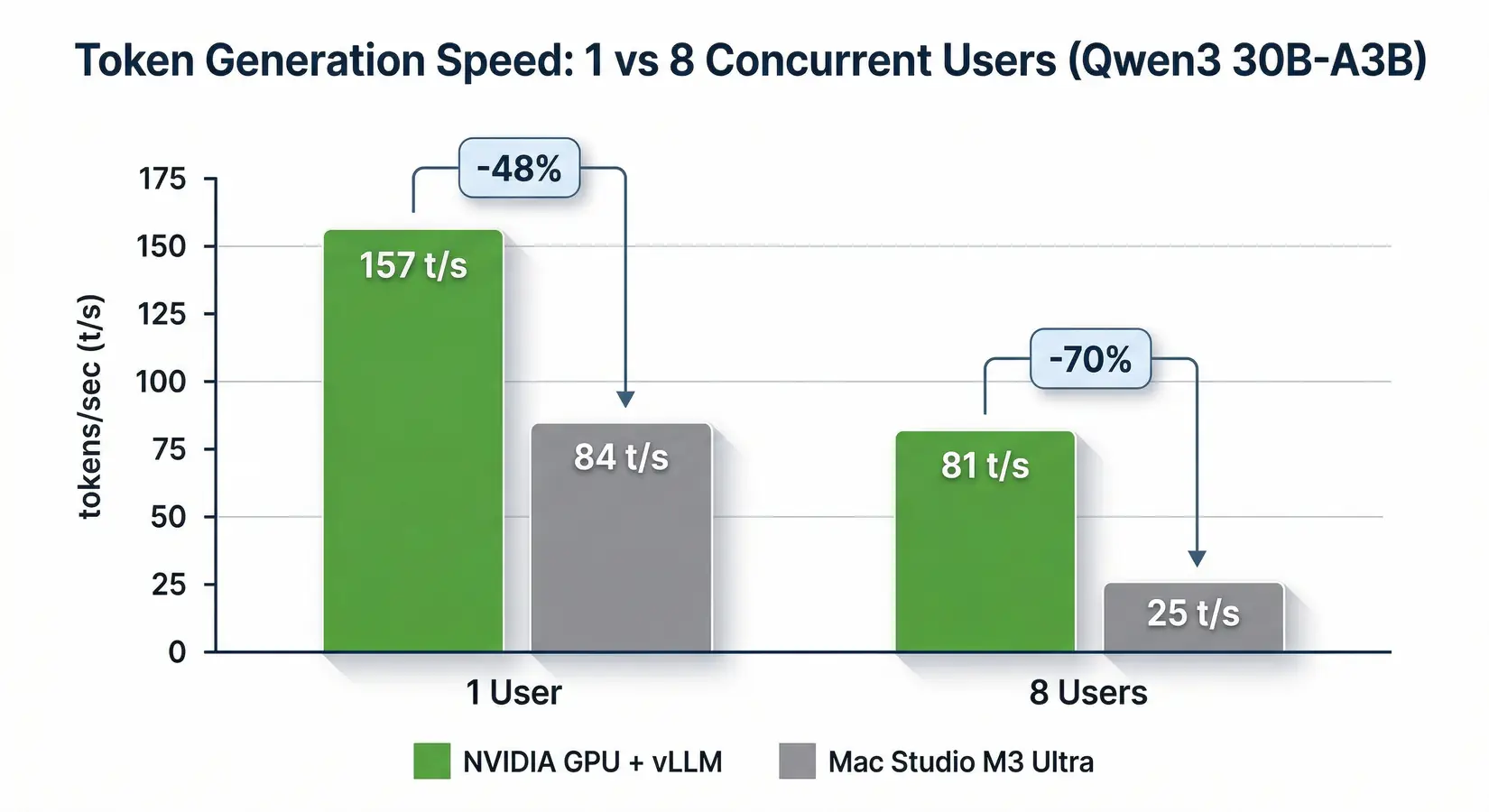
Token generation speed at 1 and 8 concurrent users on Qwen3 30B-A3B (Olares benchmarks, November 2025)
NetworkChuck on linking 5 Mac Studios into an AI cluster over Thunderbolt. NetworkChuck channel.
Apple's unified memory architecture is the culprit. The shared pool that makes loading large models convenient also means the CPU, GPU, Neural Engine, and every active process compete for the same bandwidth. NVIDIA GPUs dedicate their full VRAM bandwidth to inference while the CPU handles its own work through separate system memory. No contention. NetworkChuck's viral video makes the tradeoff concrete: a 5-Mac-Studio Thunderbolt cluster requiring five machines and five power supplies to match what a single dual-GPU NVIDIA workstation handles from one chassis. For small teams, internal APIs, or any agentic workflow firing parallel queries, that shared-bandwidth architecture turns from a feature into a hard limit.
CUDA vs Metal for AI
NVIDIA's CUDA stack supports vLLM, TensorRT-LLM, Triton, and every major training framework, while Apple's Metal/MLX ecosystem only recently picked up vLLM coverage. Hardware bandwidth is half the story. The AI software ecosystem was built on CUDA long before Apple Silicon was a local-LLM consideration. Apple's Metal Performance Shaders and the newer MLX have narrowed the gap for inference, but core production tooling ships CUDA-first or remains CUDA-only, and fine-tuning toolchains like LoRA, QLoRA, DeepSpeed, and FSDP are almost entirely CUDA-native. Metal works for chat-style inference on curated models and breaks down everywhere else.
vLLM is the gold standard for production LLM serving. CUDA-native. Deep NVIDIA optimization. Apple Silicon compatibility arrived in early 2026 through vllm-metal, but it's limited to text-only inference with no vision support and no advanced scheduling. A first-generation port.
TensorRT-LLM, NVIDIA's own inference optimization engine, is CUDA-only with no Metal path.
PyTorch supports Apple Silicon through the MPS backend. It works, but performance lags CUDA for many operations and CUDA still gets optimizations first.
llama.cpp and Ollama offer the best Mac experience for local inference and are the reason those YouTube videos look so good. For single-user, single-model chat, they deliver a smooth experience on Apple Silicon.
Fine-tuning is where the gap becomes a wall. LoRA, QLoRA, and major fine-tuning toolchains are CUDA-first. For tier-by-tier GPU selection, see our Best GPU for LLM Training & Inference guide.
Jeff Geerling (independent hardware reviewer) on scaling Mac Studio clusters via RDMA over Thunderbolt 5. Jeff Geerling channel.
Today, production fine-tuning at meaningful scale overwhelmingly favors NVIDIA.
Jeff Geerling's deep-dive on RDMA-over-Thunderbolt-5 Mac Studio clusters confirms scaling Apple Silicon past single-machine inference adds enormous complexity. Production inference serving, fine-tuning, or multi-user API endpoints require CUDA, and the software gap is unlikely to close quickly. The next section names the specific Mac mini and Mac Studio buyer profiles where Apple Silicon is the right call.
When Mac mini Makes Sense
Three workloads justify Apple Silicon: quantized models under 30B, single-user development, and macOS-native tooling chains where a second machine creates more friction than it solves. Credit where it's earned. The Mac mini and Mac Studio fit real buyer profiles, just not the ones YouTube reviewers market. The next entries name those patterns and the specific configurations that match each workload.
Quantized models are the sweet spot - Q4 and below are less sensitive to raw bandwidth because the data read per token is smaller. A Llama 8B Q4_K_M weighs ~4.9 GB. Per Apple's spec sheet, the Mac mini M4 Pro's 273 GB/s delivers ~36 t/s at that model size. A perfectly usable speed for chatting. Quantized 27B and 30B models run at 10-11 t/s on Apple's compact desktop, a comfortable reading pace for interactive chat.
Mac mini M4 Pro (64GB) is an affordable entry point. Runs quantized models up to ~30B parameters, handles Ollama well, sits silently drawing minimal power. For macOS-ecosystem developers who want local AI as a side workflow, it adds that capability without a second machine.
Mac Studio M4 Max (128GB) roughly doubles the mini's bandwidth and fits larger quantized models, including 70B Q4 with KV cache room. Single-user inference on 27B-70B models is its sweet spot.
Mac Studio M3 Ultra (256GB) holds quantized models up to ~200B parameters in one piece and delivers usable token speeds for personal exploration and prototyping. It runs silent and compact with no GPU fans.
Prototyping and experimentation is where all three shine. A single developer testing prompt engineering or building a proof-of-concept will not hit the walls that appear under multi-user or production load. But if LLM inference is your primary workload, multi-user serving, fine-tuning, or any workflow where token output directly hits productivity, NVIDIA GPUs deliver roughly 2-4x more throughput at Q4 quantization. That gap is physics, not marketing.
BIZON Workstations for Local LLMs
Every BIZON system ships with a pre-installed deep learning stack. Ubuntu, CUDA, cuDNN, PyTorch, TensorFlow, vLLM, and Docker are ready the afternoon it arrives. In our experience, the first week post-delivery is where most labs lose time, so we verify quantized model loading, KV cache allocation, and multi-GPU sharding before the box ships. The result is a workstation that hits its rated tokens-per-second on day one.
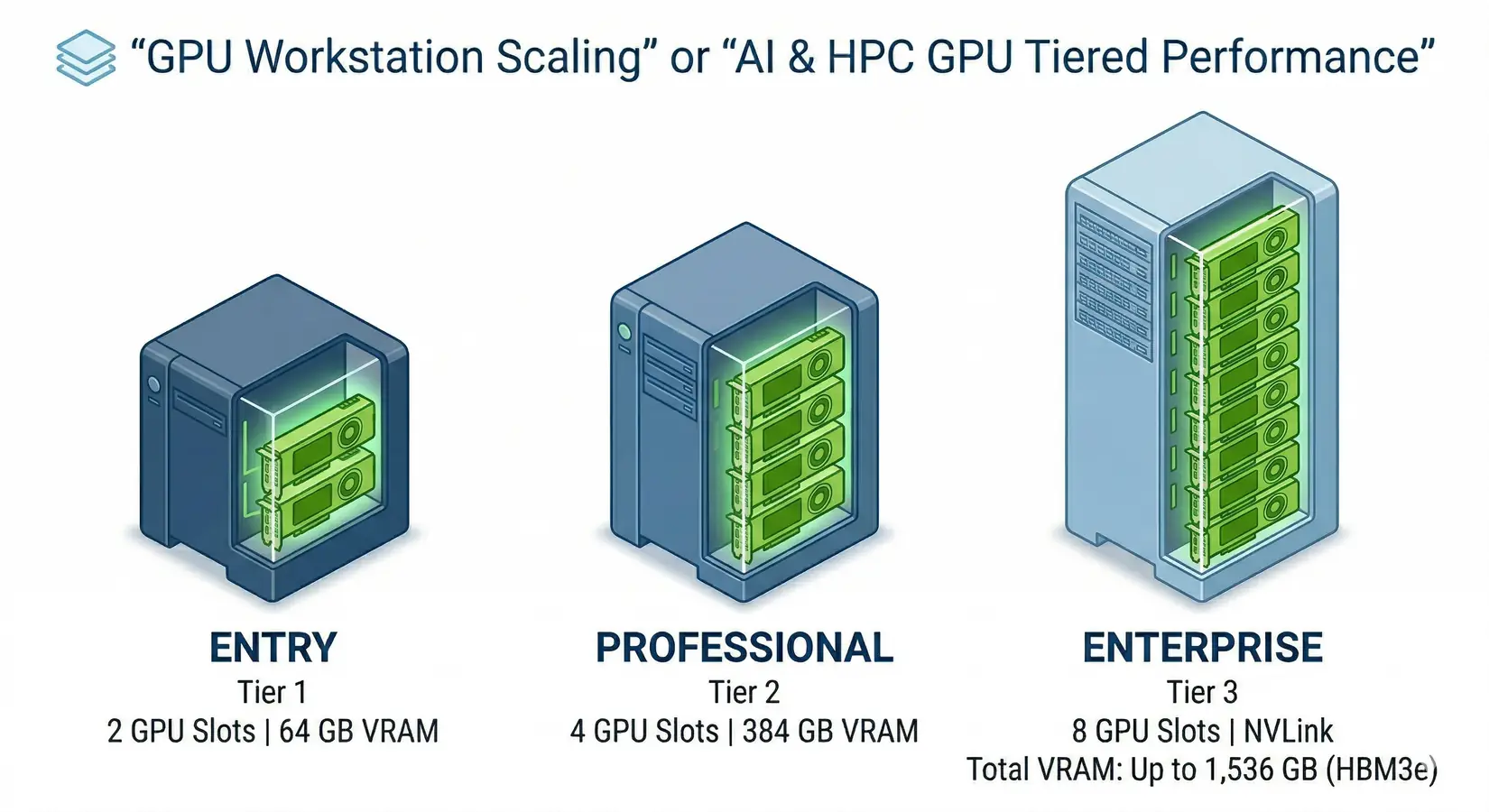
BIZON GPU workstation tiers for local LLM inference
The BIZON X3000 and BIZON V3000 G4 with a single RTX 5090 are the most direct Mac Studio alternative, delivering dedicated bandwidth for sub-30B models at speeds no Mac can touch. Dual-GPU workstations (X5500) unlock 70B models at production speeds, hitting ~55 t/s on Llama 3.3 70B versus ~13 t/s on the M3 Ultra. The quad-GPU professional tier (ZX5500) puts 384 GB of ECC VRAM at 7,168 GB/s into a single water-cooled Threadripper PRO chassis for 200B+ model serving. Enterprise H100, H200, and B200 SXM5 systems are where NVLink enables inter-GPU communication PCIe-based cards can't match. Every system gets workload-matched validation before shipping, organized by GPU count and cooling profile rather than SKU price band.
BIZON Advantage
On-prem LLM inference keeps every prompt and training file inside your network. No cloud egress, no compliance exposure. That matters for legal, medical, government, and financial clients who cannot send data to OpenAI or Anthropic, and it means zero per-token billing on workloads that run 24/7.
On our build floor, the right tier comes down to model size and how many users hit the inference endpoint simultaneously. A solo developer running an 8B model at Q4 lands in the entry tier. A team serving a 70B model at production throughput needs dual GPUs or better. The four tiers below cover that range.
Entry Level - Up to Dual-GPU Workstations
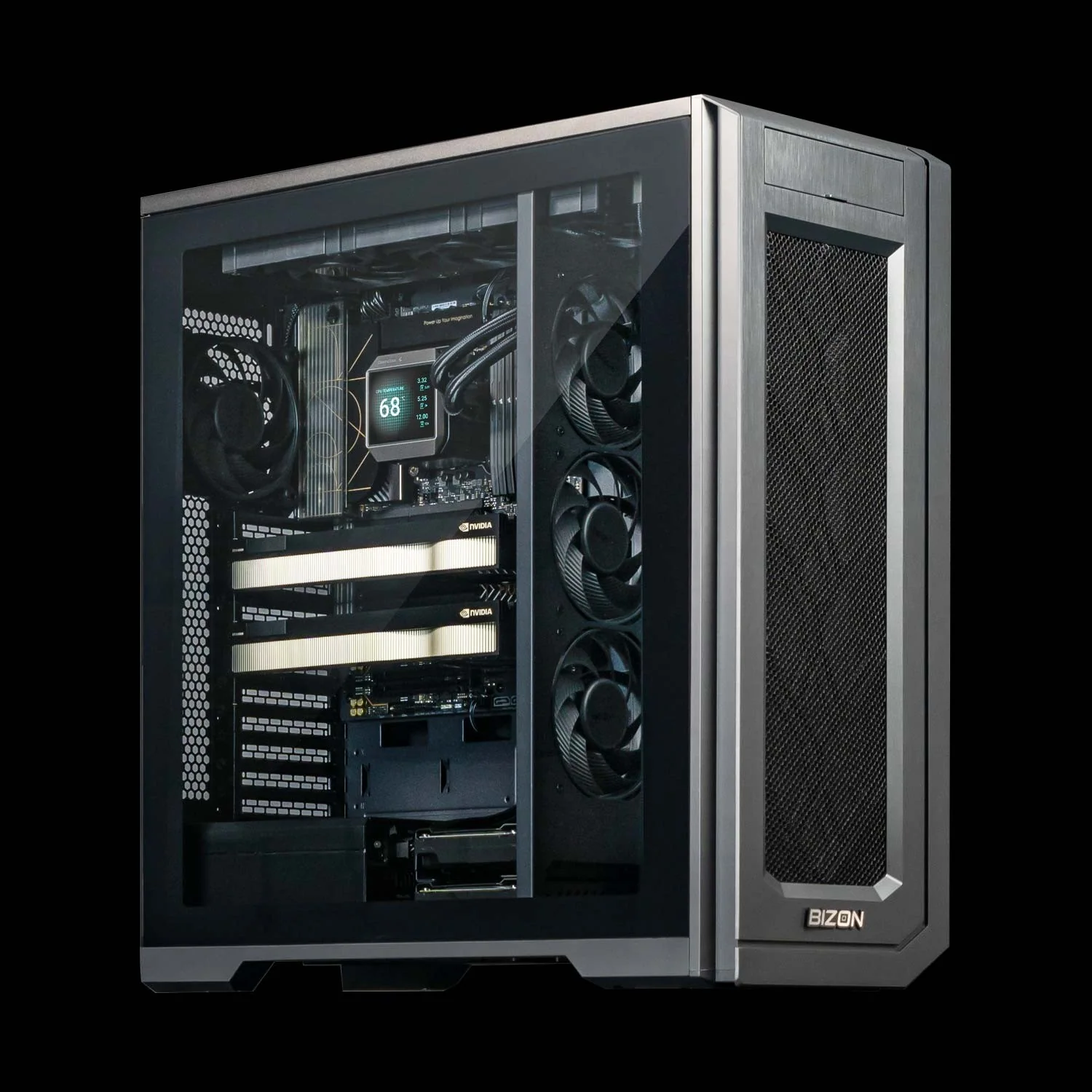
BIZON V3000 G4 Desktop Workstation
- Best for: Intel-standardized single-user LLM inference up to 30B at Q4, image generation, light fine-tuning
- GPUs: Up to two GPUs. Compatible with the full RTX Blackwell and Ada workstation lineup (no datacenter SXM or HBM cards)
- VRAM: Up to 192 GB (two RTX PRO 6000 Blackwell at 96 GB each)
- CPU: Intel Core Ultra 9 (14, 20, or 24 cores)
- RAM: Up to 192 GB DDR5, dual-channel
- Connectivity: 1 GbE built-in plus Wi-Fi/Bluetooth, up to 25 GbE or 100 Gbps InfiniBand
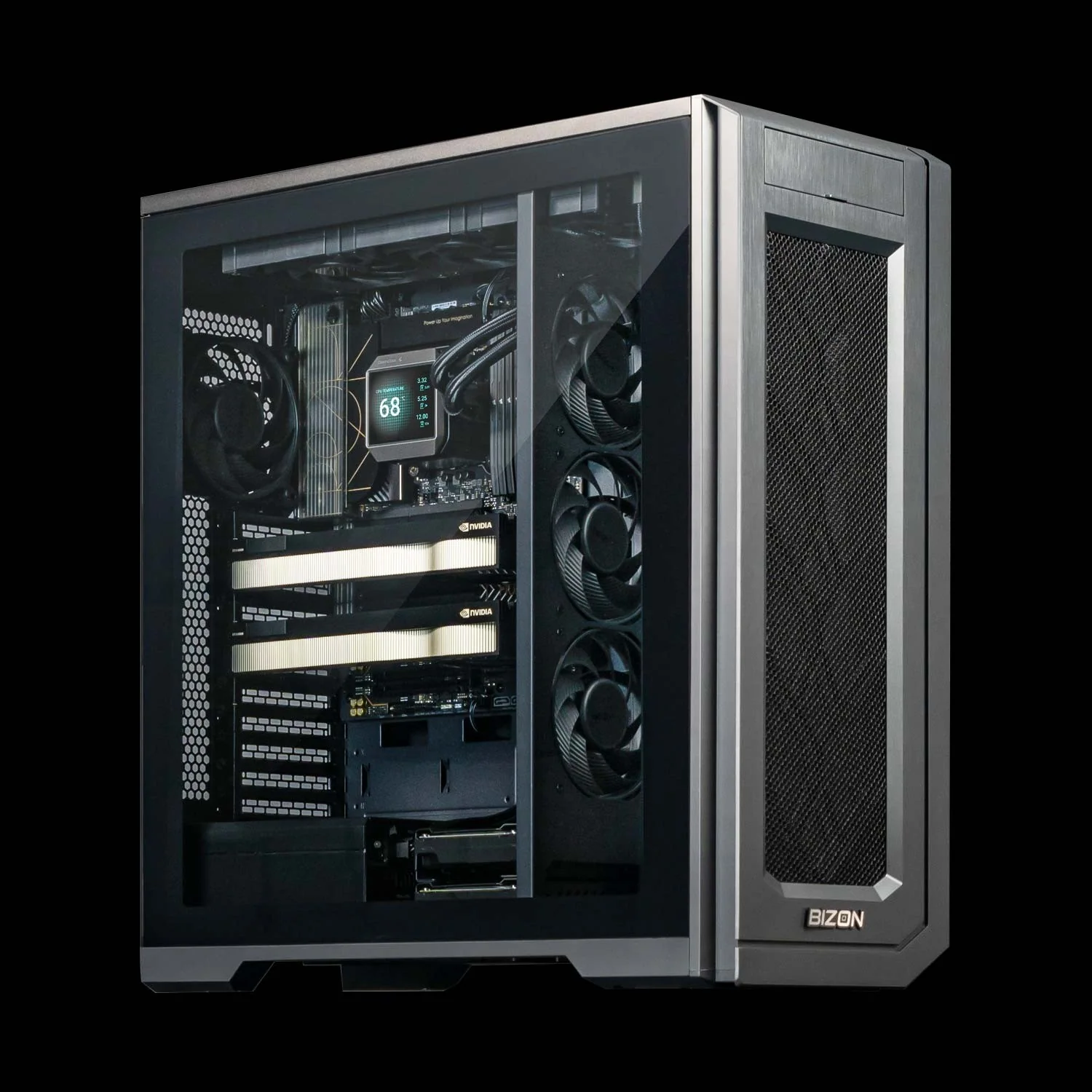
BIZON X3000 G2 Desktop Workstation
- Best for: AMD-standardized single-user LLM inference up to 30B at Q4, prosumer dual-card upgrade path
- GPUs: Up to two GPUs. Compatible with the full RTX Blackwell and Ada workstation lineup (no datacenter SXM or HBM cards)
- VRAM: Up to 192 GB (two RTX PRO 6000 Blackwell at 96 GB each)
- CPU: AMD Ryzen 9000 (9900X or 9950X, up to 16 cores)
- RAM: Up to 256 GB DDR5, dual-channel
- Connectivity: 1 GbE built-in plus Wi-Fi/Bluetooth, up to 25 GbE or 100 Gbps InfiniBand
Mid-Range - Up to Quad-GPU Workstations
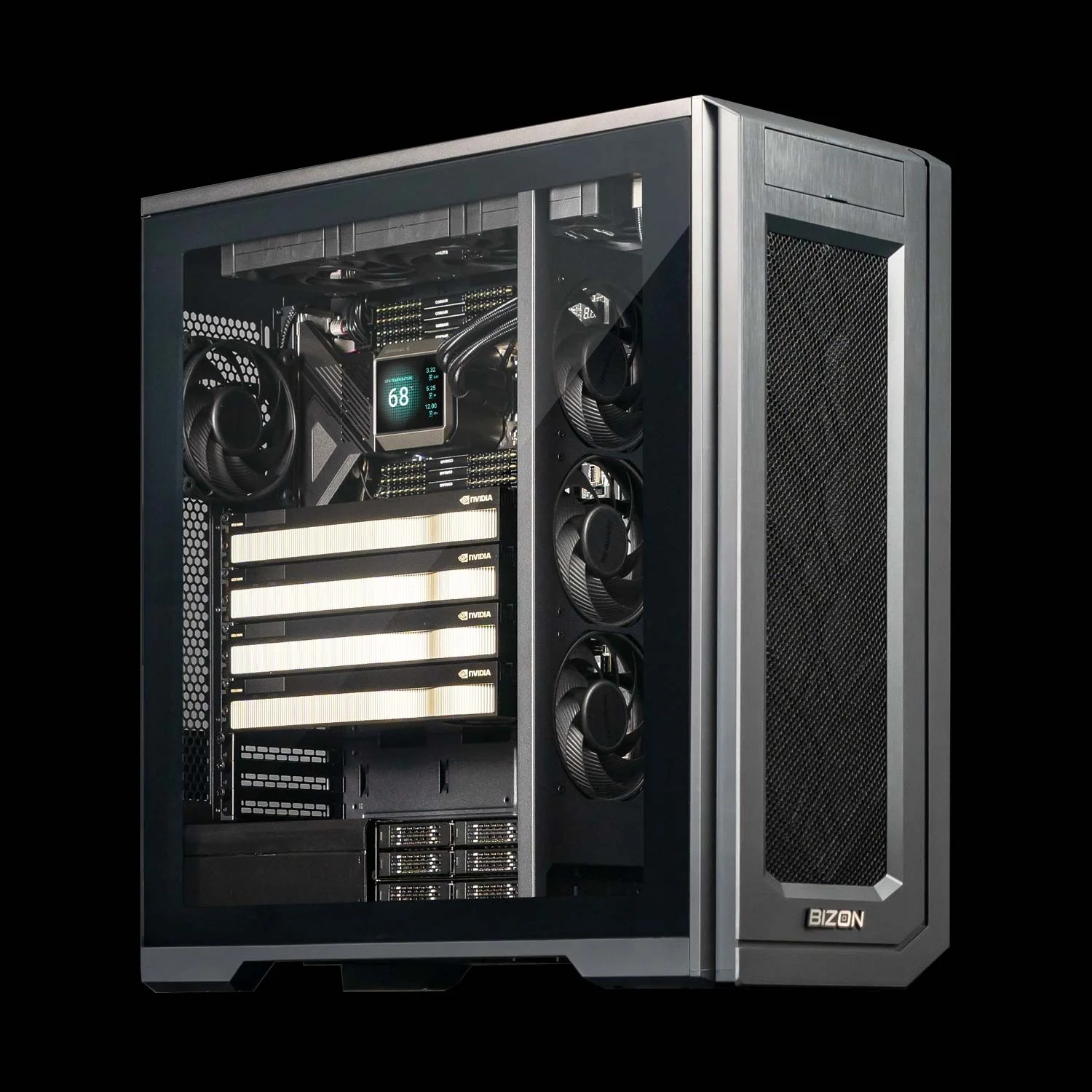
BIZON X5500 G2 Desktop Workstation
- Best for: 70B parameter models on dual RTX 5090 in tensor-parallel, scaling path to four RTX PRO 5000 or PRO 6000 cards
- GPUs: Up to four GPUs. Compatible with the full RTX Blackwell and Ada workstation lineup
- VRAM: Up to 384 GB (four RTX PRO 6000 Blackwell at 96 GB each)
- CPU: AMD Threadripper PRO (16, 24, 32, 64, or 96 cores)
- RAM: Up to 1,024 GB DDR5 ECC, 8-channel
- Connectivity: 1 GbE built-in plus Wi-Fi/Bluetooth, up to 25 GbE or 200 Gbps InfiniBand HDR
Professional - 7-GPU Water-Cooled
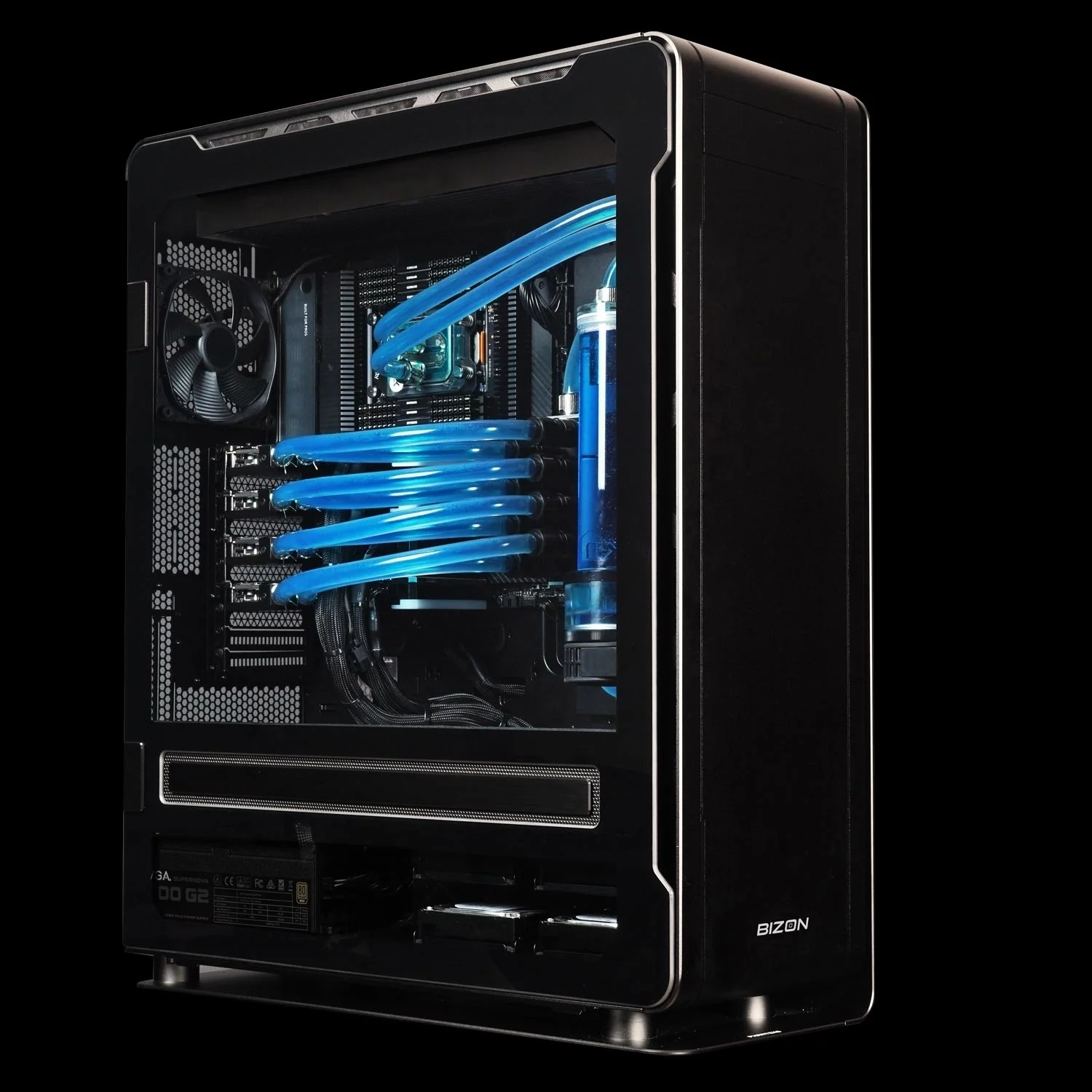
BIZON ZX5500 Water-Cooled Workstation
- Best for: Sustained 24/7 multi-GPU inference, four RTX PRO 6000 production serving with no thermal throttle, water-cooled CPU and all GPUs
- GPUs: Up to seven GPUs. Compatible with RTX A1000, RTX 5080, RTX 5090, RTX PRO 6000 Blackwell, and H200 141GB NVL
- VRAM: Up to 987 GB (seven H200 141GB NVL)
- CPU: AMD Ryzen Threadripper PRO 7000/9000 (24, 32, 64, or 96 cores)
- RAM: Up to 1,024 GB DDR5 ECC, 8-channel
- Connectivity: 1 GbE built-in plus Wi-Fi/Bluetooth, up to 25 GbE or 100 Gbps InfiniBand EDR
Enterprise - 8-GPU SXM Data Center Server
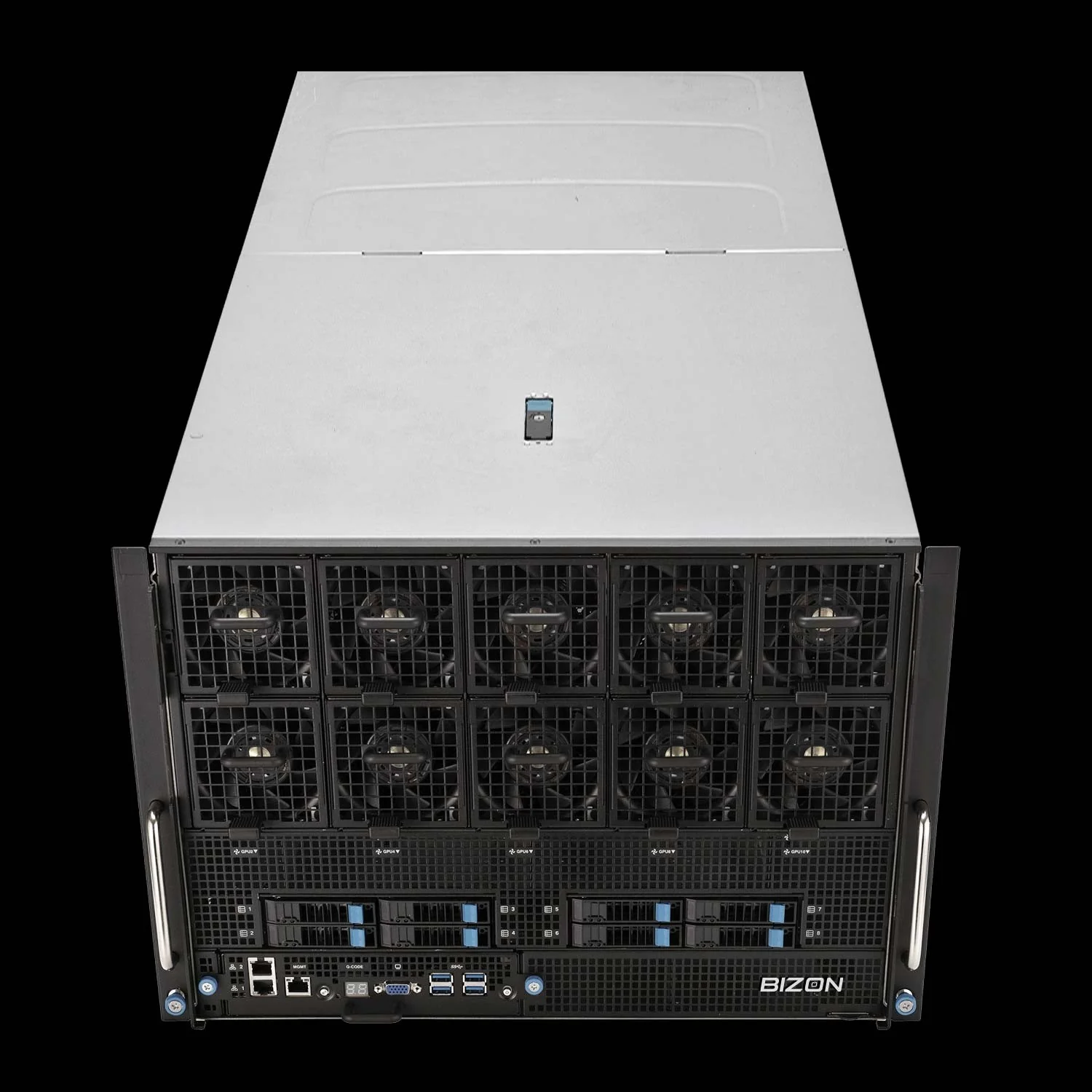
BIZON X9000 G4 HGX Server
- Best for: Production 405B+ model serving, multi-team multi-model concurrent inference, large-scale fine-tuning with HBM3 and NVLink 5.0
- GPUs: Eight NVIDIA B200 192GB SXM5 (fixed SXM-only chassis)
- VRAM: 1,536 GB HBM3 total (eight B200 at 192 GB each)
- CPU: Dual AMD EPYC 9004/9005 or dual Intel Xeon Scalable 4th/5th Gen
- RAM: Up to 3,072 GB (AMD) or 4,096 GB (Intel) DDR5 ECC Buffered
- Connectivity: 10 GbE dual port (two RJ45), up to 400 Gbps InfiniBand NDR (Mellanox ConnectX-7)
Mac vs NVIDIA Final Pick
The Mac mini and Mac Studio are capable machines held back by bandwidth physics. For quantized models under 30B parameters, Apple Silicon delivers a perfectly usable single-user experience, especially the Mac mini M4 Pro as an affordable entry point. But across every comparable hardware tier, NVIDIA GPUs deliver 2-4x more tokens per second. Unified memory trades bandwidth for capacity, and for LLM inference, bandwidth is the metric that matters.
The Apple Silicon myth persists because "256GB of unified memory" is easy to understand and, per NVIDIA's spec sheet, the RTX 5090's 1,792 GB/s of memory bandwidth isn't. Token throughput equals bandwidth divided by model size, with a 65% real-world efficiency factor. The physics don't change as the numbers get bigger. If your workload extends beyond LLM inference, two companion guides cover neighboring territory: our Best GPU for Data Science guide addresses RAPIDS, cuDF, and mixed ML pipelines, and our GPU buyer guide for molecular dynamics covers ns/day throughput on sustained FP64 workloads.
Ready to build an LLM workstation with the bandwidth to match your ambitions? Explore BIZON AI workstations or browse BIZON GPU servers to find the right configuration for your team. Each tier ships with the inference stack pre-installed and water cooling on multi-GPU rigs that hold sustained boost clocks. Procurement matches what's actually in stock today, not what was teased at the keynote.
BIZON manufactures the workstations and servers discussed in this article. Benchmark figures and product specifications reflect published vendor sources (NVIDIA datasheets, Apple Silicon specs, Hardware-Corner, Olares Blog, arXiv 2402.16363) and BIZON build-floor experience. Our editorial recommendations follow the bandwidth-first, workload-first analysis shown above. They are not constrained by inventory or commercial considerations.