Your Own AI. Your Own Hardware. No API Bills.
NVIDIA GPU Workstations for Local LLM
500+ Top Universities Trust BIZON
Academic, Gov, Startups Discounts Available











VRAM Is All That Matters

Pre-Installed. Ready to Run.

Quiet Enough for Your Desk

Expert Support from AI Engineers

500+ Universities Trust BIZON

Wide Range of Configurations Powered by the Latest Hardware
AI Workstations for LLM
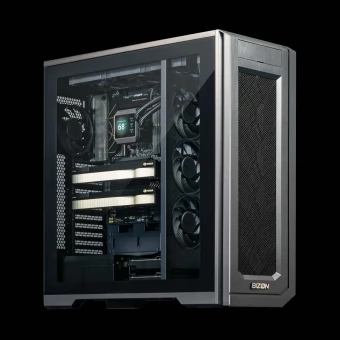
RTX 5090 32GB, 64GB, 96GB, 192GB VRAM Workstation
192 GB VRAM. 2x NVIDIA RTX GPUs. Run Gemma 4 locally.
-
CPU
AMD Ryzen 9000 Series (16 Cores)
-
GPU
Up to 2x NVIDIA RTX 5090, RTX PRO 6000 Blackwell
-
Storage
VRAM: up to 192GB
-
Memory
Up to 192 GB DDR5 Memory
-
Cooling
GPU: Air-cooling | CPU: Water-cooling
-
Features
Optimized for local LLMs, Gemma 4
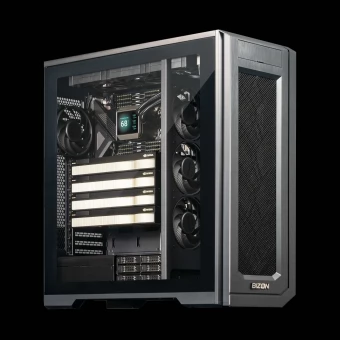
384GB VRAM Workstation
384 GB VRAM. 4x NVIDIA RTX GPUs.
-
CPU
AMD Threadripper 7000 (96 Cores)
-
GPU
Up to 2 x NVIDIA RTX 5090 or 4 x RTX PRO 6000 Blackwell
-
Memory
Up to 1 TB DDR5 Memory
-
Cooling
GPU: Air-cooling | CPU: Water-cooling
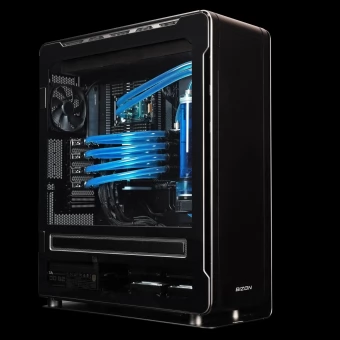
987GB VRAM Workstation
987 GB VRAM. 7x NVIDIA RTX, H200 GPUs.
-
CPU
AMD Threadripper Pro (96 Cores)
-
GPU
Up to 7x Water-cooled NVIDIA 5090, H100, H200, RTX PRO 6000 Blackwell
-
Storage
VRAM: 384GB, 512GB, 987GB (Up to 7x 96GB or 7x 141GB VRAM)
-
Memory
Up to 1 TB DDR5 Memory
-
Cooling
Enterprise-class water-cooling
-
Features
Up to 3x times lower noise vs. air-cooling. Maximum GPU power for inference and training
 BIZON GPU workstations are optimized for local LLM inference and training — no cloud, no API costs, full data privacy. Run Gemma, Llama, NVIDIA Nemotron, Kimi K, DeepSeek, Qwen, Mistral Large, GLM-5, Phi-4, MiniMax, MiMo LLMs, and other open-source models out of the box with pre-installed vLLM, Ollama.
From 7B models on a single GPU to 1T-parameter models on 8× NVIDIA RTX PRO 6000 96GB Blackwell — plug in and start inference.
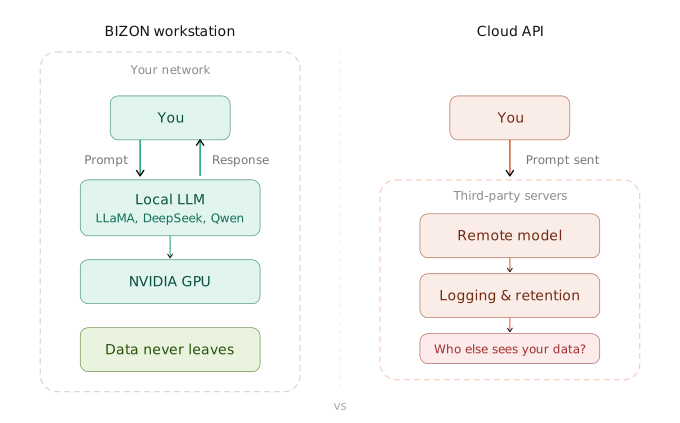 Every prompt, every response, every document you feed into your model stays on your machine. No cloud provider reads your data, no third-party retention policies apply. Whether you're a startup protecting IP, a law firm handling privileged information, or a developer who simply doesn't want their code on someone else's server — local is the only way to guarantee privacy.
- Which BIZON workstation is right for me?
It depends on the models you want to run. For 7B–14B models a single-GPU system is plenty. For 70B+ models you'll want dual or quad-GPU. Not sure? Tell us your use case and our engineers will recommend the right config.
- What GPU do I need to run a 70B model locally?
At Q4 quantization, a 70B model needs ~40 GB VRAM. A dual RTX 5090 (64 GB total) handles this comfortably. For unquantized or 200B+ models, RTX PRO 6000 Blackwell cards offer 96 GB each.
- How does this compare to a Mac Studio / Mac mini?
Apple Silicon offers large unified memory but ~600 GB/s bandwidth. A single RTX 5090 delivers 1,792 GB/s — roughly 9x faster. For inference speed, dedicated NVIDIA GPUs win decisively.
- What software comes pre-installed?
Ubuntu or Windows with Ollama, LM Studio, Docker, CUDA, and cuDNN. Power on, pull a model, go. Can I run multiple models at once? Yes. Multi-GPU systems can serve different models on different GPUs simultaneously — a coding assistant on one, a document summarizer on another.

