Table of Contents
- The Workload Picks the Engine
- What Does an Inference Engine Do?
- Which Workload Class Fits?
- Single-User Local Engines
- Ollama for Fast Local Setup
- LM Studio for GUI-First Local Use
- llama.cpp for Hardware Breadth
- KoboldCpp (creative-writing footnote)
- Performance-Local for NVIDIA
- Engines Built for Serving
- When Do TensorRT-LLM and Triton Fit?
- BIZON Picks by Engine Class
- Pick Your LLM Inference Engine
vLLM, Ollama, LM Studio, llama.cpp: Choosing the best LLM inference engine for local LLM in 2026 [ Updated ]
Last verified: 2026. Engine versions rechecked 2026.
How to pick an LLM inference engine for local LLMs in 2026 starts with the workload, not the engine name. Popularity is secondary here. Pick Ollama or LM Studio for a single-user laptop, llama.cpp or ExLlamaV3 for an enthusiast workstation, vLLM or SGLang for a multi-user serving box, and TensorRT-LLM with Triton for production scale on NVIDIA-only infrastructure. The same model can need a different engine when the user count, latency target, or hardware tier changes. A roundup that recommends one engine for every setup is answering the wrong question.
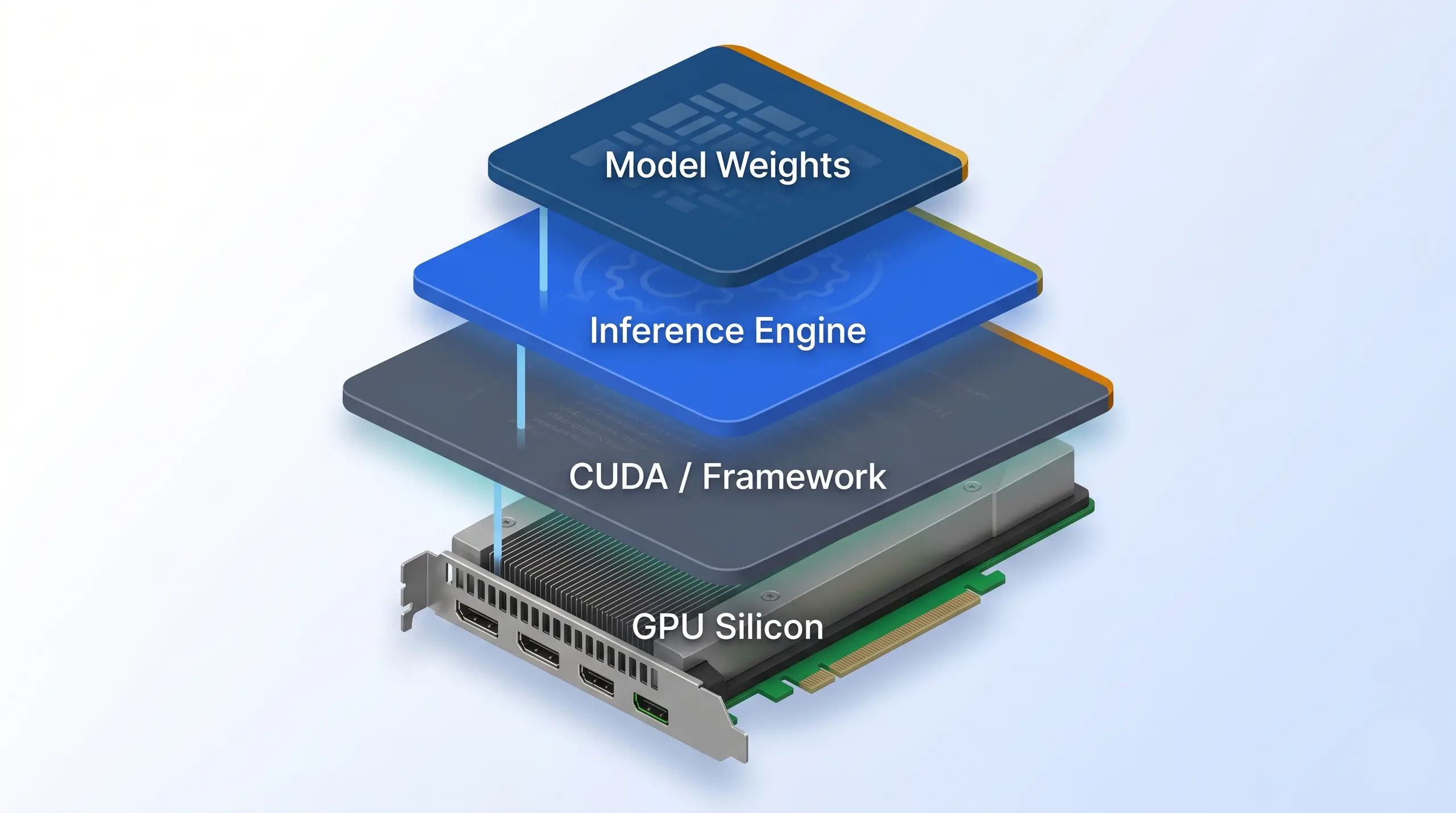
An LLM inference engine sits between the model weights and the GPU silicon, translating tokens into compute. The engine you pick shapes everything below it, framework, driver, hardware, chassis.
The matrix below is the starting point. Each row names the workload shape first, then lists the engines that make sense for that shape. Get the workload right and the decision narrows from a dozen open-source projects to two or three. The table is a filter, not the final answer.
| Workload shape | Right engines for the job |
|---|---|
| Single-user laptop, sequential requests | Ollama, LM Studio, KoboldCpp |
| Single-user workstation, NVIDIA, max quality per VRAM byte | llama.cpp, ExLlamaV3, MLC LLM |
| Small-team serving, 5 to 20 concurrent users | vLLM, SGLang |
| Production batched, multi-node, peak FLOPS efficiency | vLLM with Triton, TensorRT-LLM, SGLang at scale |
One news beat changes the serving section. Per HuggingFace's official TGI docs, Text Generation Inference moved into maintenance mode on March 21, 2026, and the project now points users at vLLM, SGLang, llama.cpp, and MLX. That moves TGI out of the primary recommendation path. Workload first. Define the workload, match the engine to it, and only then size the hardware around that engine.
What Does an Inference Engine Do?
An LLM inference engine does three jobs between the model file and the application. Loading comes first. The engine reads model weights from disk into Video RAM (VRAM), often quantizing during transfer as it goes. Second, it schedules work on the GPU, batches small requests, and keeps the KV cache from fragmenting during generation. Third, it serves the result through an HTTP, gRPC, WebSocket, or OpenAI-compatible API.
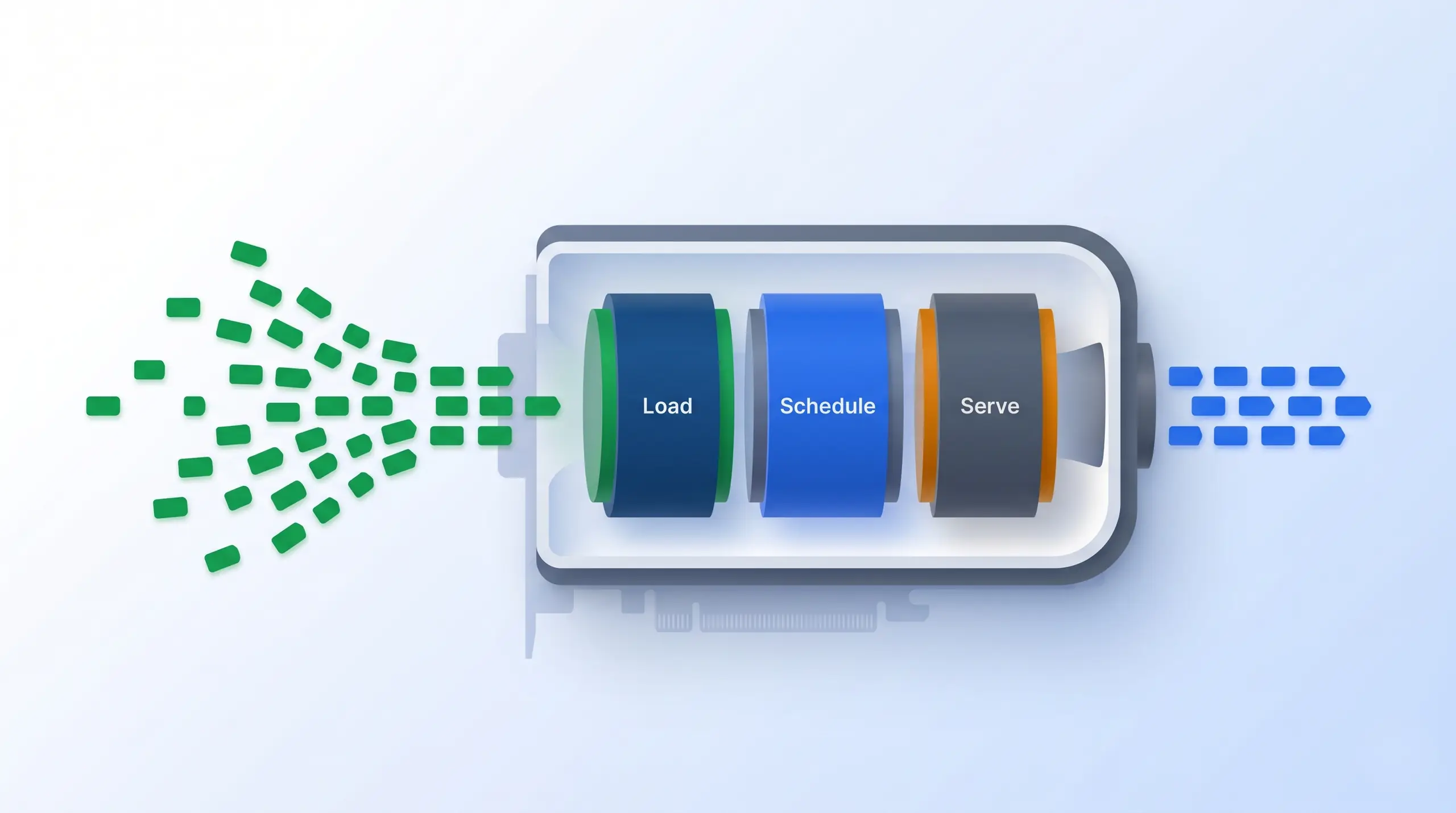
Three jobs sit inside an inference engine. The load step pulls model weights into VRAM (often quantized on the fly). The schedule step batches requests and manages the KV cache. The serve step exposes the OpenAI-compatible API. Prompt tokens enter, generated tokens stream out.
Engines diverge in how they schedule work, represent quantized models, and target hardware. Scheduling is the hinge. vLLM's PagedAttention treats the KV cache like virtual memory pages, while SGLang's RadixAttention reuses page slots when jobs share a prefix and many requests arrive at once. Format choice matters too. Quantization decides which model formats fit in VRAM. GGUF dominates local engines, EXL2 and EXL3 define the ExLlama line, and AWQ, GPTQ, FP4, FP8, and NVFP4 show up across production engines. Hardware target separates NVIDIA-only stacks like TensorRT-LLM and ExLlamaV3 from broadly portable llama.cpp.
The OpenAI compatibility layer makes the market interchangeable for app builders. A `/v1/chat/completions` endpoint plugs straight into LangChain, LlamaIndex, Continue.dev, and most chat UIs. That surface is the escape hatch. Almost every engine ships it, except TensorRT-LLM, which leaves the app-facing API surface to Triton or a wrapper.
Which Workload Class Fits?
There are four useful workload classes. Single-user local means one person, one machine, and sequential requests through a chat UI, so install friction matters more than throughput. Scale changes the answer. Performance-local is still one user, but the target changes to maximum model quality per VRAM byte, usually a 70B-class model on consumer NVIDIA hardware. Multi-user serving means 5 to 20 concurrent users behind a low-latency API, where continuous batching becomes mandatory. Production batched is the multi-node, multi-model tier where TensorRT-LLM and Triton earn their footprint.
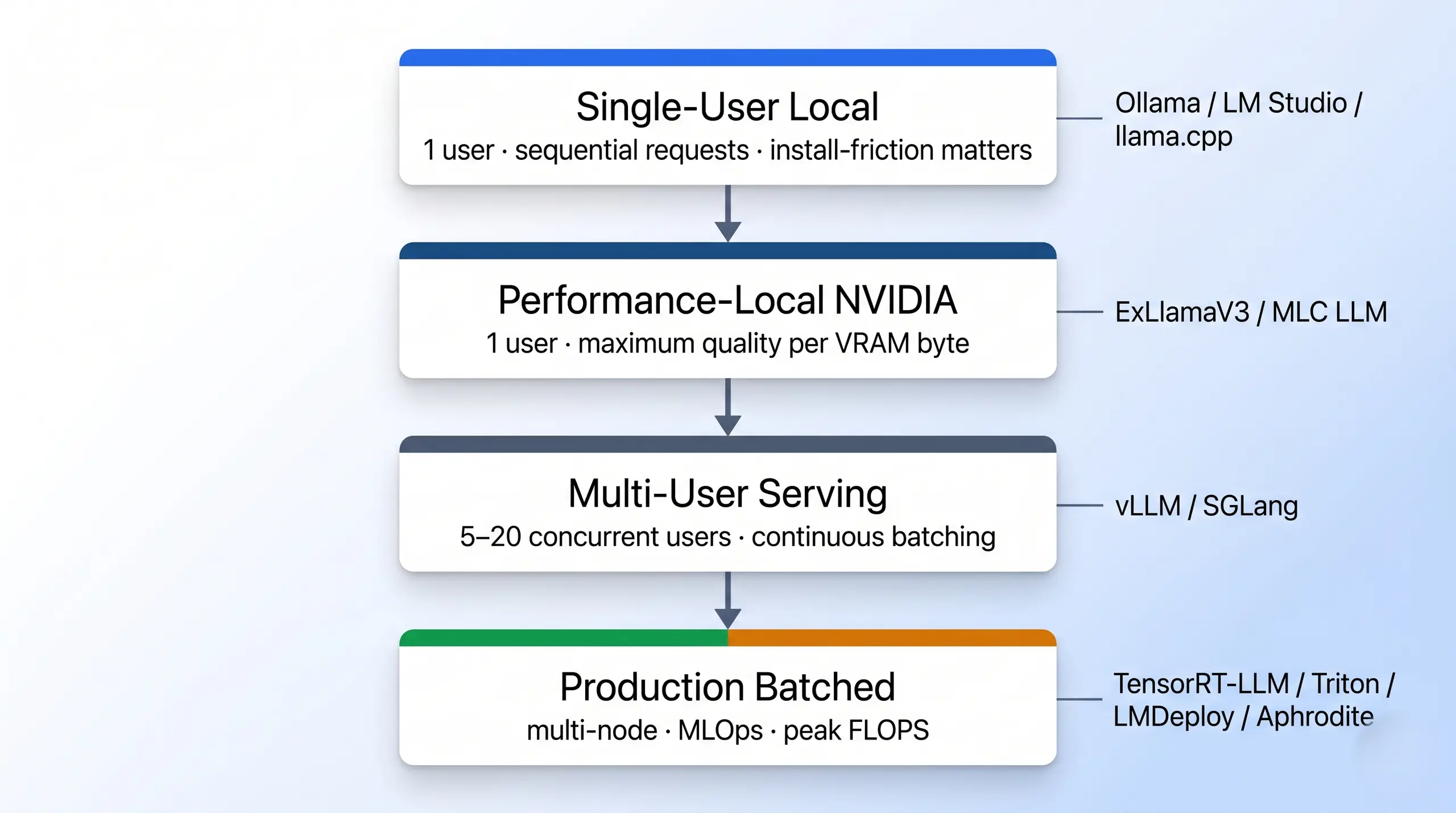
Four workload classes that decide every engine choice in this guide.
The hardware tiers follow the same split. Single-user local fits a laptop or quiet desktop, while performance-local needs an NVIDIA workstation with enough VRAM and PCIe Gen 5 headroom between cards. Serving heat matters. Multi-user serving wants sustained-thermal multi-GPU hardware in a 2U or 4U chassis, while production batched moves to dense 8-GPU rackmount systems where cooling and interconnect stop being secondary details. Our LLM GPU pillar covers card-level selection.
Single-User Local Engines
For single-user local LLM inference, Ollama wins on install friction, LM Studio on graphical-interface polish, and llama.cpp on hardware breadth. These engines optimize for "does it just work?" over throughput. Hardware breadth matters. The user might be on NVIDIA, AMD ROCm, Apple Silicon, or CPU-only, and the engine still has to run. GGUF dominates the format choice, and our local AI hardware pillar walks the build around the engine.
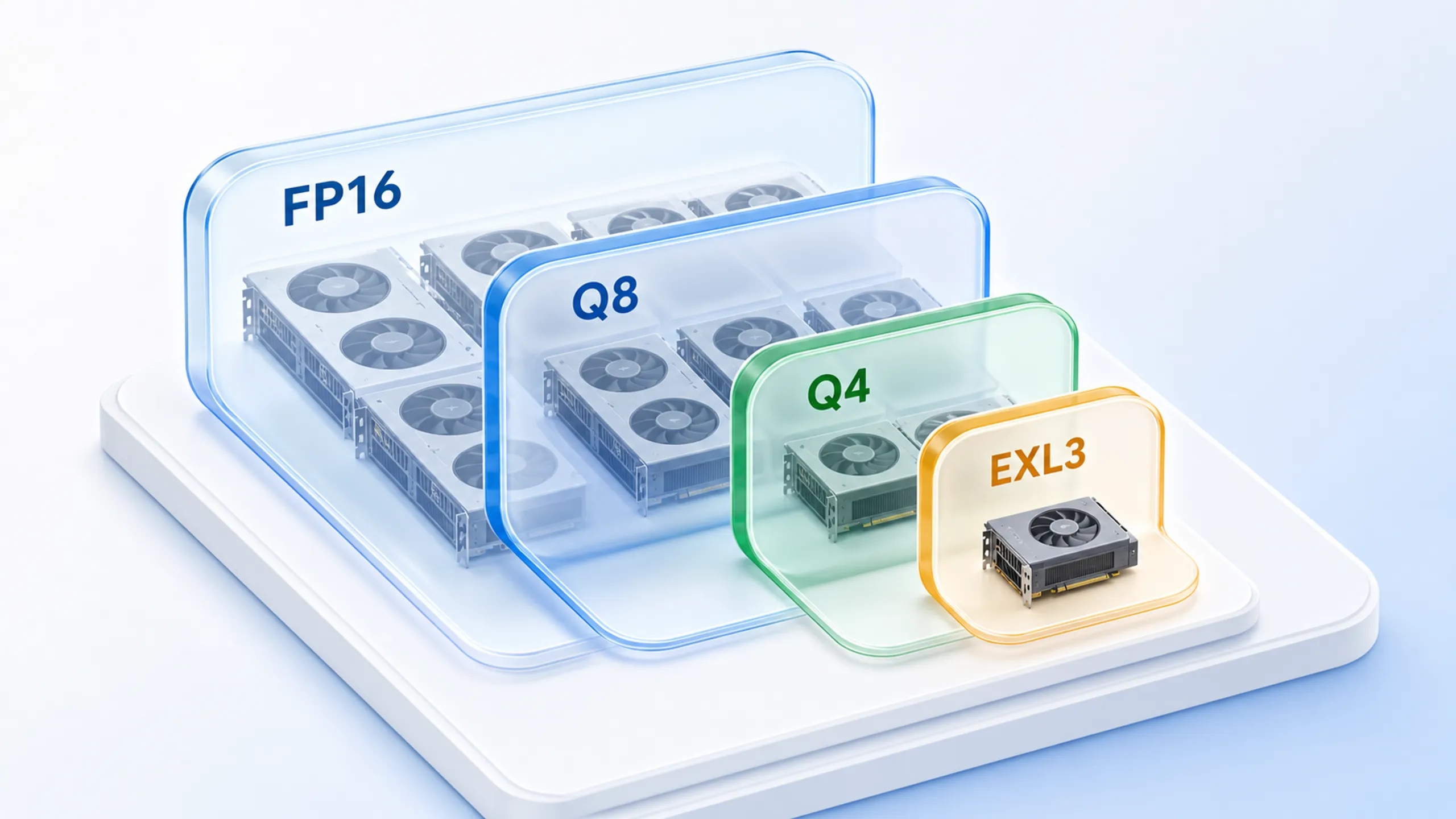
A 70B-parameter model in FP16 occupies ~140 GB of VRAM. Quantization shrinks the same model down dramatically, Q8 to ~75 GB, Q4 to ~42 GB, EXL3 1.6 bpw to ~16 GB, at increasing quality cost. The smaller footprints fit on smaller hardware.
Use this section when the buyer starts from a personal machine rather than a server target. Ollama is the fastest setup path, and LM Studio is the GUI-first lane for users who do not want shell control. llama.cpp is the portability baseline across odd hardware targets. KoboldCpp is the creative-writing fork.
Ollama for Fast Local Setup
Per the Ollama GitHub repository, the project ships under MIT license and version 0.24.0 landed on May 14, 2026. The install path is deliberately short. Use `curl -fsSL https://ollama.com/install.sh | sh` on macOS or Linux, a PowerShell script on Windows, or a Docker image. Hardware coverage runs NVIDIA through CUDA, AMD through ROCm, Apple Silicon on Metal, plus CPU fallback. Quantization is GGUF, with automatic quant selection based on available VRAM. Multi-GPU is limited to model-splitting for oversized weights, because Ollama is not designed for tensor-parallel batched serving. That boundary matters. Ollama is the right pick for laptop users and quiet workstations, not for concurrent serving past one or two requests at a time.
Srce Cde walks through a step-by-step Ollama setup on a local machine, end to end. Source: Srce Cde on YouTube.
That walkthrough captures Ollama's core appeal. The engine is usually running before heavier options finish dependency setup. The tradeoff is interface style, not model format. LM Studio uses the same GGUF model ecosystem, but wraps it in a click-through desktop application for buyers who do not want command-line control.
LM Studio for GUI-First Local Use
LM Studio is the graphical-interface answer for single-user local. Per the LM Studio official site, the application is free for home and work use with no paid tier. The product is closed-source, distributed as a binary, and version 0.4.12 was current for Windows at research time with macOS and Linux supported alongside. Setup stays visual. On Windows it is a graphical download, while macOS and Linux use a one-line bash script and the SDK ships through npm or pip. The OpenAI-compatibility API is listed under developer resources. The model library is built around GGUF, the same format Ollama and llama.cpp use. The fit is narrow. LM Studio fits non-technical users and one-click model management, but it does not suit buyers who need open-source provenance.
llama.cpp for Hardware Breadth
llama.cpp is the engine beneath Ollama, LM Studio, and KoboldCpp. Per the llama.cpp GitHub repository, the project ships under MIT license and build b9222 was current as of May 19, 2026. Its advantage is reach across NVIDIA through CUDA, AMD on HIP and ROCm, Apple Silicon through Metal, x86 across AVX through AVX512, RISC-V, Intel GPU through SYCL, plus Vulkan, OpenCL, and Moore Threads. Quantization is GGUF from 1.5-bit through 8-bit plus FP16 and FP32. The OpenAI-compatible HTTP server ships as `llama-server`, with setup via brew, winget, nix, Docker, prebuilt binaries, or source build. llama.cpp wins for CPU-plus-GPU hybrid inference and any non-NVIDIA target.
KoboldCpp (creative-writing footnote)
KoboldCpp is a creative-writing fork of the same llama.cpp foundation. Per the KoboldCpp GitHub repository, the project ships AGPL-3.0, version 1.113.1 landed on May 16, 2026, and the headline feature is a single `koboldcpp.exe` on Windows plus precompiled binaries for macOS and Linux. Bundled features include the KoboldAI Lite UI, Tavern Character Cards, multimodal vision, text-to-speech, and an MCP server. The OpenAI-compatible API lives at `/v1`. KoboldCpp suits roleplay and creative-writing users who want story, adventure, and instruct modes alongside the engine, and it is not a production API server.
From the BIZON Build Floor
Local engines all "just work" on paper. On a self-built rig that means two days of CUDA, cuDNN, and Docker setup first. Our workstations ship with Ubuntu, CUDA, cuDNN, PyTorch, TensorFlow, and Docker pre-installed and tested. The engine swap is one command.
Those four engines cover the local tier without pretending to solve serving. Ollama is the install-tonight default and LM Studio is the GUI pick. llama.cpp wins on hardware breadth, and KoboldCpp owns creative writing. The DevEx pattern across all four is one install command or one binary. The next tier pivots to quality while keeping the user count low, so the model-quality target rises before the serving target does.
Performance-Local for NVIDIA
Performance-local targets 70B-class models on one or two consumer NVIDIA cards. The goal is better quality than GGUF Q4_K_M usually gives in our experience, without stepping up to data-center VRAM. ExLlamaV3 owns that niche with EXL3 quantization. MLC LLM trades local simplicity for cross-platform compilation. The setup is harder. Model-quality headroom is the reason to bother.
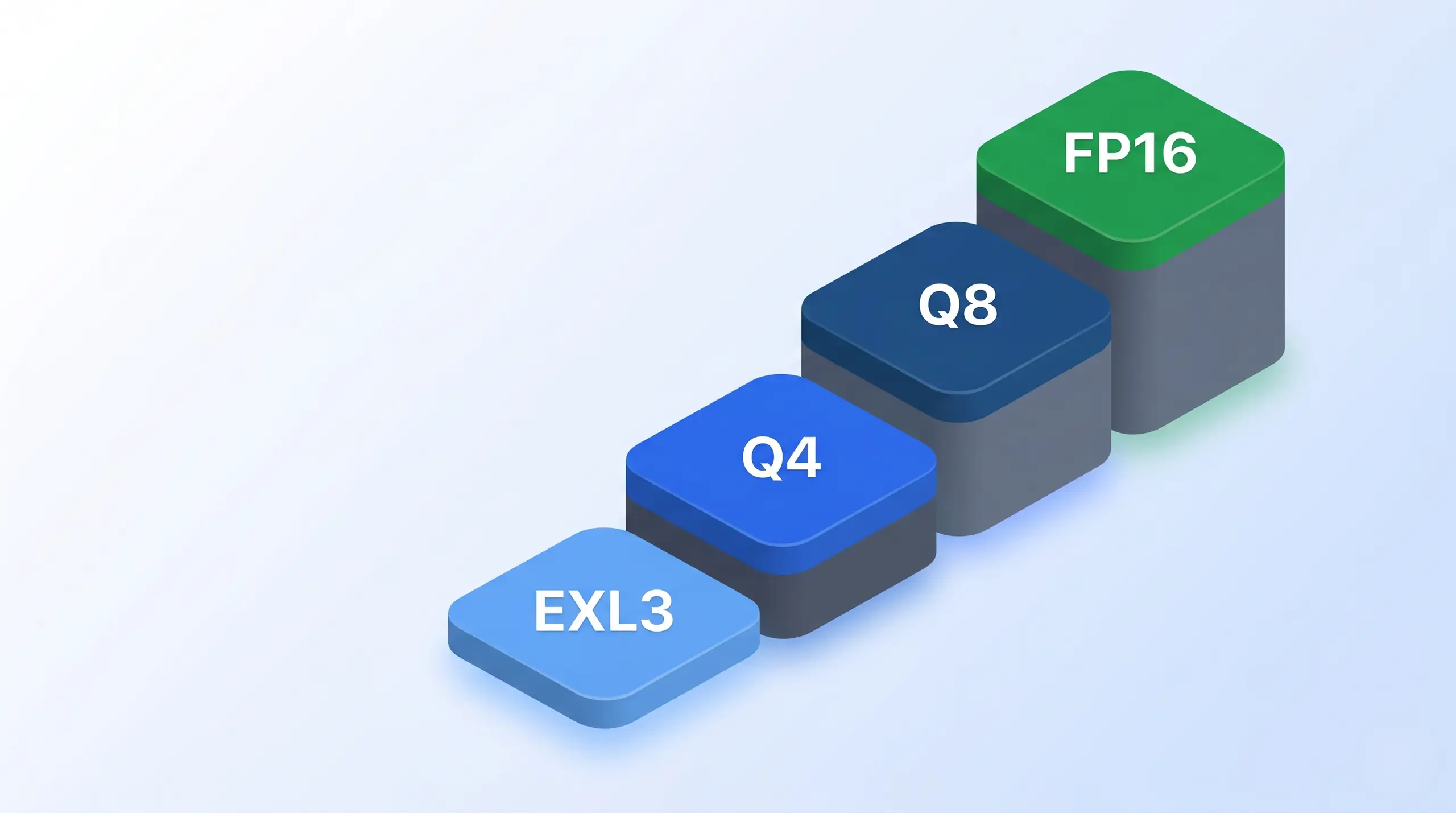
Quantization tiers for a 70B model. EXL3 1.6 bpw fits one consumer-class card. Q4 GGUF needs a pro-tier card. Q8 GGUF needs two H100s or a pair of pro cards. FP16 needs the full data-center pair for the ~140 GB footprint.
This is the trade. The buyer accepts more setup work and a narrower NVIDIA target because model quality per VRAM byte is the prize. That is why ExLlamaV3 appears before broader platform tools. ExLlamaV3 is not the most portable option. It is the option built around this specific payoff.
ExLlamaV2 / ExLlamaV3
The ExLlama line has two active branches. Per the ExLlamaV2 GitHub repository, V2 ships MIT, version 0.3.2 from July 13, 2025 is the legacy branch, and per the ExLlamaV3 GitHub repository, V3 is the active successor at v0.0.34 from May 9, 2026. Both are NVIDIA-only and require the CUDA Toolkit, with Blackwell support through an xformers monkey-patch. Format is the reason. EXL3 is QTIP-derived, supports 2 to 8 bits with mixed precision, and per the V3 README, "Llama-3.1-70B-EXL3 is coherent at 1.6 bpw," fitting a 70B model on one 24 GB card. Multi-GPU runs through tensor-parallel and expert-parallel inference, with the OpenAI-compatible API through TabbyAPI. Setup is a conda environment plus a manual quant conversion step. ExLlamaV3 fits NVIDIA enthusiasts running 70B-class models on 24 to 48 GB of consumer VRAM.
MLC LLM
Per the MLC LLM GitHub repository, the project ships under Apache 2.0 with a machine-learning-compiler approach built on TVM. Compilation is the trade. Models compile per target hardware before they run, so MLC is not the pull-and-run GGUF path. The payoff is platform coverage across NVIDIA, AMD, Apple Silicon iOS and iPadOS, Intel GPU, the web through WebGPU and WebAssembly, and Android through OpenCL. The OpenAI-compatible REST API ships through the MLCEngine, with native Python, JavaScript, iOS, and Android bindings. Quantization is int3, int4, int8, and FP16, varying by backend. Multi-GPU serving is not explicitly confirmed in the GitHub README at research time, so deployments need verification against the buyer's hardware. MLC LLM fits cross-platform teams that need mobile, web, and desktop in one framework.
Engines Built for Serving
For multi-user serving, the problem changes to many users sharing the same GPU. One run is easy. The serving question is how concurrent requests stay packed without wasting tokens. vLLM has the hardware breadth, while SGLang leads on prefix-heavy workloads via RadixAttention. Both engines optimize for concurrent jobs instead of single-stream throughput. Continuous batching is the baseline feature in this tier. For the multi-user chassis tier, our LLM GPU pillar covers H100, H200, and RTX PRO 6000 selection.
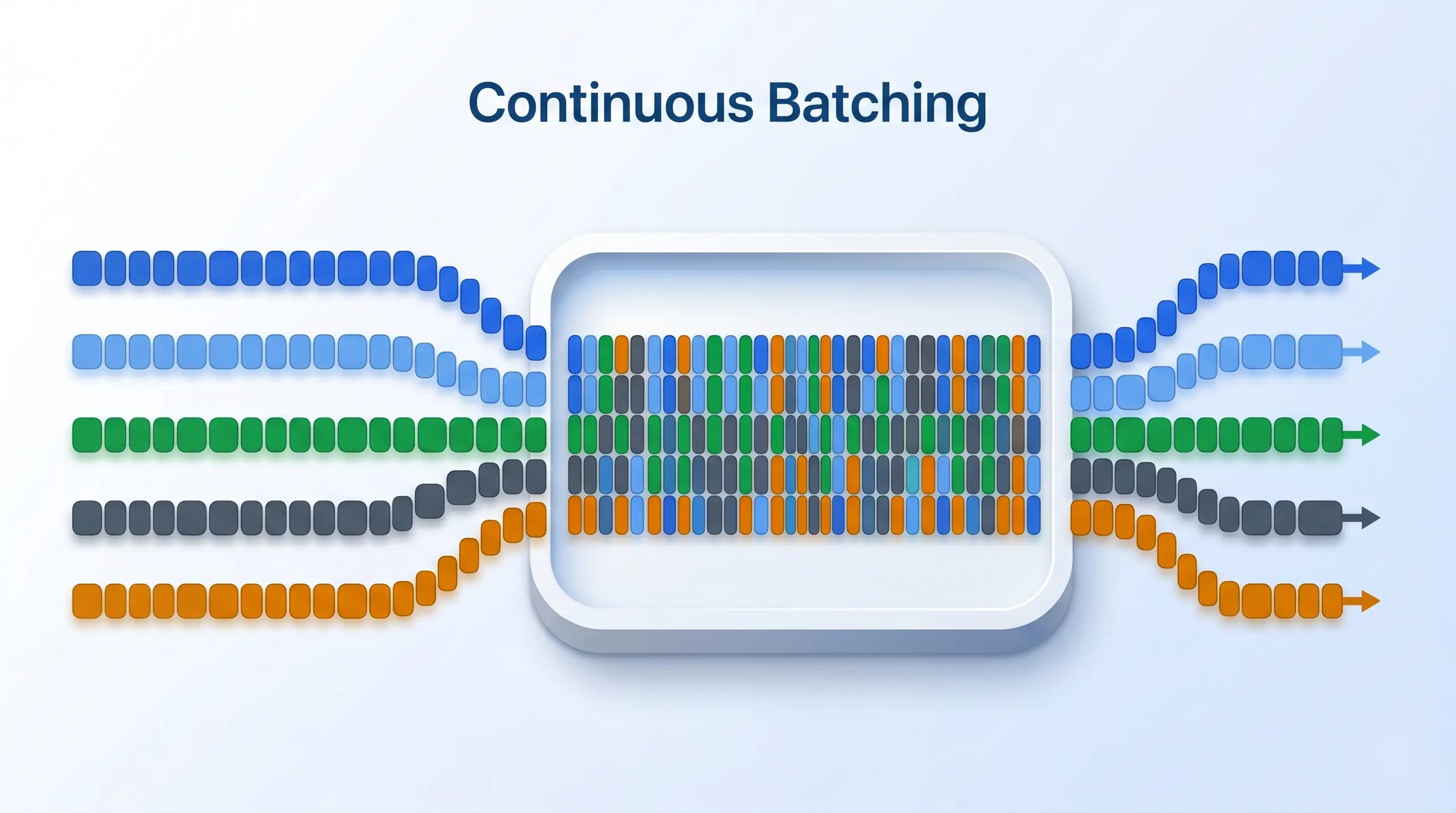
Continuous batching is what separates serving engines from single-user engines. Five concurrent user requests flow into a single GPU compute pass, packed dynamically as new tokens generate, instead of running each request end-to-end before starting the next. vLLM and SGLang both use it. Ollama and LM Studio do not.
vLLM for Small-Team Serving
Per the vLLM GitHub repository, vLLM is one of the default production serving choices in 2026, v0.21.0 from May 15, 2026 under Apache 2.0. Its strongest advantage is breadth across NVIDIA at the core, AMD on ROCm, CPU, Google TPU, Intel Gaudi, Huawei Ascend, and Apple Silicon as plugin. Quantization runs FP8, MXFP8, MXFP4, NVFP4, INT8, INT4, GPTQ, AWQ, GGUF, compressed-tensors, ModelOpt, and TorchAO. Multi-GPU runs through tensor, pipeline, data, expert, and context parallelism, and the API surface ships OpenAI, Anthropic Messages, and gRPC. Setup is `uv pip install vllm` against Python 3.10 or newer with a matching CUDA build. Dependency drift is real. Most production teams pin the exact CUDA, PyTorch, and wheel triple before they expose vLLM to users. vLLM is the default for small-team production in the 5 to 20 concurrent user range.
KodeKloud walks through vLLM's serving architecture with a hands-on demo. Source: KodeKloud on YouTube.
"There is no single best inference engine. There is a best engine for your workload, your hardware, and your team size."
The fork is practical. Start with vLLM when hardware coverage and model breadth are the priority. Move to SGLang when the workload repeats long prefixes often enough for cache reuse to pay off.
SGLang for Prefix-Heavy Serving
Per the SGLang GitHub repository, SGLang is positioned as the prefix-heavy specialist in 2026, version 0.5.12 from May 16, 2026 under Apache 2.0. Hardware support covers NVIDIA GPUs, AMD MI355 and MI300, Intel Xeon CPUs, Google TPUs, and Ascend NPUs. Quantization runs FP4, FP8, INT4, AWQ, and GPTQ, and multi-GPU runs through tensor, pipeline, expert, and data parallelism. Setup is `pip install sglang` under the same Python and CUDA pin discipline vLLM requires. Per SGLang's published benchmark against vLLM v0.6.0, SGLang v0.3.0 edged vLLM on Llama 3.1 8B and 70B offline batch tests. The headline needs context. Its "5x faster inference with RadixAttention" claim applies to prefix-heavy workloads with high KV-cache reuse, not standard batched throughput.
Watch Out, TGI Is in Maintenance Mode
Most existing comparison articles still position Text Generation Inference as a primary serving option. Per HuggingFace's official TGI docs, the project moved into maintenance mode on March 21, 2026, the repo was archived the same day, and HuggingFace recommends vLLM, SGLang, llama.cpp, or MLX for new builds. Existing TGI deployments still work. New projects should not start on TGI.
vLLM and SGLang together cover the 5-to-20 concurrent user range. Start with vLLM for broad model and hardware coverage. Choose SGLang when prefix-heavy RAG or multi-turn chat makes KV-cache sharing the main lever. Production scale is different because TensorRT-LLM and Triton earn their place one tier deeper, where the serving problem becomes infrastructure.
When Do TensorRT-LLM and Triton Fit?
For production scale on NVIDIA-only infrastructure, TensorRT-LLM extracts peak FLOPS and Triton orchestrates multi-model serving. This tier is MLOps tooling for multi-node inference, not the shared-workstation buyer this guide mostly targets. The split is clean. TensorRT-LLM optimizes the model runtime, while Triton exposes and manages the service, so the pair makes sense when orchestration, monitoring, deployment flow, and peak NVIDIA throughput are all part of the job.
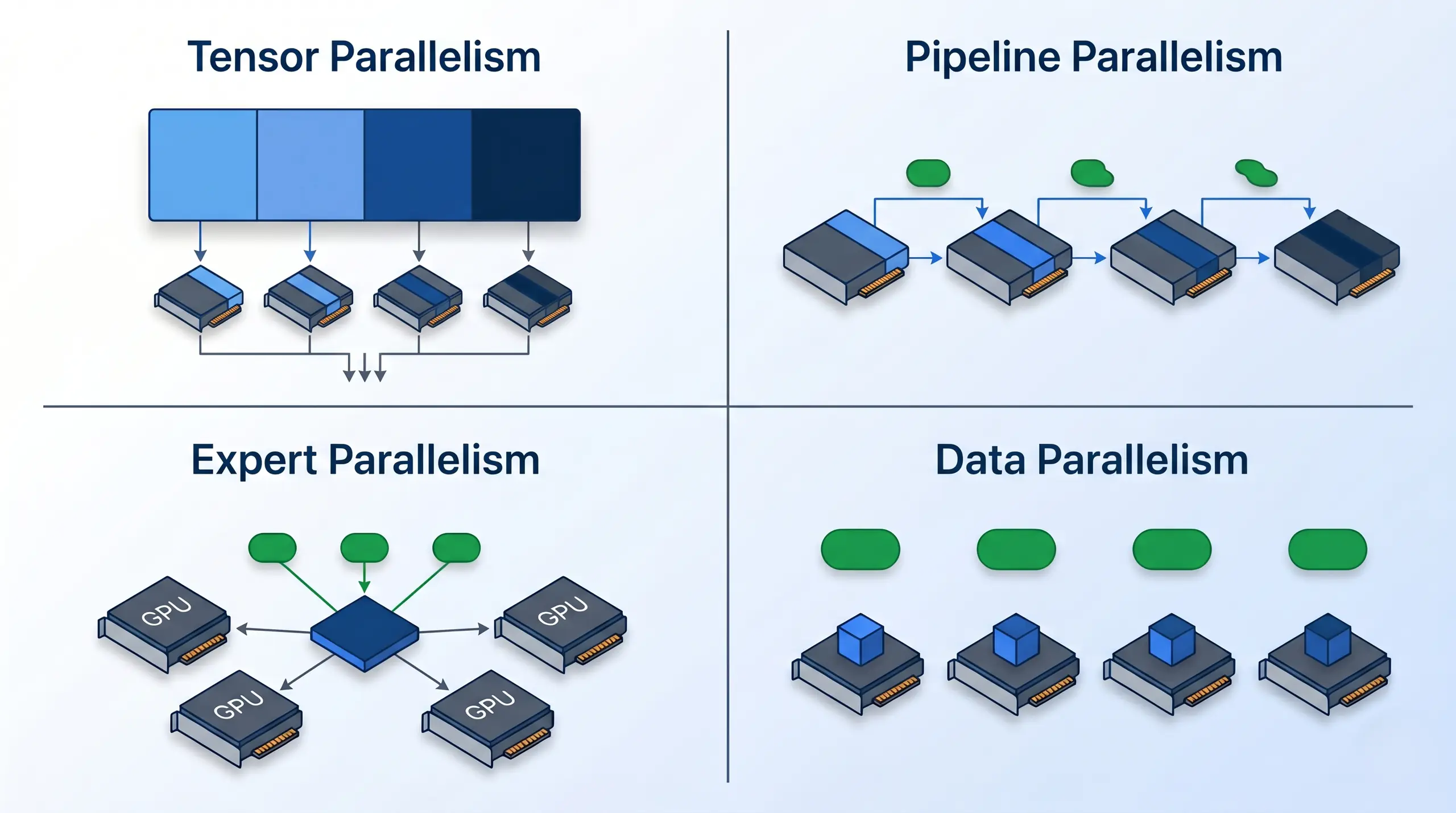
Tensor parallelism splits a matrix across GPUs (low latency, heavy cross-GPU traffic). Pipeline parallelism runs model layers in stages with micro-batched throughput. Expert parallelism routes tokens to MoE expert subsets for sparse compute. Data parallelism replicates the full model and splits the input batch. Production engines combine 2-4 of these for scale.
Per NVIDIA's TensorRT-LLM GitHub repository, v1.2.1 from April 20, 2026 ships under Apache 2.0 and is NVIDIA-only across H100, H200, L4, RTX consumer, and Jetson AGX Orin, with a current CUDA toolkit required. Quantization runs INT8, INT4 via AWQ, FP8, FP4, and QAT. Multi-GPU works through tensor, pipeline, and expert parallelism plus disaggregated serving. The TensorRT-LLM runtime is not a complete app-facing serving stack. It does not ship a native OpenAI-compatible server, which is why the production stack pairs it with Triton.
Per NVIDIA's Triton Inference Server GitHub repository, v2.68.0 ships in the April 28, 2026 NGC container 26.04 under BSD-3-Clause, with NVIDIA GPUs, x86 and ARM CPU, and AWS Inferentia support. Triton is an orchestration layer that hosts plugin runtimes for TensorRT-LLM, PyTorch, ONNX, OpenVINO, vLLM, and custom Backend API targets. Triton is the control plane. It fits MLOps teams running multi-model inference when orchestration is the job.
Per the LMDeploy GitHub repository, v0.13.0 from May 12, 2026 ships under Apache 2.0, NVIDIA primary through CUDA, with Huawei Ascend, ROCm, Cambricon, and macOS Maca secondary. The TurboMind engine is pure C++. Quantization runs weight-only, KV-cache (int8 and int4), 4-bit AWQ, and MXFP4. The OpenAI-compatible API serves both LLM and VLM workloads. Treat that as vendor data. LMDeploy's "up to 1.8x higher throughput than vLLM" headline is self-reported and should be cited as the project's own claim. LMDeploy fits teams on the InternLM ecosystem.
Per the Aphrodite Engine GitHub repository, v0.21.0 from May 2, 2026 ships under AGPL-3.0, more restrictive than the MIT or Apache licenses elsewhere here. Aphrodite builds on vLLM's PagedAttention and originally targeted PygmalionAI's community serving. The differentiator is broad quantization-format coverage, including AQLM, AWQ, BitNet, ExLlamaV3, GGUF, GPTQ, and Marlin. License comfort decides. Aphrodite fits community-AI serving where format breadth and AGPL are both acceptable.
BIZON Picks by Engine Class
Engine class comes first. BIZON sizes the chassis around it: V3000 G4 handles single-user local on a quiet desktop, while X3000 covers performance-local on a Ryzen 9000 workstation. X8000 G3 covers multi-user serving in a sustained-thermal rackmount platform. G7000 G4 covers 8-GPU production batched inference.
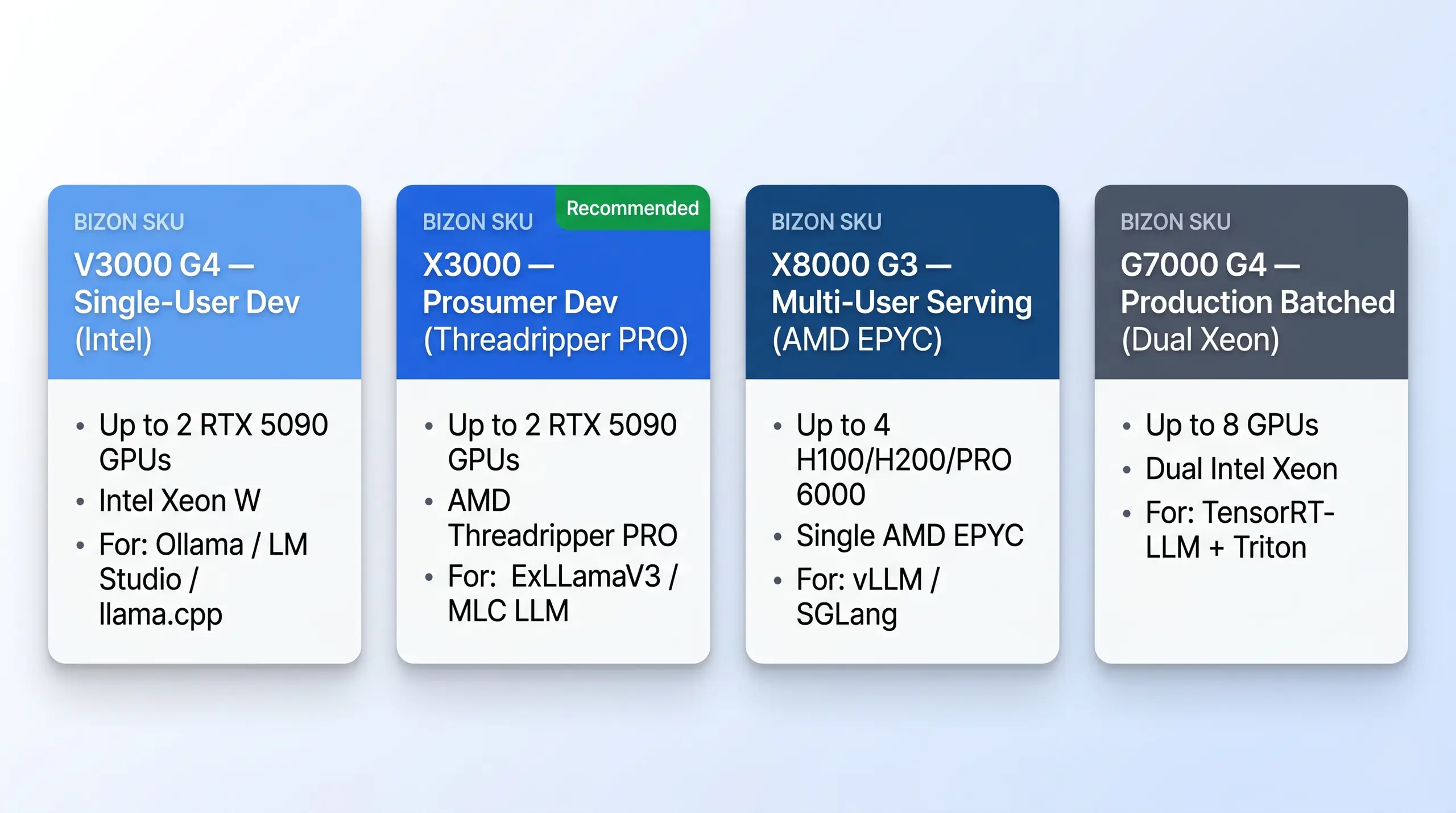
Four BIZON tiers mapped to engine classes, single-user local, prosumer local, multi-user serving, production batched.
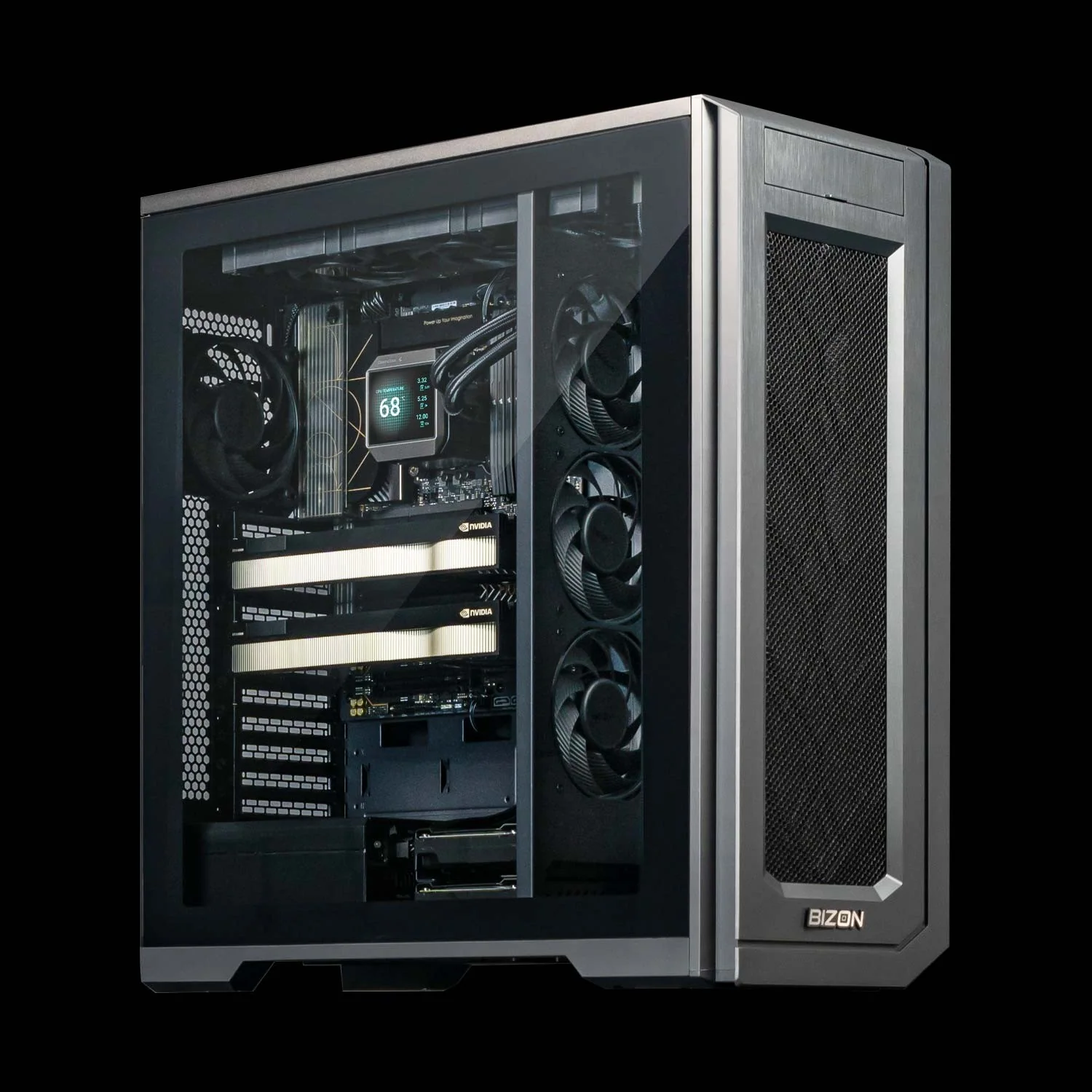
BIZON V3000 G4 Desktop Workstation
- Best for: Single-user dev with Ollama, LM Studio, or llama.cpp on a quiet Intel-platform workstation
- GPUs: Up to two GPUs, full RTX Blackwell and Ada workstation lineup compatible
- VRAM: Up to 192 GB total (two RTX PRO 6000 at 96 GB ECC each)
- CPU: Intel Core Ultra 9 (14, 20, or 24 cores)
- RAM: Up to 192 GB DDR5, dual-channel
- Connectivity: 1 GbE built-in plus Wi-Fi/Bluetooth, up to 25 GbE, with the BIZON deep learning stack pre-installed
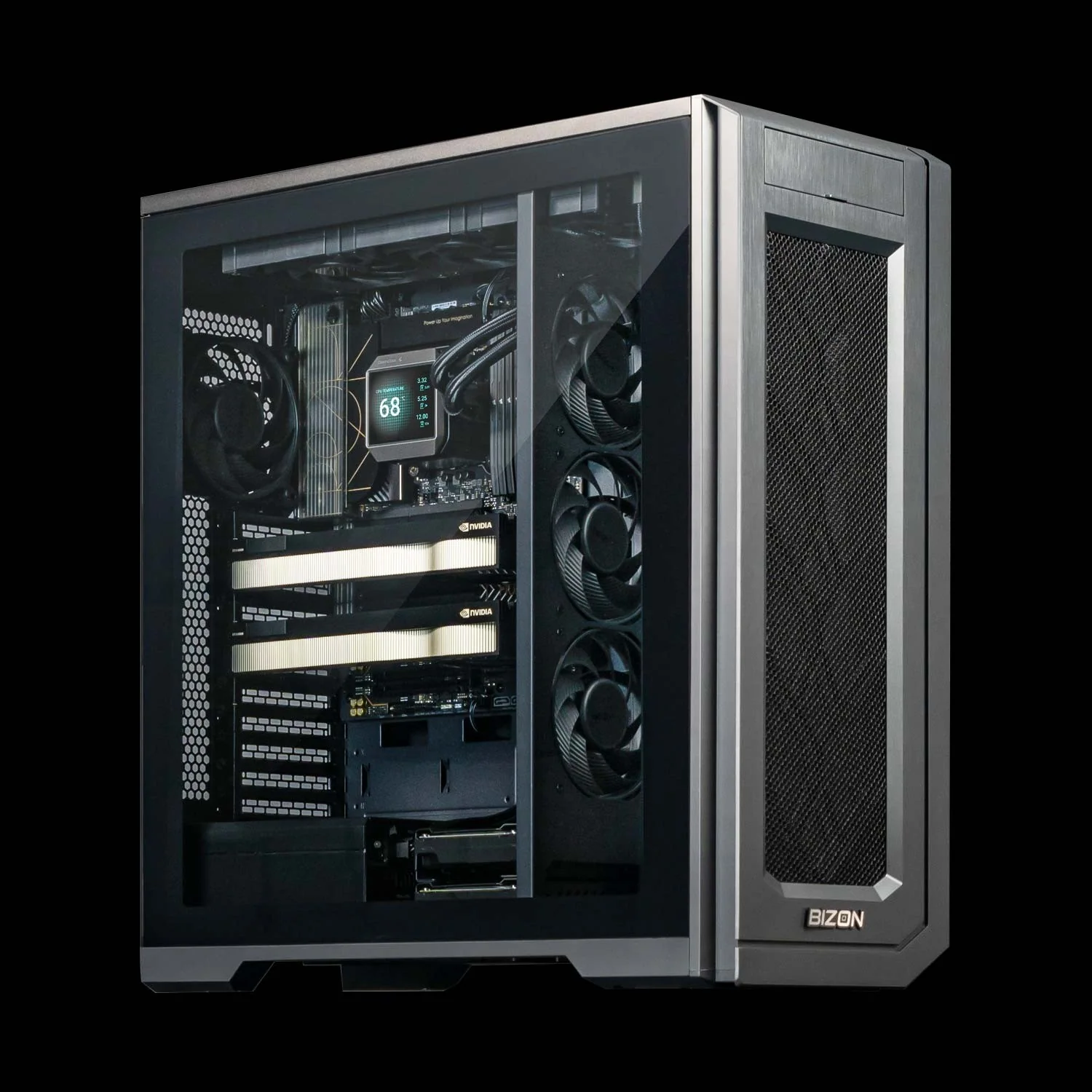
BIZON X3000 Desktop Workstation
- Best for: Prosumer dev running ExLlamaV3, MLC LLM, or llama.cpp at 70B-class quality on two consumer cards
- GPUs: Up to two GPUs, full RTX Blackwell and Ada workstation lineup compatible
- VRAM: Up to 192 GB total (two RTX PRO 6000 at 96 GB ECC each)
- CPU: AMD Ryzen 9000 (9900X or 9950X, up to 16 cores)
- RAM: Up to 256 GB DDR5, dual-channel
- Connectivity: 1 GbE built-in plus Wi-Fi/Bluetooth, up to 25 GbE, with the BIZON deep learning stack pre-installed and tested
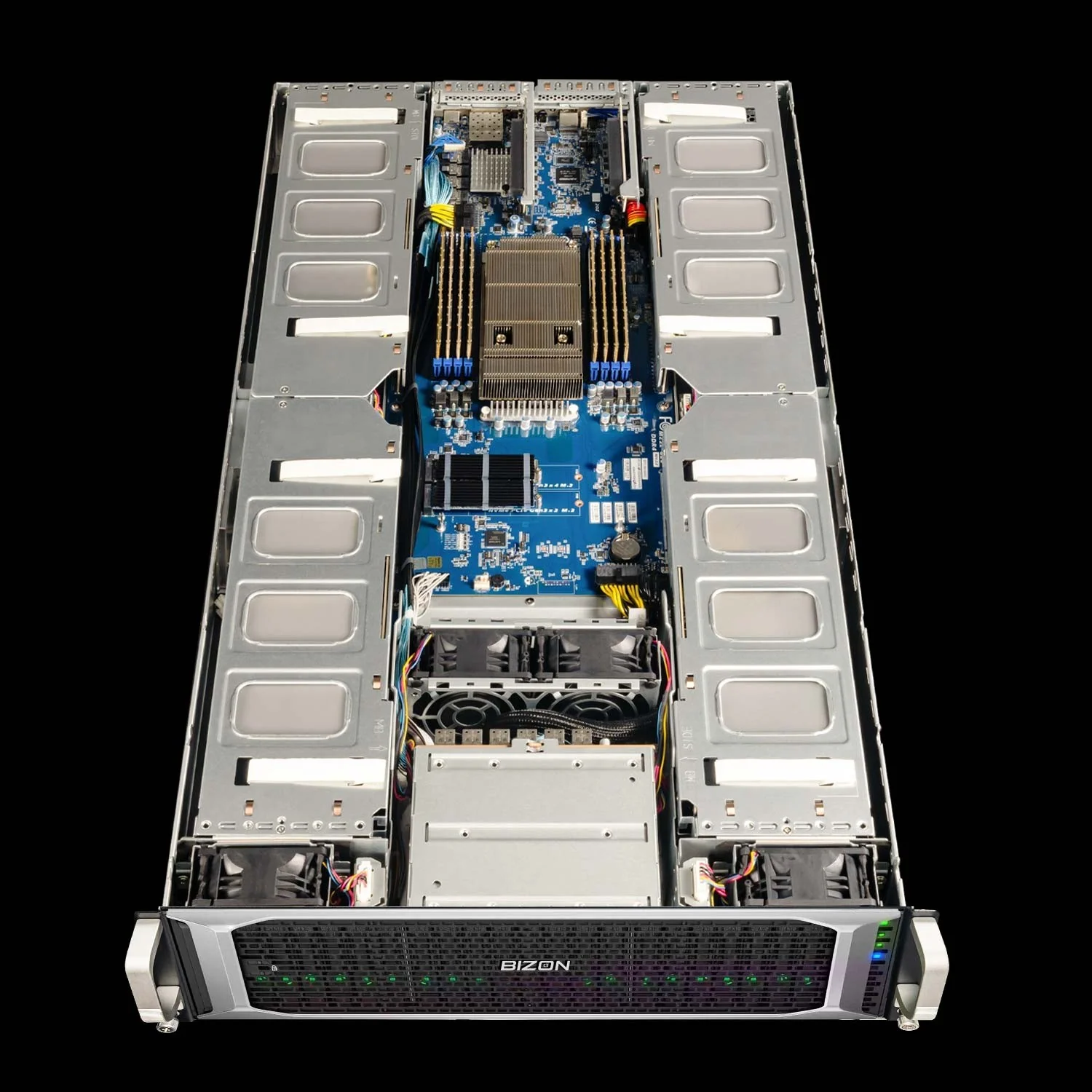
BIZON X8000 G3 Rackmount Server
- Best for: Multi-user vLLM or SGLang serving for 5 to 20 concurrent users on a team-shared API box
- GPUs: RTX A1000, RTX 6000 Ada, RTX PRO 4000/4500/5000/6000 Max-Q/6000 Server, L40s, A100 80GB, H100 94GB NVL, H200 141GB NVL (up to four)
- VRAM: Up to 564 GB total (four H200 NVL at 141 GB each)
- CPU: AMD EPYC 9004/9005 (up to 192 cores per CPU, single socket)
- RAM: Up to 1,536 GB DDR5 ECC Buffered, 12-channel
- Connectivity: 10 GbE dual port (two RJ45), up to 100 GbE optional, with the BIZON deep learning stack and SLURM available for shared-team scheduling
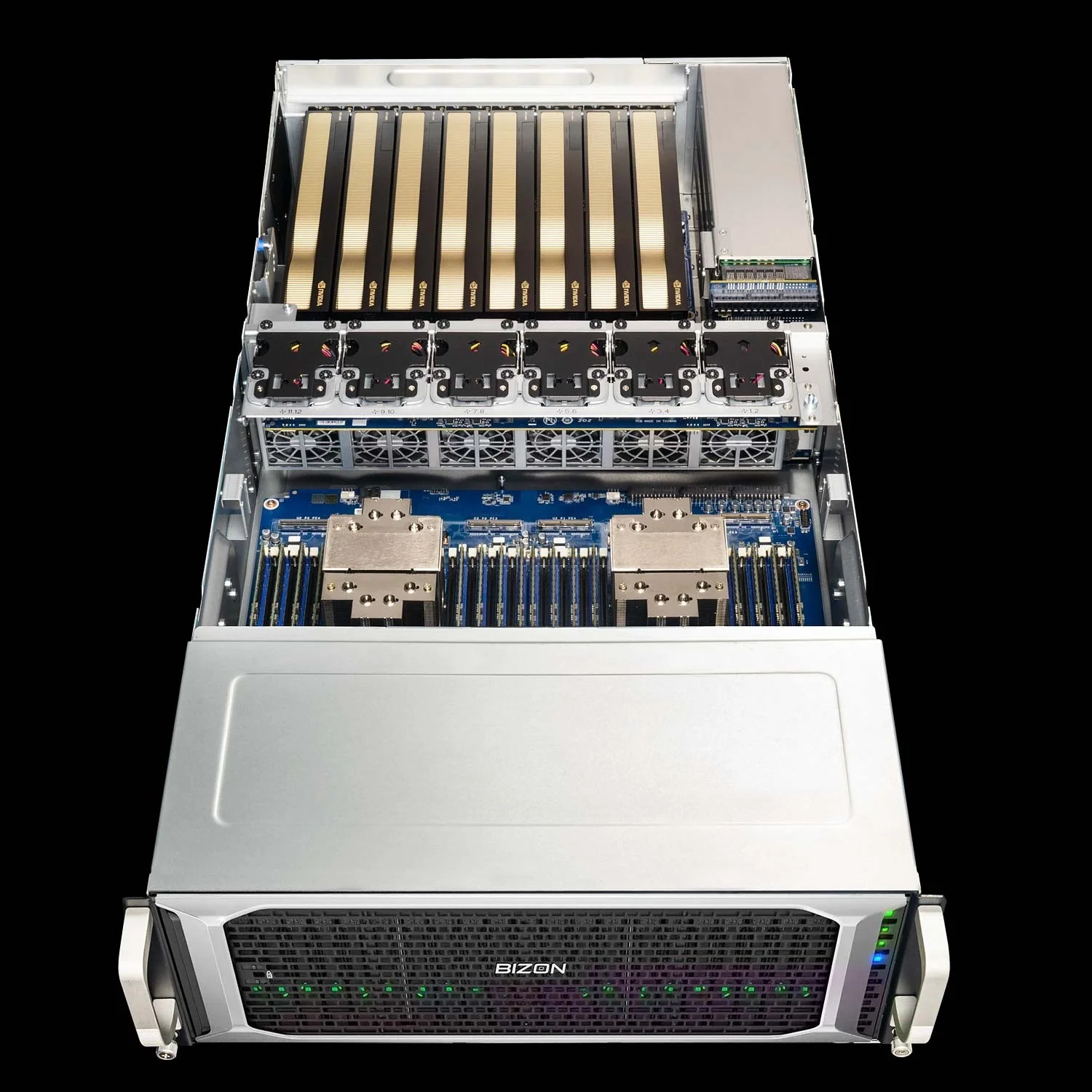
BIZON G7000 G4 Rackmount Server
- Best for: Production batched inference with TensorRT-LLM and Triton, vLLM and SGLang at higher concurrency, multi-model serving
- GPUs: RTX A1000, RTX 6000 Ada, RTX PRO 4000/4500/5000/6000 (300W and 600W), L40s, A100 80GB, H100 94GB NVL, H200 141GB NVL (up to eight)
- VRAM: Up to 1,128 GB total (eight H200 NVL at 141 GB each)
- CPU: Dual Intel Xeon Scalable 4th or 5th Gen
- RAM: Up to 4,096 GB DDR5 ECC Buffered, 8-channel per CPU
- Connectivity: 10 GbE dual port (two RJ45), up to 100 Gbps InfiniBand, with the BIZON deep learning stack and chassis cooling sized for 8-GPU sustained load
Pick Your LLM Inference Engine
No engine wins across all classes because workload class determines the right pick before engine popularity enters the conversation. Single-user dev lands on Ollama, LM Studio, llama.cpp, or KoboldCpp by use case. Performance-local enthusiasts pick ExLlamaV3 for 70B-class on consumer cards or MLC LLM for cross-platform targets. Small-team production starts with vLLM for breadth and moves to SGLang for prefix-heavy workloads. Production scale lands on TensorRT-LLM with Triton, with LMDeploy or Aphrodite for narrower fits.
The TGI footnote earlier is the SERP-freshness signal worth carrying away, because many existing roundups have not caught up to HuggingFace's recommendation. That is why this article keeps returning to workload class instead of ranking engines by popularity. The workload class drives both. The engine list and BIZON tiers are two sides of the same decision. For buyers comparing macOS-only inference against the CUDA stacks here, our Mac Studio versus NVIDIA breakdown covers the bandwidth tradeoff with the same workload-first framing.
BIZON sizes the chassis around the engine class first. Specification comes after workload. The deep learning AI workstation lineup spans V3000 G4 and X3000, and the NVIDIA GPU server lineup covers X8000 G3 and G7000 G4. We ship every configuration with the deep learning stack pre-installed, parts sized to the workload, a three-year warranty, and lifetime support. The configurator handles the last mile. It narrows the exact CPU, GPU, memory, and networking spec from there.