Table of Contents
- What GPU Do You Need for LLM Training and Inference in 2026?
- Training vs Inference: What's the Difference for Hardware?
- Top Open-Source LLMs in 2026 and Their VRAM Requirements
- Understanding Quantization: How to Fit Bigger Models on Smaller GPUs
- Best GPUs for LLM Inference in 2026
- Entry Tier (~$749): RTX 5070 Ti
- Mid Tier ($700 to $1,000): RTX 5080
- High Tier (~$1,999): RTX 5090
- Professional Tier (~$8,000 to $9,200): RTX PRO 6000 Blackwell
- Enterprise Tier ($20K to $470K+): H200 / B200 / B300
- GPU Comparison for LLM Inference
- Best GPUs for LLM Training and Fine-Tuning
- LoRA and QLoRA Fine-Tuning
- Full Fine-Tuning
- Pre-Training from Scratch
- Cost-per-Token: Dual RTX 5090 vs Single H100
- Multi-GPU Scaling: NVLink vs PCIe and When You Need It
- NVLink vs PCIe: The Bandwidth Gap
- Consumer Multi-GPU (2 to 4x RTX 5090 via PCIe)
- Professional Multi-GPU (NVLink with H100/H200/B200)
- Cost Comparison
- Inference Frameworks and Software Stack
- BIZON Workstations and Servers for LLMs
Best GPU for LLM Inference and Training in 2026 [Updated]
What GPU Do You Need for LLM Training and Inference in 2026?
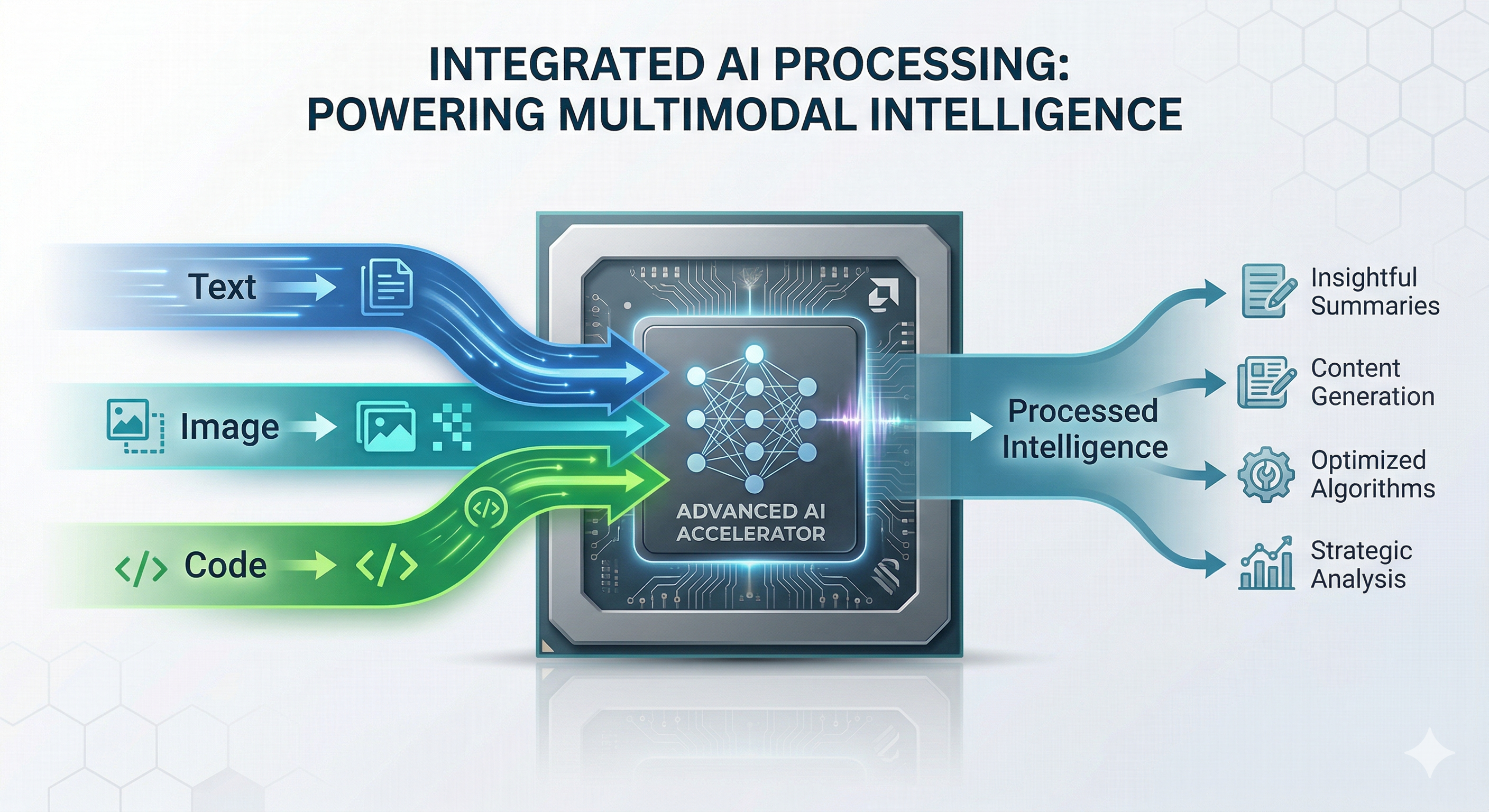
The best GPU for LLM workloads in 2026 comes down to two things. What model are you running, and how much VRAM can you get your hands on.
The LLM world has moved fast over the past year. Mixture-of-Experts architectures now dominate the frontier. LLaMA 4, DeepSeek V3.2, Qwen 3.5, Gemma 4, and Mistral Small 4 all use sparse expert routing to push parameter counts past 400B while keeping active compute manageable. Context windows have exploded. LLaMA 4 Scout supports 10 million tokens natively. Multimodal is no longer a bonus feature. It's expected. And quantization breakthroughs, including Blackwell's native FP4 support, mean you can now fit models on hardware that would have been out of reach eighteen months ago.
For GPU buyers, this changes the math. Raw TFLOPS still matter, but VRAM capacity and memory bandwidth matter more. If your model doesn't fit in memory, nothing else counts. And if your memory bandwidth can't feed tokens fast enough, you'll feel it on every prompt.
We built this guide to help you make the right call. We'll walk through VRAM requirements for every major open-source LLM, tiered GPU recommendations from the $750 RTX 5070 Ti up to our X9000 G5 with 8x B300 GPUs, quantization strategies that cut your VRAM needs by 75%, and the real differences between training and inference hardware. Whether you're a researcher prototyping locally or a team deploying at scale, the goal is the same. Match your budget to your workload without overspending or coming up short.
Quick GPU Picks for LLM Inference
| Budget | GPU | VRAM | Best For (Q4) | Tok/s |
|---|---|---|---|---|
| ~$750 | RTX 5070 Ti | 16 GB | Up to 14B | ~80 |
| ~$1,000 | RTX 5080 | 16 GB | Up to 27B | ~80 (14B) |
| ~$2,000 | RTX 5090 | 32 GB | Up to 32B | ~45 (32B) |
| ~$4,000 | 2x RTX 5090 | 64 GB | Up to 70B | ~27 (70B) |
| ~$8,500 | RTX PRO 6000 | 96 GB | Up to 120B | ~32 (70B) |
| ~$35,000 | H200 SXM | 141 GB | Up to 250B | ~120 (70B FP8) |
| $422K+ | 8x B200/B300 | 1.5-2.3 TB | 671B+ | Pre-training scale |
Tok/s = output tokens per second, single user, Q4 quantization, short context. Real-world speeds vary by framework, context length, and quantization format.
Training vs Inference: What's the Difference for Hardware?
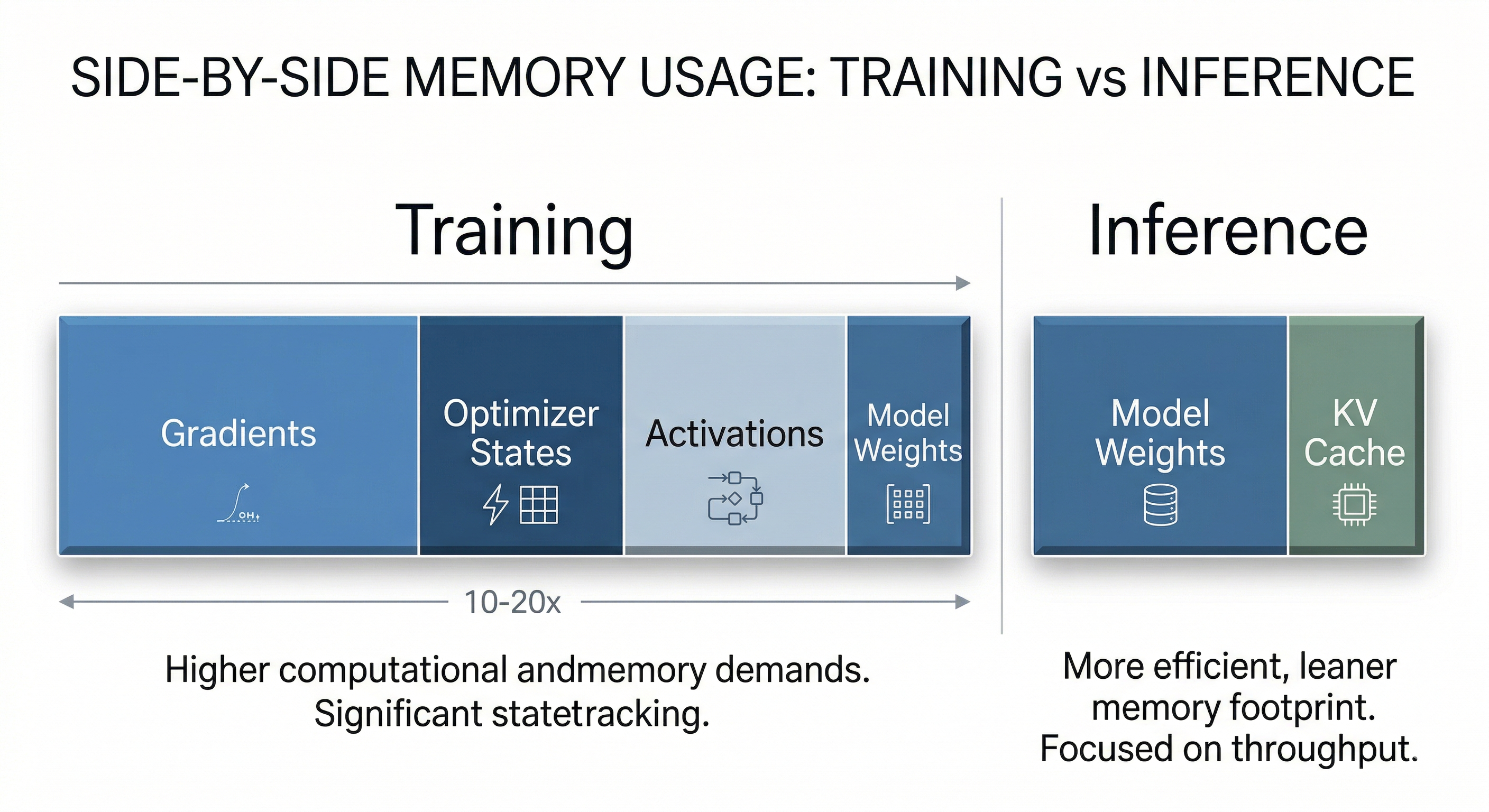
Training and inference place fundamentally different demands on GPU hardware. Training requires 3 to 4x the VRAM of inference because the GPU must store not just the model weights but also gradients, optimizer states (like Adam's momentum and variance), and intermediate activations for backpropagation. Inference only needs to hold the model weights plus a KV cache for context, making it far more memory-efficient.
In practice, most readers running LLMs locally are doing inference or fine-tuning, not pre-training from scratch. That distinction matters enormously for hardware selection. A single RTX 5090 can handle inference for models that would require four or more H100s during full training. Understanding where your workload falls on this spectrum can save you tens of thousands of dollars.
Memory bandwidth is king for inference. Faster bandwidth means faster token generation. For training, compute throughput (TFLOPS in FP16/BF16) and multi-GPU interconnect speed take priority. Here's how the two compare.
| Dimension | Training | Inference |
|---|---|---|
| VRAM Multiplier | 3 to 4x model size (weights + gradients + optimizer) | 1 to 1.3x model size (weights + KV cache) |
| Key Bottleneck | Compute throughput (TFLOPS) | Memory bandwidth (TB/s) |
| Multi-GPU Need | Essential for models >13B parameters | Often single GPU with quantization |
| Interconnect Priority | NVLink critical (900 GB/s on H100) | PCIe adequate for most setups |
| Cost Profile | $10K to $500K+ (multi-GPU clusters) | $2K to $30K (single or dual GPU) |
| Recommended GPU Class | H100 / H200 / B200 / B300 | RTX 5090 / RTX PRO 6000 / H200 |
Top Open-Source LLMs in 2026 and Their VRAM Requirements
The most important open-source LLMs in 2026 range from 4B to 671B parameters, and the VRAM you'll need depends on model architecture (dense vs. MoE), precision format, and context length. Below you'll find every model that matters, organized by category, followed by a unified VRAM requirements table.
General-Purpose Frontier Models
LLaMA 4 marks Meta's transition to MoE architecture. Scout (109B total, 17B active) delivers a staggering 10M-token context window, enough to process entire codebases or book-length documents in a single pass. Maverick (400B total, 17B active) targets high-quality reasoning with 1M context. Both are natively multimodal, handling text, images, and video. The anticipated Behemoth variant at 2T parameters hasn't shipped yet, but Scout and Maverick have already reshaped what "local LLM" means for serious users.
LLaMA 3.x remains the backbone of the fine-tuning ecosystem. LLaMA 3.3 70B (dense) is the most popular base for custom fine-tunes, while LLaMA 3.1 405B (dense, ~810 GB at FP16) continues to drive demand for 8x H100/H200 GPU servers. If you're building a fine-tuned model for production, odds are you're starting from one of these.
DeepSeek V3.2 (March 2026) pushed the MoE boundary to 671B total parameters with 37B active, adding tool-integrated reasoning and a 163K context window. It's one of the strongest open-weight models available, but its sheer size means you're looking at serious multi-GPU hardware for the full model.
Mistral Large 3 (675B MoE, 41B active) is the open-weight counterpart to DeepSeek V3.2 at the same parameter scale. It ships under Apache 2.0 with 256K context. The full model requires ~370 GB at Q4, putting it in the same 8x H100/H200 territory as DeepSeek R1 and V3.2. For teams evaluating 671B-class models, this is the alternative to benchmark against.
Qwen 3.5 (February to March 2026) is Alibaba's most ambitious release yet. The family spans from 4B dense up to a 397B MoE flagship (17B active). The 35B-A3B variant deserves special attention. It's a MoE model that activates only 3B parameters per token, making it remarkably efficient for single-GPU inference. With 128K context and 201-language support, Qwen 3.5 offers the broadest model lineup of any open-source family in 2026.
Mistral Small 4 (March 2026) packs unified reasoning, vision, and coding into a 119B MoE model that activates just 6B parameters per token. With 256K context and 40% faster inference than its predecessor, it's built for production edge deployment. The low active parameter count means strong throughput even on modest hardware, as long as you can fit the full 119B parameter set in VRAM.
Gemma 4 (April 2026) is Google's latest open-weight family under Apache 2.0. The 31B dense model needs ~62 GB at FP16 or ~22 GB at Q4, fitting comfortably on a single RTX 5090. The 26B-A4B MoE variant activates only 4B parameters per token, dropping Q4 VRAM to roughly 14 GB, enough for a 16 GB card. Both support 256K context and native multimodal input (text, image, video). Gemma 4 supersedes the Gemma 3 27B that was a popular single-GPU pick throughout 2025.
Phi-4-Reasoning-Vision 15B (Microsoft, March 2026) is a compact multimodal reasoning model that fits entirely on a single RTX 5090 at FP16, taking up roughly 30 GB of VRAM. For researchers who want multimodal reasoning without multi-GPU overhead, this is the model to watch. Its 16K context window is limited compared to other models on this list, but for short-prompt reasoning tasks it punches well above its weight class.
NVIDIA Nemotron Ultra 253B is a LLaMA 3.1-based model optimized for NVIDIA hardware, targeting enterprise inference pipelines with TensorRT-LLM integration.
Reasoning Models
DeepSeek R1 (671B MoE, 37B active) introduced chain-of-thought reasoning at scale under an MIT license. The full model demands 370+ GB at Q4. In practice, the distilled dense variants are where most users live. The R1 Distill 32B has become the go-to reasoning model for single-GPU setups with 80 GB VRAM, while the 7B and 8B distills run comfortably on consumer hardware. The 70B distill remains popular for users with dual RTX 5090 or single RTX PRO 6000 configurations.
Code-Specialized Models
Qwen3-Coder 480B-A35B is the strongest open-weight code model available. It packs 480B MoE with 35B active parameters, 256K context, and support for 358 programming languages. It's a serious contender against proprietary coding assistants, but you'll need multi-GPU hardware (4x H200 or a BIZON X9000 G4) for the full model. A more accessible 30B-A3B variant exists for single-GPU deployment.
Qwen2.5-Coder 32B (32B dense, 128K context) is the most widely deployed code model on Ollama and LM Studio. At Q4, it fits on a single RTX 5090 with room to spare.
DeepSeek-Coder V2 released in mid-2024 and is showing its age, but remains popular on Ollama and LM Studio. It offers two MoE variants. The 16B-Lite (2.4B active) handles lightweight code completion and the 236B (21B active) delivers full-featured code generation and analysis.
Devstral 2 (Mistral) brings a 123B dense model for serious code generation, while Devstral Small 2 at 24B (Apache 2.0) is a practical single-GPU option for developers.
VRAM Requirements by Model
This table shows VRAM requirements at FP16 (full precision) and Q4 quantization. MoE models must load all parameters into VRAM but only activate a subset per token. VRAM is determined by total parameters, while inference speed scales with active parameters.
| Model | Total Params | Active Params | Context | FP16 VRAM | Q4 VRAM | Recommended GPU |
|---|---|---|---|---|---|---|
| Phi-4-Reasoning-Vision 15B | 15B | 15B (dense) | 16K | ~30 GB | ~9 GB | RTX 5090 (32 GB) at FP16 |
| Gemma 4 26B-A4B | 26B | 4B (MoE) | 256K | ~52 GB | ~14 GB | RTX 5070 Ti / RTX 5080 (16 GB) at Q4 |
| Gemma 4 31B | 31B | 31B (dense) | 256K | ~62 GB | ~22 GB | RTX 5090 (32 GB) at Q4 |
| Qwen2.5-Coder 32B | 32B | 32B (dense) | 128K | ~64 GB | ~18 GB | RTX 5090 (32 GB) at Q4 or RTX PRO 6000 at FP16 |
| DeepSeek R1 Distill 32B | 32B | 32B (dense) | 128K | ~64 GB | ~18 GB | RTX 5090 (32 GB) at Q4 or RTX PRO 6000 at FP16 |
| Qwen 3.5 35B-A3B | 35B | 3B (MoE) | 128K | ~70 GB | ~20 GB | RTX 5090 (32 GB) at Q4 |
| LLaMA 3.3 70B | 70B | 70B (dense) | 128K | ~140 GB | ~40 GB | RTX PRO 6000 (96 GB) or 2x RTX 5090 |
| LLaMA 4 Scout | 109B | 17B (MoE) | 10M | ~218 GB | ~60 GB | RTX PRO 6000 (96 GB) at Q4 |
| Mistral Small 4 | 119B | 6B (MoE) | 256K | ~238 GB | ~66 GB | RTX PRO 6000 (96 GB) at Q4 |
| LLaMA 3.1 405B | 405B | 405B (dense) | 128K | ~810 GB | ~225 GB | Multi-GPU: 4 to 8x H200 / 2 to 4x B200 |
| LLaMA 4 Maverick | 400B | 17B (MoE) | 1M | ~800 GB | ~220 GB | Multi-GPU: 4x H200 or 2x B200 |
| Qwen 3.5-397B-A17B | 397B | 17B (MoE) | 128K | ~794 GB | ~220 GB | Multi-GPU: 4x H200 or 2x B200 |
| Qwen3-Coder 480B-A35B | 480B | 35B (MoE) | 256K | ~960 GB | ~266 GB | Multi-GPU: 4x H200 / 2x B200 / 1x X9000 G4 |
| DeepSeek R1 / V3.2 (full) | 671B | 37B (MoE) | 128K / 163K | ~1.3 TB | ~370 GB | Multi-GPU: 8x H200 / 4x B200 / 2x B300 |
| Mistral Large 3 | 675B | 41B (MoE) | 256K | ~1,350 GB | ~370 GB | Multi-GPU: 8x H200 / 4x B200 / 2x B300 |
Note: MoE models must load all parameters into VRAM but only activate a subset per token. VRAM is determined by total parameters, and inference speed scales with active parameters.
Understanding Quantization: How to Fit Bigger Models on Smaller GPUs
Quantization compresses model weights from 16-bit floating point to lower precisions, typically 4-bit or 8-bit. That reduces VRAM requirements by 50 to 75% with surprisingly small quality trade-offs. It's the single most impactful technique for running large models on consumer hardware.
Several formats compete for dominance in 2026. GGUF (used by llama.cpp and Ollama) offers granular options, with Q4_K_M and Q5_K_M being the most popular for balancing compression and quality. AWQ and GPTQ remain widely used for GPU-accelerated inference via vLLM and other frameworks. FP8, introduced with Hopper, delivers near-FP16 quality at half the memory. And FP4, native to Blackwell, pushes the frontier further. The RTX 5090, B200, and B300 all support FP4 in hardware, halving VRAM requirements compared to FP8 while preserving more dynamic range than integer-based Q4.
The practical rule of thumb is simple. Divide FP16 VRAM by 4 for Q4 quantization, by 2 for Q8, and add 10 to 20% overhead for the KV cache. A 70B model at FP16 needs ~140 GB of VRAM. At Q4, that drops to roughly 40 GB, comfortably within reach of a dual RTX 5090 setup or a single RTX PRO 6000.
The sweet spot for most users is Q4_K_M. It delivers approximately 72% VRAM reduction compared to FP16 with minimal quality degradation on benchmarks. For applications where accuracy is critical (medical, legal, financial), consider Q5_K_M or Q8 to preserve more precision. For raw throughput on Blackwell hardware, FP4 is the new frontier.
When downloading quantized models from HuggingFace or Ollama, the filename tells you what you're getting. The letter after "Q" is the bit width (Q4 = 4-bit, Q5 = 5-bit, Q8 = 8-bit), "K" means k-quant (a smarter per-layer quantization), and the suffix indicates size. "M" is medium (best balance), "S" is small (more compression, slightly lower quality), and "L" is large (less compression, higher quality).
In practice, Q4_K_M reduces VRAM by about 72% compared to FP16 with roughly 1-2% quality loss on benchmarks. Q5_K_M uses about 15% more VRAM than Q4 but closes most of that quality gap, making it the better choice for tasks where precision matters (coding, math, legal). Q8 is nearly lossless but only cuts VRAM by about 50%. Q3 and below save the most memory but introduce noticeable degradation in reasoning and coherence. If a model barely fits at Q4, try Q5_K_S before dropping to Q3. The small jump in VRAM is usually worth the quality you keep.
Watch: Andrej Karpathy's deep dive into how LLMs actually work, from tokenization and training to inference and prompting strategies.
Best GPUs for LLM Inference in 2026
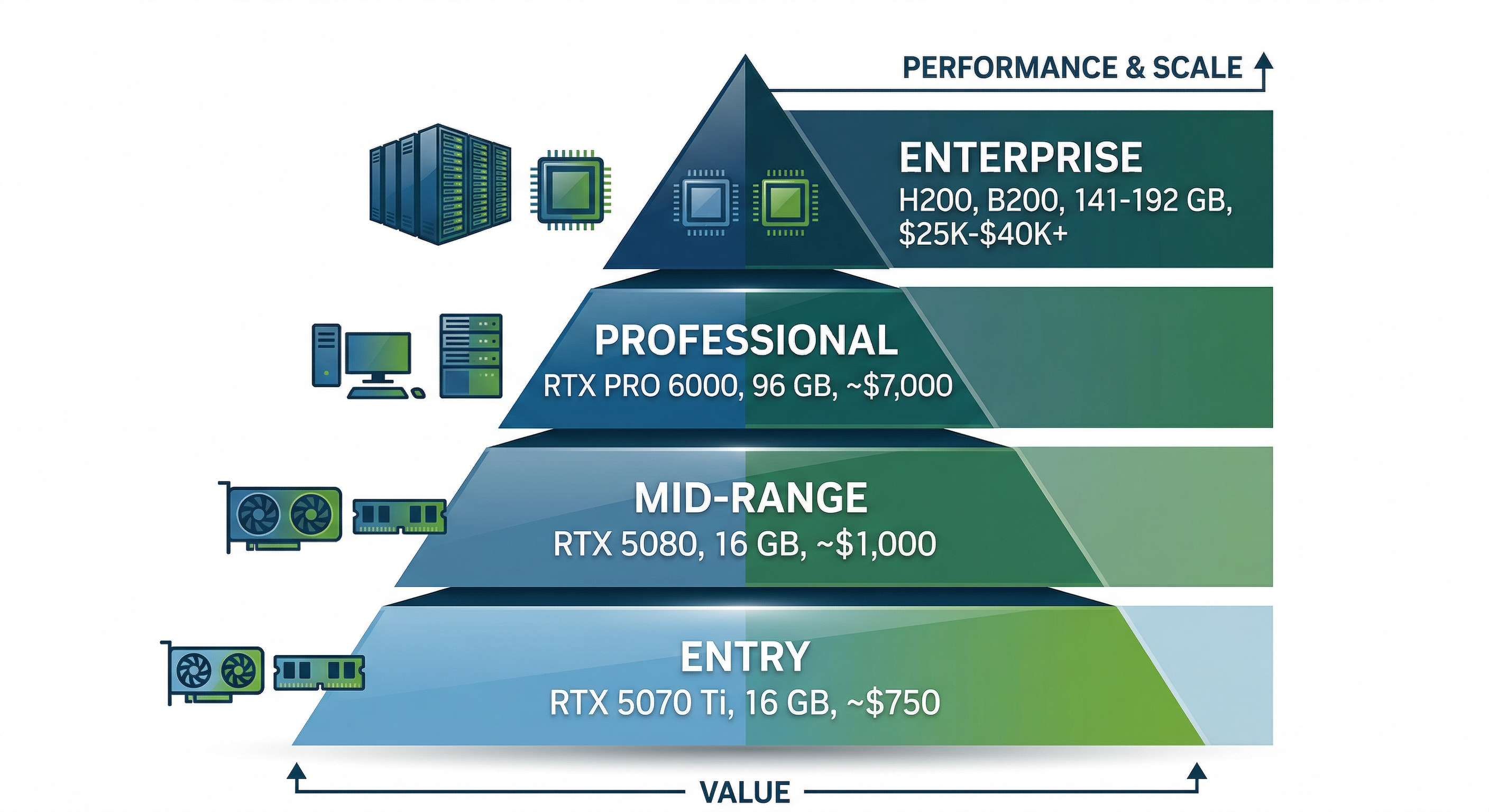
The best GPU for LLM inference depends on the model size you're targeting and your budget. For most users running models up to 70B parameters, the RTX 5090 is the clear sweet spot. But the right card for your workload could range from a $749 RTX 5070 Ti to a $470K B300 cluster. Here's how the tiers break down.
Entry Tier (~$749): RTX 5070 Ti
The RTX 5070 Ti delivers 16 GB of GDDR7 at an accessible price point, making it viable for running 7B to 14B models at Q4 quantization. Think Phi-4-Reasoning 15B at Q4, Gemma 3 12B, or LLaMA 3.2 8B at higher precision. It won't handle the bigger models, but for developers experimenting with local LLMs or deploying small models in production, it's a solid value pick.
Mid Tier ($700 to $1,000): RTX 5080
The RTX 5080 also packs 16 GB of GDDR7 but with higher bandwidth and more CUDA cores, handling 14B to 27B models at Q4 comfortably. Gemma 3 27B at Q4 (~16 GB) fits nicely. The faster memory bus translates directly to higher tokens-per-second during inference, and that difference is noticeable in interactive use. In real-world testing, a 14B model at Q4 generates around 80 tokens per second at 4K context.
High Tier (~$1,999): RTX 5090
This is the sweet spot. The RTX 5090 delivers 32 GB of GDDR7 at 1.8 TB/s memory bandwidth, roughly 2.6x the inference throughput of an A100 40 GB. It runs 70B models at Q4 (~40 GB with KV cache, tight but workable at shorter contexts, or pair two cards). Qwen2.5-Coder 32B, DeepSeek R1 Distill 32B, and Qwen 3.5 35B-A3B all fit on a single card at Q4 with room for context. Native FP4 support via Blackwell means even better memory efficiency is available. For researchers, developers, and power users running local LLMs, this is the GPU to buy in 2026. In benchmarks, the RTX 5090 generates around 45 tokens per second on 32B models at Q4, and MoE models with low active parameter counts can push past 200 tok/s.
Upgrading from an RTX 4090? The 4090's 24 GB handles 32B models at Q4 at around 34 tokens per second. The RTX 5090 bumps that to 45 tok/s with 32 GB of VRAM, a 30% speed gain plus the headroom to fit models that won't load on 24 GB. If you're already running 32B models comfortably on a 4090, the upgrade is nice but not urgent. If you're hitting VRAM limits, it's a clear jump.
Professional Tier (~$8,000 to $9,200): RTX PRO 6000 Blackwell
The RTX PRO 6000 Blackwell is the first professional GPU with 96 GB GDDR7 ECC memory available at retail. That's enough to run LLaMA 3.3 70B at full FP16 precision, or LLaMA 4 Scout (109B MoE) and Mistral Small 4 (119B MoE) at Q4 on a single card. For users who need precision in fine-tuning, evaluation, or production inference with long context windows, the RTX PRO 6000 eliminates the quantization trade-off for most models under 100B. It commands a premium, but justifies the investment when model quality cannot be compromised. In testing, it generates around 32 tokens per second on LLaMA 3.3 70B at Q4. The real advantage shows on 100B+ models that simply cannot fit on a 32 GB card.
Enterprise Tier ($20K to $470K+): H200 / B200 / B300
For frontier-scale models and production training, enterprise GPUs are the only path forward. The H200 (141 GB HBM3e) remains the workhorse for LLM inference at scale, and the BIZON X7000 configured with 8x H200 is our bestselling enterprise LLM server. The B200 (192 GB HBM3e) pushes the VRAM ceiling higher. And the B300 (288 GB HBM3e), shipping since January 2026, delivers 8 TB/s memory bandwidth and 15 PFLOPS of FP4 compute. That's enough to run DeepSeek R1 full across just two cards. A single H100 handles LLaMA 3.3 70B at FP8 at roughly 120 tokens per second for a single user.
Looking ahead, NVIDIA confirmed the Vera Rubin architecture at GTC 2026. The VR200 promises 288 GB HBM4 and 50 PFLOPS FP4, with datacenter availability expected in H2 2026. For a deeper look at the roadmap, see our GTC 2026 recap.
GPU Comparison for LLM Inference
| GPU | VRAM | Memory BW | FP16 TFLOPS | Price (est.) | Best For | Largest Model (Q4, single card) |
|---|---|---|---|---|---|---|
| RTX 5070 Ti | 16 GB GDDR7 | 896 GB/s | ~88 | ~$749 | 7B to 14B inference | ~14B |
| RTX 5080 | 16 GB GDDR7 | 960 GB/s | ~113 | ~$999 | 14B to 27B inference | ~27B |
| RTX 5090 | 32 GB GDDR7 | 1,792 GB/s | ~209 | ~$1,999 | 32B to 70B inference, fine-tuning small models | ~70B |
| RTX PRO 6000 Blackwell | 96 GB GDDR7 ECC | 1,792 GB/s | ~250 | ~$8,500 | 70B FP16, 100B+ MoE at Q4 | ~120B MoE |
| H200 SXM | 141 GB HBM3e | 4,800 GB/s | ~990 | ~$35,000 | Production inference, 405B at Q4 (multi-GPU) | ~250B |
| B200 SXM | 192 GB HBM3e | 8,000 GB/s | ~2,250 | ~$40,000 | Frontier models, training | ~340B |
| B300 SXM | 288 GB HBM3e | 8,000 GB/s | ~2,250 | ~$50,000 | Full DeepSeek R1 (2 cards), pre-training | ~500B |
Consumer GPU prices reflect MSRP. Street prices may be significantly higher due to supply constraints. Enterprise GPU pricing varies by configuration and volume. All BIZON product prices should be verified against bizon-tech.com before purchase.
Best GPUs for LLM Training and Fine-Tuning
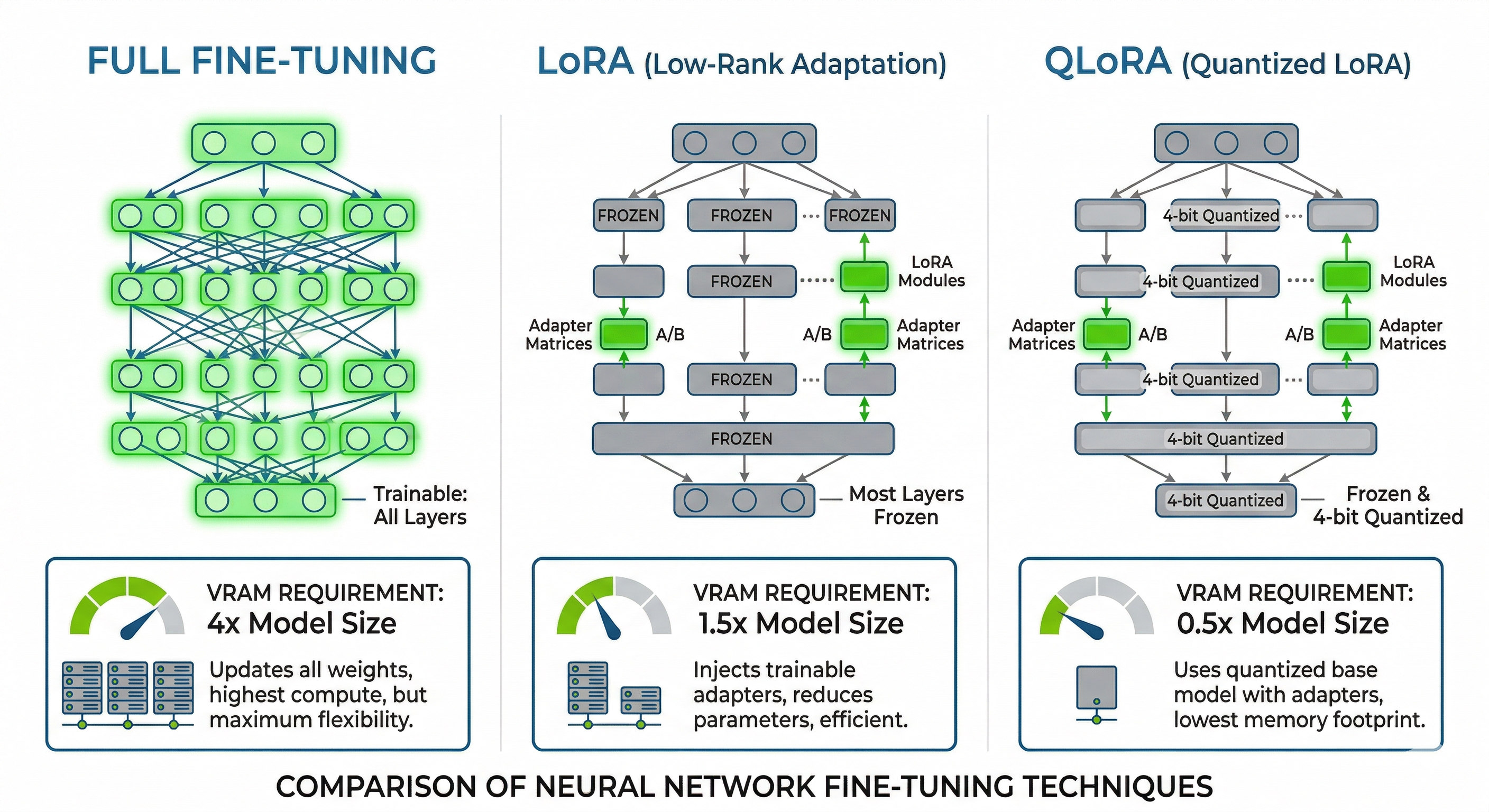
The best GPU for LLM training depends on your training method. LoRA and QLoRA fine-tuning (which update a small fraction of model weights) require dramatically less VRAM than full fine-tuning or pre-training from scratch. Most users will fall into the fine-tuning category, and that's where consumer and prosumer GPUs can deliver serious value.
LoRA and QLoRA Fine-Tuning
LoRA (Low-Rank Adaptation) adds small trainable matrices alongside frozen model weights, typically requiring only 10 to 20% more VRAM than inference. The base model weights stay frozen. Only the low-rank adapter weights are updated during training, which dramatically reduces memory overhead. QLoRA goes further, quantizing the base model to 4-bit and training the LoRA adapters in FP16, combining aggressive compression with effective fine-tuning.
In practice, this means a single RTX 5090 (32 GB) can LoRA fine-tune models up to 13B parameters at FP16, or QLoRA fine-tune a 32B model like DeepSeek R1 Distill 32B or Qwen2.5-Coder 32B. For 70B models, a single H100 or H200 (80 to 141 GB) handles QLoRA fine-tuning comfortably. This is the most common training workflow we see from BIZON customers, and it delivers surprisingly good results for domain-specific applications like legal analysis, medical coding, and financial document processing.
Full Fine-Tuning
Full fine-tuning updates every parameter, which means storing full-precision weights, gradients, and optimizer states. The VRAM requirement balloons to 3 to 4x the model's FP16 size. A 70B model at FP16 needs ~140 GB just for weights. Add gradients and optimizer states, and you're looking at 420 to 560 GB total. That demands multi-GPU setups like 4 to 8x H100s, 4x H200s, or 2 to 4x B200s. NVLink interconnect becomes essential at this scale to avoid PCIe bottlenecks during gradient synchronization.
Pre-Training from Scratch
Pre-training a model from scratch is an entirely different class of workload. You're talking multi-node GPU clusters, NVLink or NVSwitch fabrics, and training runs measured in weeks or months. Data throughput, checkpoint management, and fault tolerance all become critical considerations. The B200 and B300 are the current workhorses for this. The B300's 288 GB of HBM3e per GPU and 15 PFLOPS of FP4 compute make it the most efficient single GPU for pre-training available today. Vera Rubin promises even more, but it's not shipping until late 2026.
If you're planning pre-training or large-scale full fine-tuning, the BIZON X9000 G4 (8x B200, 1,536 GB total HBM3e) and X9000 G5 (8x B300, 2,304 GB total HBM3e) are purpose-built for this workload. The X9000 G5 can hold the full DeepSeek R1 671B model in memory with room for gradients. That was physically impossible on any single server just two years ago.
Cost-per-Token: Dual RTX 5090 vs Single H100
Here's a practical comparison that comes up constantly. Two RTX 5090s (~$4,000 total, 64 GB combined VRAM) can handle QLoRA fine-tuning of a 70B model at Q4 quantization. A single H100 (~$30,000, 80 GB HBM3) handles the same workload at higher precision with NVLink scalability for future expansion. The dual RTX 5090 setup costs roughly 87% less upfront.
The trade-off matters, though. The H100 offers ECC memory for bit-flip protection during long training runs, NVLink for smooth scaling to 4 to 8 GPUs, and roughly 4x the memory bandwidth (3.35 TB/s HBM3 vs 1.8 TB/s GDDR7). For sustained training throughput, especially runs lasting days or weeks, that bandwidth and reliability advantage compounds. For researchers and startups doing iterative fine-tuning with frequent experimentation, the RTX 5090 path delivers far more experiments per dollar. For production training pipelines where a corrupted checkpoint means restarting a multi-day run, the H100/H200 path pays for itself in reliability.
Multi-GPU Scaling: NVLink vs PCIe and When You Need It
You need multi-GPU scaling when your model's VRAM requirements exceed what a single card provides. That threshold hits faster than most people expect. Any model over 70B parameters at Q4 will push past a single RTX 5090's 32 GB. The question isn't whether you'll need multi-GPU, but how to interconnect those cards efficiently.
NVLink vs PCIe: The Bandwidth Gap
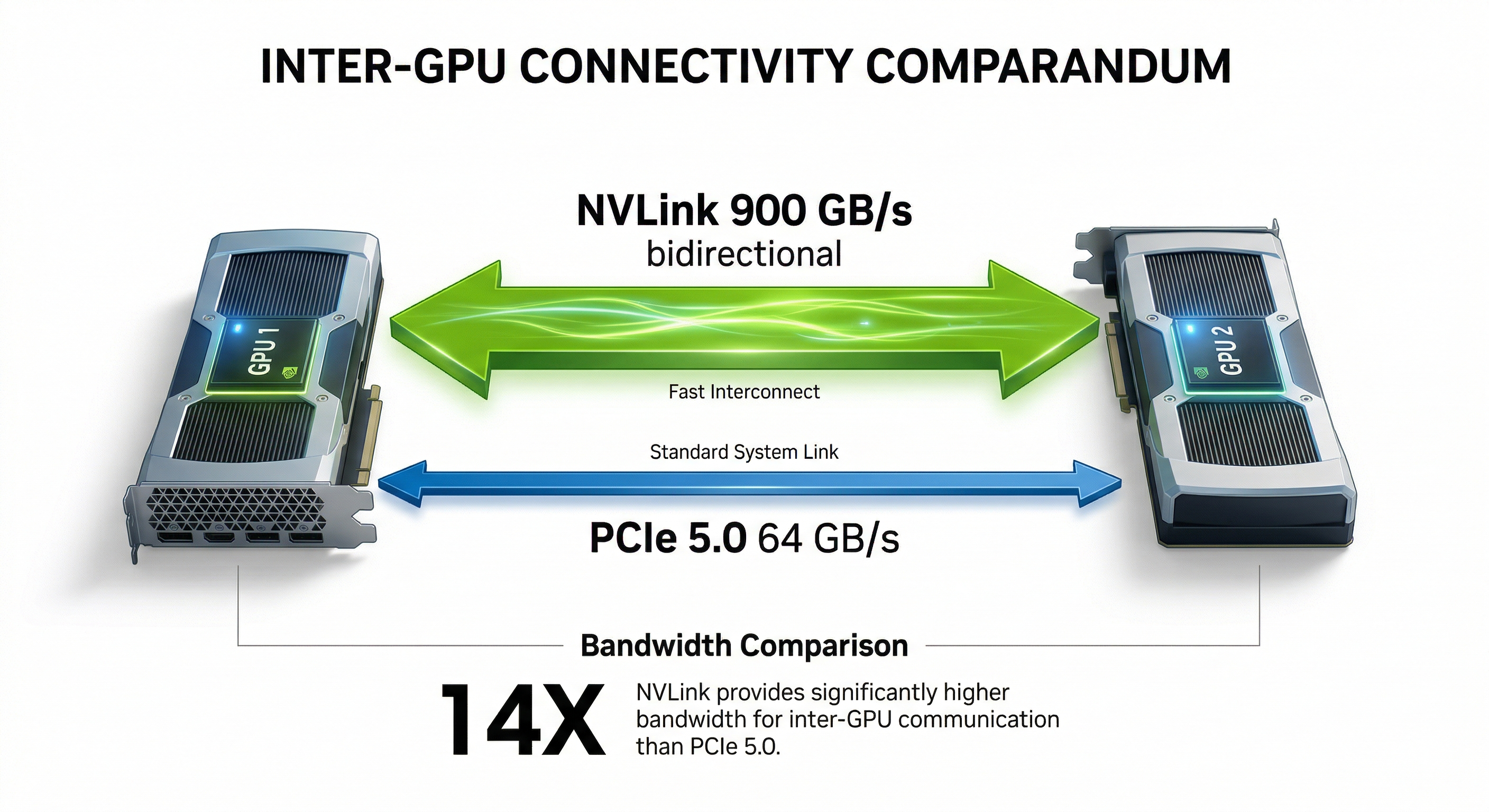
NVLink on H100 delivers 900 GB/s of bidirectional bandwidth between GPUs, roughly 14x faster than PCIe 5.0 x16 (64 GB/s). Under the hood, this means gradient synchronization during training and tensor parallelism during inference both run dramatically faster on NVLink. For training workloads where GPUs must constantly exchange gradient data, NVLink isn't optional. It's the difference between a training run that takes 3 days and one that takes 3 weeks.
Consumer Multi-GPU (2 to 4x RTX 5090 via PCIe)
For inference, PCIe multi-GPU works surprisingly well. Running two or four RTX 5090s with tensor parallelism via vLLM or llama.cpp splits the model across cards, and the PCIe bandwidth is sufficient because inference is memory-bandwidth-bound, not interconnect-bound. A dual RTX 5090 setup provides 64 GB of combined VRAM, enough for LLaMA 3.3 70B at Q4 with overhead to spare. Four RTX 5090s push you to 128 GB, opening the door to models like LLaMA 4 Scout (109B MoE, ~60 GB at Q4) with comfortable headroom for longer context windows.
For 405B-class models at Q4 (~225 GB), you'll need to step up to 4x RTX PRO 6000 Blackwell (384 GB total) or move to enterprise H200/B200 hardware. The BIZON X5500 supports exactly this configuration with 4x RTX PRO 6000 on AMD Threadripper PRO, making it the most capable workstation-class system for large MoE model inference.
Professional Multi-GPU (NVLink with H100/H200/B200)
For training and production inference serving multiple users, NVLink-equipped H100, H200, or B200 GPUs are the standard. NVLink enables efficient data parallelism, tensor parallelism, and pipeline parallelism, the three pillars of distributed training. The B200 adds NVLink 5th-gen with even higher bandwidth.
Cost Comparison
| Configuration | Total VRAM | Interconnect | Approx. Cost | Best For |
|---|---|---|---|---|
| 2x RTX 5090 | 64 GB | PCIe 5.0 | ~$4,000 | Local inference up to 70B at Q4 |
| 1x RTX PRO 6000 Blackwell | 96 GB | N/A (single card) | ~$8,500 | Single-card 70B FP16 / 120B MoE at Q4 |
| 1x H100 SXM | 80 GB | NVLink (900 GB/s) | ~$30,000 | Training, production inference, NVLink scaling |
| 1x H200 SXM | 141 GB | NVLink (900 GB/s) | ~$35,000 | Large model inference, fine-tuning 70B+ |
One advantage worth highlighting. BIZON's water-cooled multi-GPU workstations maintain full boost clocks across all cards, even under sustained load. Air-cooled 4-GPU systems often throttle the inner cards by 10 to 15% due to heat buildup. Water cooling eliminates that performance penalty entirely.
Watch: Linus Tech Tips' full RTX 5090 review, covering real-world performance, thermals, and whether it's worth the upgrade from the 4090.
Inference Frameworks and Software Stack
The right software stack can double your inference throughput on the same hardware. Choosing an inference framework is almost as important as choosing your GPU. Here are the tools that matter in 2026.
Ollama is the easiest way to get started with local LLMs. One command downloads and runs a model. It handles quantization, GPU detection, and memory management automatically. If you're new to local inference, start here.
vLLM is the production standard. Its PagedAttention mechanism manages KV cache memory like virtual memory pages, dramatically improving throughput for concurrent users. If you're serving models to multiple users or building an API endpoint, vLLM is the framework to choose.
llama.cpp powers most GGUF quantization workflows and enables CPU+GPU hybrid inference. That's useful when your model slightly exceeds GPU VRAM and you can offload some layers to system RAM. It's fast, actively maintained, and runs on virtually any hardware.
TensorRT-LLM is NVIDIA's optimized inference engine. It delivers the highest throughput on NVIDIA GPUs but requires more setup and is NVIDIA-exclusive. For production deployments on BIZON GPU servers, it's the performance ceiling.
LM Studio provides a clean GUI for running local models, ideal for non-technical users or quick model evaluation without touching the command line.
For a complete guide to building a local AI system including CPU, RAM, storage, and PSU recommendations alongside your GPU choice, see our Best PC Hardware for Local AI guide (coming soon).
Watch: NetworkChuck builds a private local AI server with Ollama setup, Open Web UI, and running multiple models at home.
BIZON Workstations and Servers for LLMs
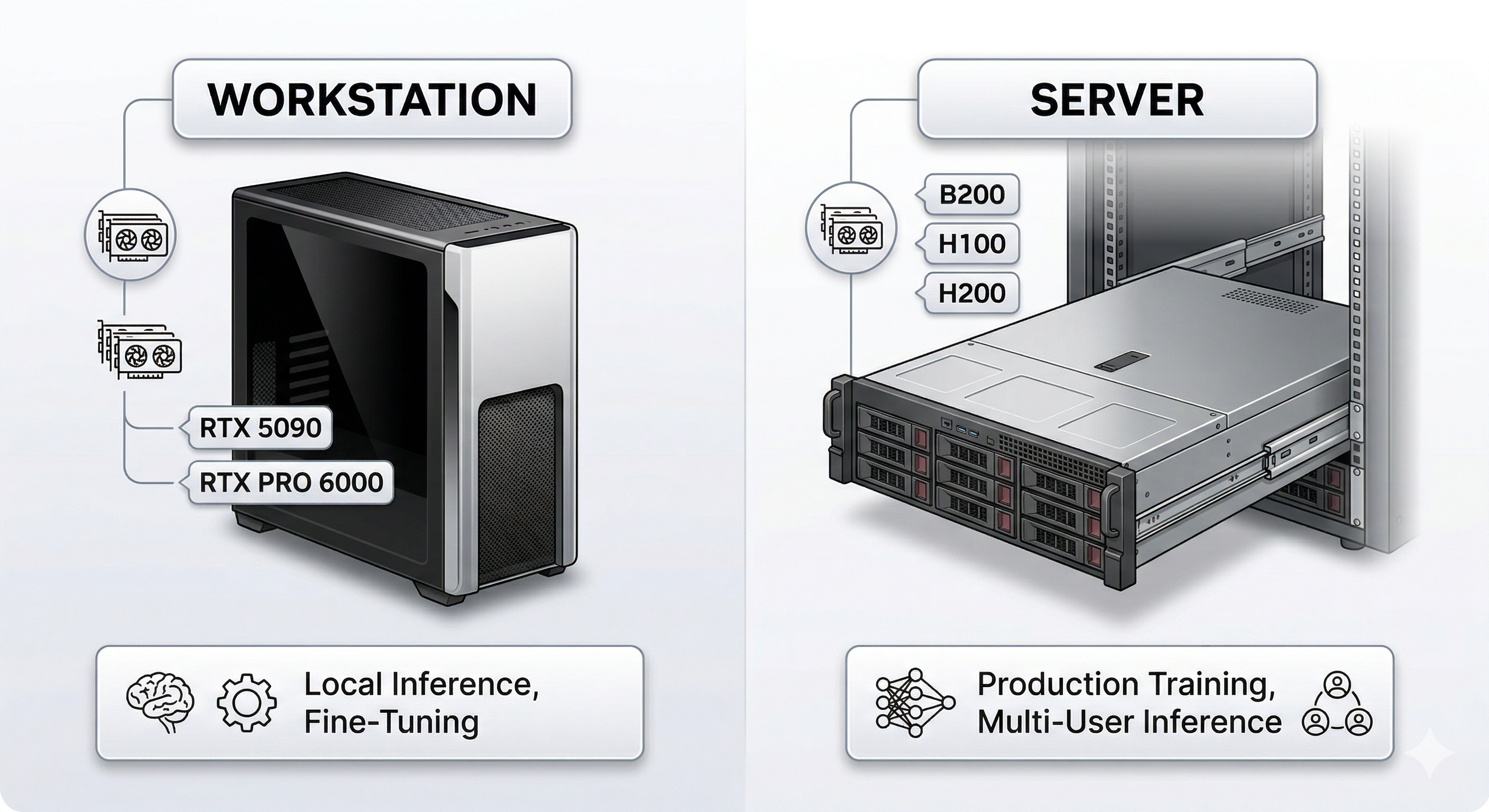
We build every BIZON system for AI from the ground up. That means pre-installed deep learning stacks, custom water cooling for sustained multi-GPU performance, and a 3-year warranty backed by lifetime technical support. Whether you're a researcher running experiments on a single RTX 5090 or an enterprise deploying 8x B300 GPUs for production training, we have a system matched to your workload.
Desktop Workstations: Inference & Fine-Tuning
BIZON X3000: Dual-GPU AI Workstation
- GPUs: Up to 2x RTX 5090
- CPU: AMD Ryzen 9000 Series
- Use case: Local LLM inference (up to 70B at Q4), LoRA fine-tuning up to 13B
- Starting at: $3,744
If you prefer Intel over AMD, the V3000 G4 offers the same dual-GPU capacity on Intel Core Ultra.
BIZON V3000 G4: Dual-GPU AI Workstation
- GPUs: Up to 2x RTX 5090
- CPU: Intel Core Ultra Series
- Use case: Local LLM inference, development, fine-tuning
- Starting at: $3,506
Professional Workstations: Multi-GPU Inference & Training
BIZON X5500: Multi-GPU Threadripper PRO Workstation
- GPUs: Up to 2x RTX 5090 or 4x RTX PRO 6000 Blackwell
- CPU: AMD Threadripper PRO
- Use case: 70B+ models at FP16, multi-GPU inference, fine-tuning up to 70B
- Starting at: $7,797
For sustained training loads where thermal throttling is a concern, the ZX5500 adds water cooling across all GPUs.
BIZON ZX5500: Water-Cooled Multi-GPU Workstation
- GPUs: Up to 7x water-cooled GPUs
- Use case: Sustained multi-GPU training, 405B inference at Q4
- Starting at: $19,618
Teams that need enterprise-grade H100 or H200 GPUs in a workstation-class form factor can step up to the Z5000.
BIZON Z5000: Liquid-Cooled Professional GPU Server
- GPUs: Up to 7x liquid-cooled GPUs including H100/H200
- CPU: Intel Xeon W
- Use case: Enterprise LLM inference, training pipelines
- Starting at: $15,383
Enterprise GPU Servers: Production Training & Frontier Models
BIZON X7000: Dual EPYC 8-GPU Server (Bestseller)
- GPUs: Up to 8x GPUs (H100/H200 configurations available)
- CPU: Dual AMD EPYC
- Use case: Production LLM training, full fine-tuning 70B+, multi-user inference
- Starting at: $20,783
Our bestselling enterprise LLM server.
If your training workloads need NVLink interconnect between all eight GPUs, the G9000 adds that.
BIZON G9000: 8-GPU NVLink Server
- GPUs: Up to 8x H100/H200 with NVLink
- Use case: Full fine-tuning 70B to 405B, distributed training
- Starting at: $26,924
For thermal-critical deployments or sustained multi-day training runs, the ZX9000 adds full water cooling to the 8-GPU formula.
BIZON ZX9000: Water-Cooled 8-GPU Server
- GPUs: Up to 8x water-cooled GPUs
- Use case: Sustained heavy training, thermal-critical deployments
- Starting at: $35,159
Frontier-Scale GPU Servers
BIZON X9000 G3: 8x H100/H200 SXM Server
- GPUs: Up to 8x H100/H200 SXM
- Use case: Full DeepSeek R1, LLaMA 3.1 405B training, frontier model research
- Starting at: $152,696
BIZON X9000 G4: 8x B200 SXM5 Server
- GPUs: 8x NVIDIA B200 SXM5 (1,536 GB HBM3e total)
- Use case: Pre-training, full DeepSeek R1/V3.2, frontier model development
- Price: $422,059
BIZON X9000 G5: 8x B300 SXM Server
- GPUs: 8x NVIDIA B300 SXM (2,304 GB HBM3e total)
- Use case: Maximum-scale training, multi-trillion parameter models, 120 PFLOPS FP4
- Price: $467,659
Every BIZON system ships with a pre-installed AI software stack (CUDA, cuDNN, PyTorch, TensorFlow), custom water cooling options for sustained multi-GPU performance, and a 3-year warranty with lifetime technical support.