Table of Contents
- Your Data Pipeline Is the Bottleneck, Not Your Model
- Quick Recommendations
- The GPU-Native Data Stack in 2026
- What Makes a GPU Good for Data Science
- GPU Comparison Table
- How Much VRAM Do You Actually Need?
- Single GPU vs Multi-GPU for Data Science
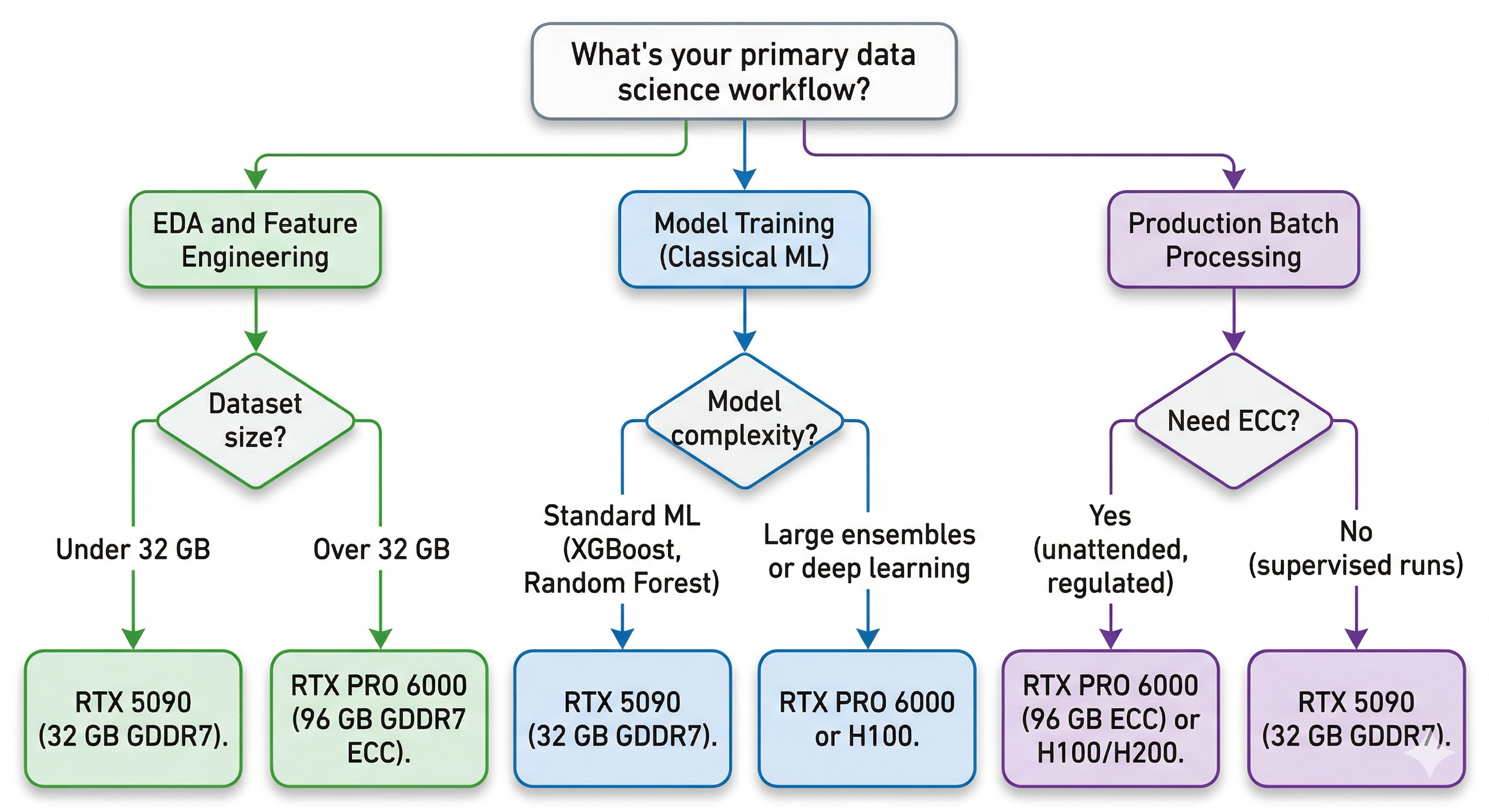
- Best GPUs by Data Science Workflow
- Exploratory Data Analysis and Feature Engineering
- Model Training (Classical ML + Small Deep Learning)
- Production Pipelines and Batch Processing
- GPU vs CPU Cost Efficiency
- Common Mistakes When Buying a GPU for Data Science
- Recommended BIZON Workstations for Data Science
- How to Get Started with GPU-Accelerated Data Science
What is the Best GPU for Data Science in 2026? [Updated ]
Your Data Pipeline Is the Bottleneck, Not Your Model
You've been staring at a progress bar for nine minutes. A pandas groupby on 100 million rows. Again. You could get coffee. You could check Slack. Or you could throw a GPU at it and get the answer in 1.2 seconds.
Most data scientists spend 80% or more of their time on data preparation, not model training. ETL, feature engineering, joins, aggregations. The tedious part. And until recently, GPUs only helped with the other 20%. That changed. RAPIDS cuDF now delivers up to 150x speedups on tabular data with zero code changes. Polars shipped a GPU engine. DuckDB, Snowflake, and Databricks all adopted GPU-native processing at GTC 2026.
The GPU you need for data science in 2026 is not the same GPU you need for deep learning. VRAM matters more than TFLOPS. Memory bandwidth matters more than tensor core count. And the right card can turn a 10-minute wait into a 15-second workflow. This guide covers which GPUs actually matter for data science, how much VRAM you need for real datasets, and which BIZON workstations are built for this work.
Quick Recommendations
| Use Case | GPU | VRAM | Why |
|---|---|---|---|
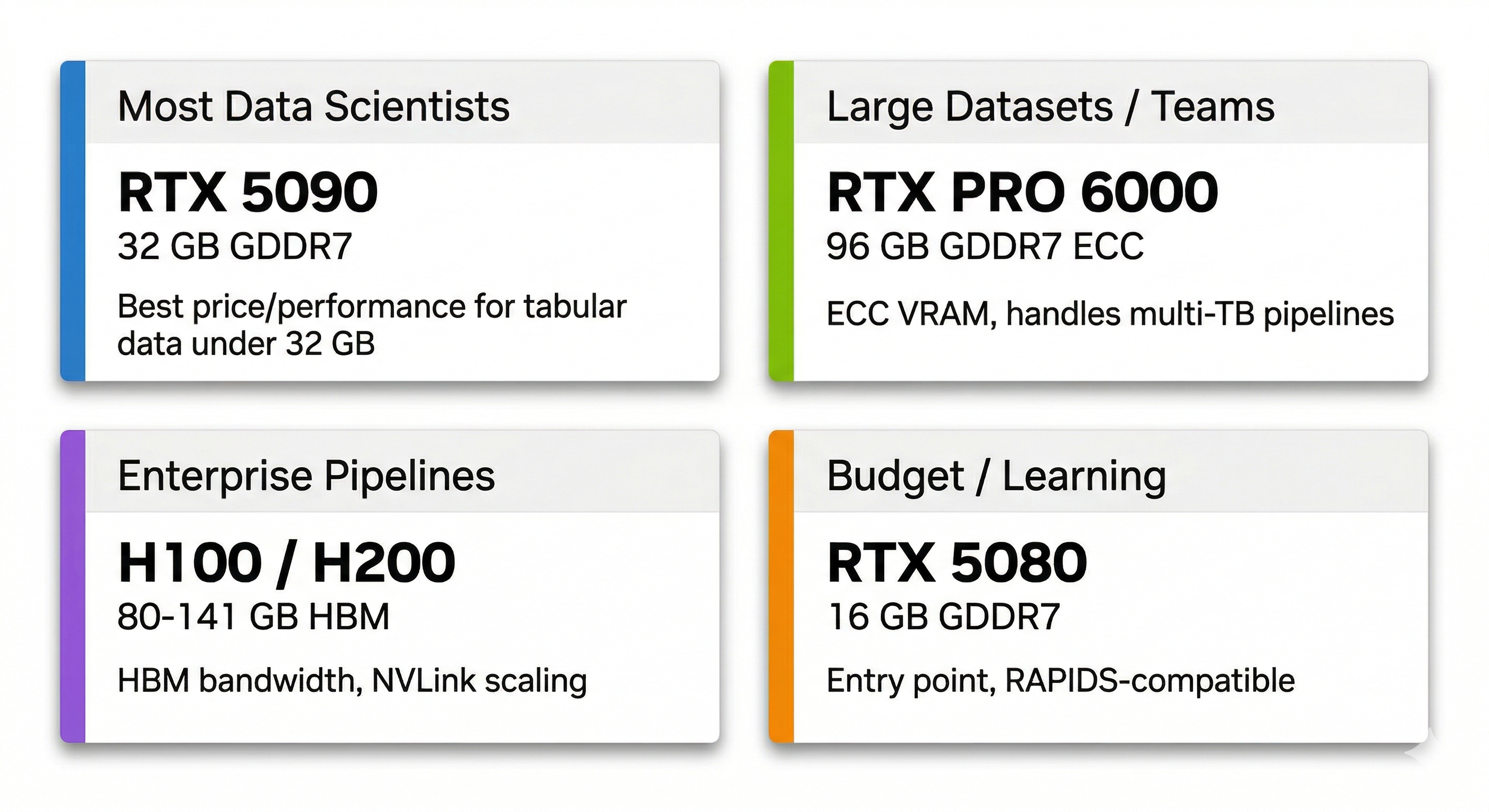
| Most data scientists | RTX 5090 | 32 GB GDDR7 | Best price/performance for tabular data under 32 GB |
| Large datasets / teams | RTX PRO 6000 | 96 GB GDDR7 ECC | ECC VRAM handles multi-TB pipelines |
| Enterprise pipelines | H100 / H200 | 80-141 GB HBM | HBM bandwidth and NVLink scaling |
| Budget / learning | RTX 5080 | 16 GB GDDR7 | Entry point and still RAPIDS-compatible |
If you already know your workload, these picks will save you time. If you want to understand why these are the right choices, keep reading.
The GPU-Native Data Stack in 2026
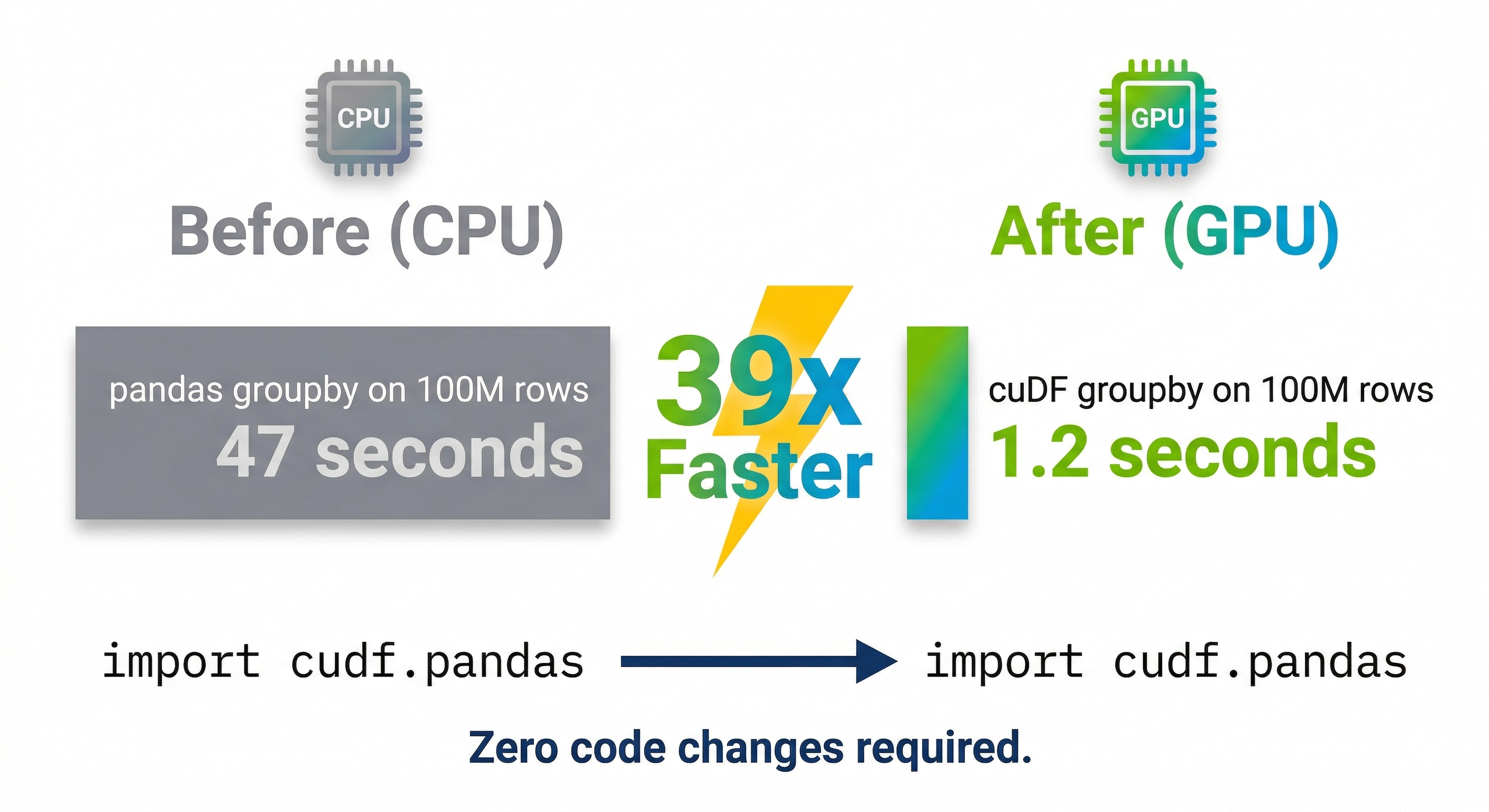
RAPIDS changed the game. Think of cuDF as a drop-in replacement for pandas that runs on your GPU instead of your CPU. You add one import line. Your existing pandas code runs on GPU memory. No rewriting, no new API to learn.
| Operation | Your existing code | Pandas (CPU) | cuDF (GPU) | Speedup |
|---|---|---|---|---|
| Switch libraries | import cudf as pd | Done | Done | One line |
| GroupBy (100M rows) | df.groupby("col").agg(...) | 47 sec | 1.2 sec | 39x |
| Join / Merge (5 GB) | df.merge(df2, on="key") | 267 sec | 1 sec | 267x |
| Advanced GroupBy | df.groupby().transform(...) | Baseline | 137x faster | 137x |
| K-Means / Random Forest | KMeans().fit(X) | Baseline (scikit-learn) | 100x+ faster (cuML) | 100x+ |
| Parquet read (Blackwell) | pd.read_parquet("file.parquet") | Baseline | 35% faster end-to-end | +35% |
Benchmarks from RAPIDS 26.02. GroupBy and Join results on RTX 5090 vs Xeon Platinum 8480C. Parquet speedup on Blackwell hardware decompression. Code is identical between pandas and cuDF.
The results speak for themselves. On a 5 GB DuckDB benchmark, cuDF delivered a 150x speedup compared to a Xeon Platinum 8480C. Join operations hit 267x faster (1 second vs 267 seconds). Advanced groupby operations ran 137x faster. And a real-world 100M row groupby that takes 47 seconds in pandas finishes in 1.2 seconds on cuDF. That's 39x faster. RAPIDS 26.02 supports CUDA 12 and CUDA 13, and requires any NVIDIA GPU from Volta or newer (compute capability 7.0+).
cuML brings the same acceleration to machine learning. Random Forest, K-Means, and K-Nearest Neighbors see 100x or greater speedups at scale compared to scikit-learn. Most algorithms land in the 3-27x range. cuGraph accelerates graph analytics by 24-487x over NetworkX. And Blackwell GPUs add hardware decompression that makes Parquet reads 35% faster end-to-end.
It's not just RAPIDS though. The whole stack moved. Polars now has a GPU engine powered by cuDF. DuckDB, Snowflake, Databricks, Apache Spark, and Presto all announced GPU-native processing. Google Colab pre-installs cuDF. Nestle reported 5x faster data pipelines after adopting RAPIDS. Snap cut compute costs by 76%. The GPU-native data stack isn't experimental anymore. It's production infrastructure.
What Makes a GPU Good for Data Science
Data science GPU buying is different from deep learning GPU buying. The workloads are memory-bound, not compute-bound. Here's how to think about it.
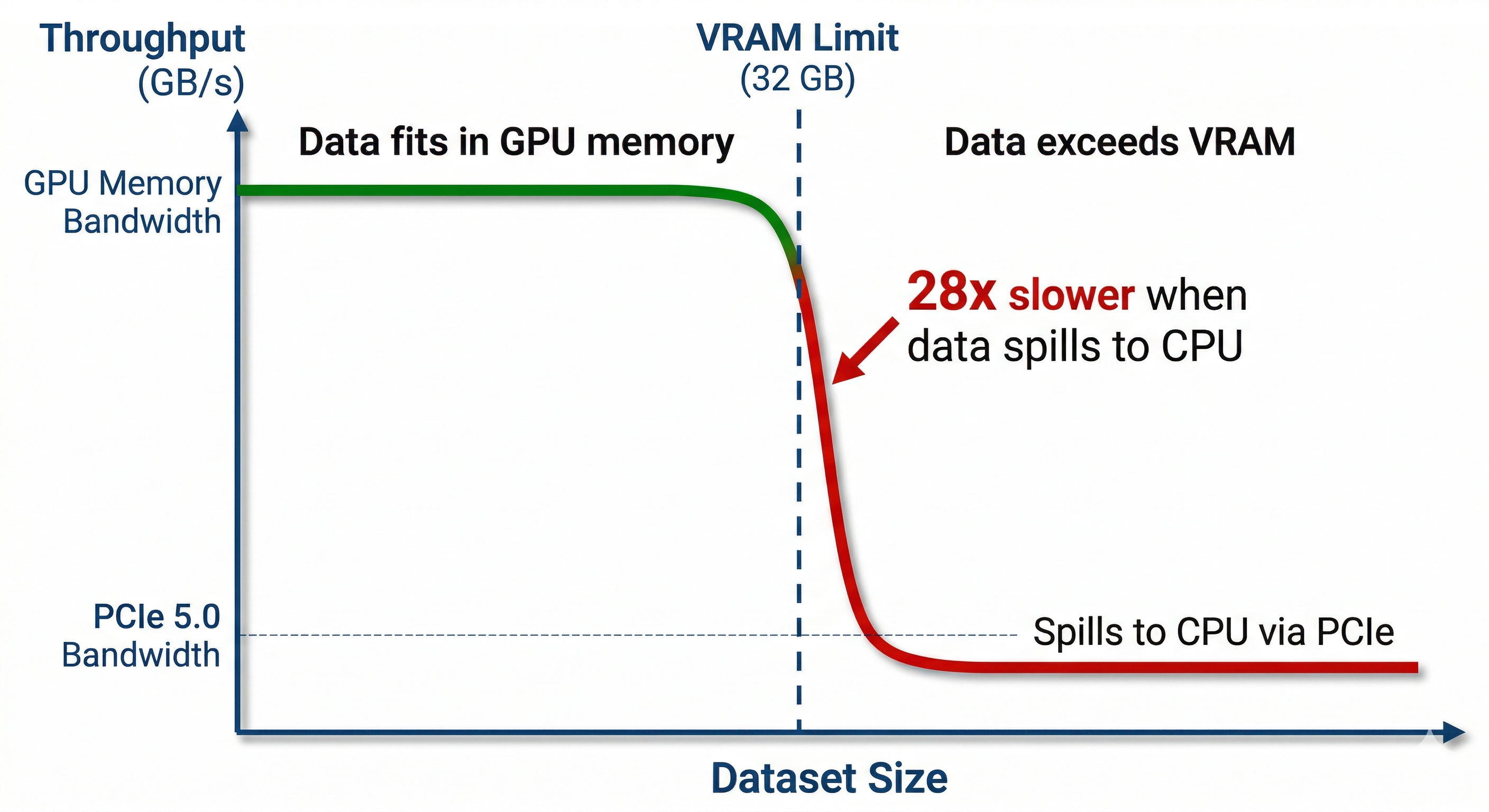
1. VRAM capacity comes first. Your dataset must fit in GPU memory to get the full speedup. If it doesn't fit, the operation spills back to the CPU over PCIe, and you lose most of the advantage. For cuDF, cuML, and most RAPIDS workloads, VRAM is the single most important spec.
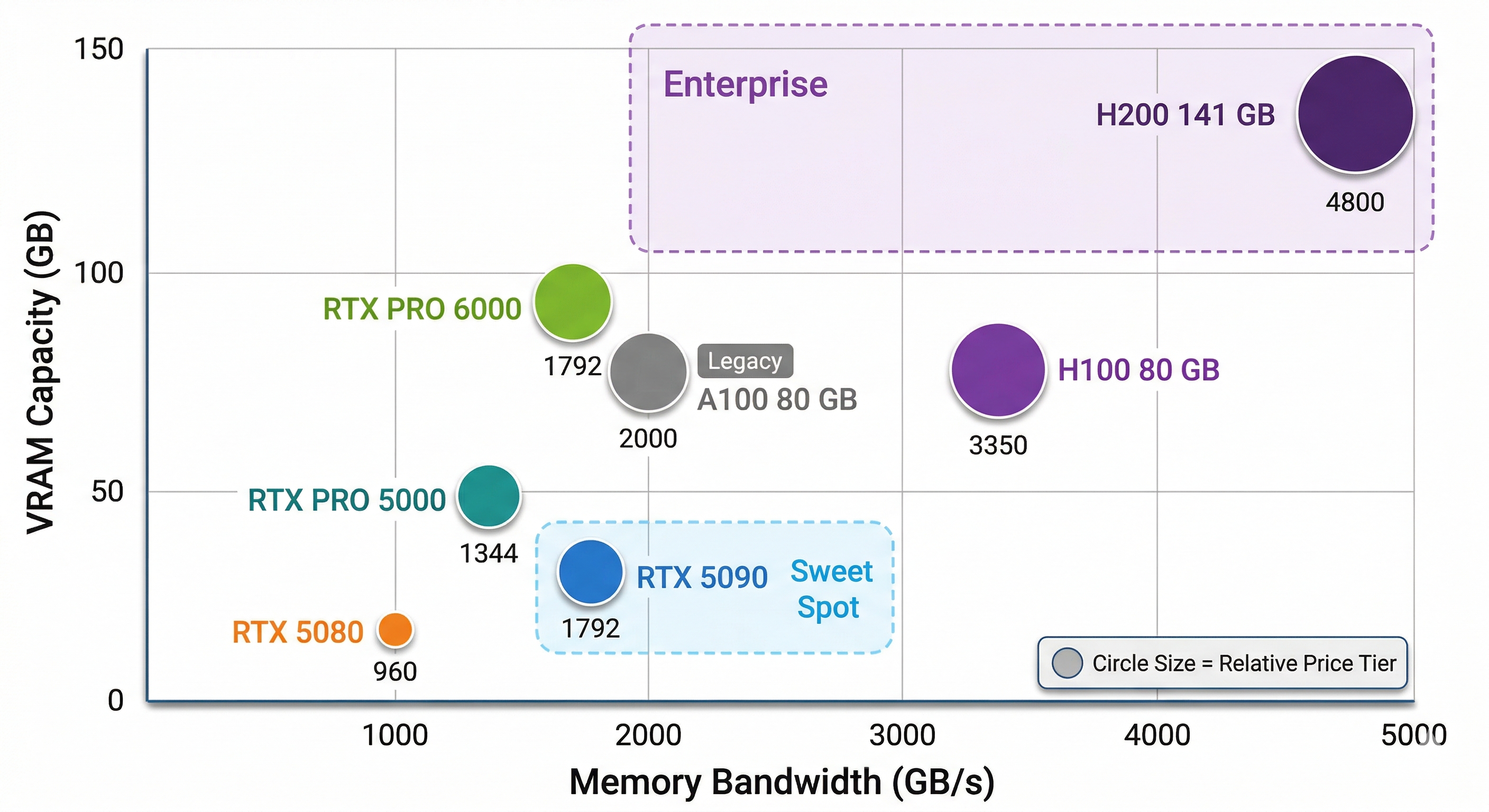
2. Memory bandwidth determines throughput. Once data fits in VRAM, bandwidth controls how fast the GPU can process it. The RTX 5090 and RTX PRO 6000 both run at 1,792 GB/s. The H200 pushes 4,800 GB/s with HBM3e. Higher bandwidth means faster scans, joins, and aggregations.
3. FP16 and FP32 tensor performance matters less than you'd think. ETL and feature engineering don't use tensor cores the way neural network training does. Raw TFLOPS matters for cuML model training, but it's third on the priority list for most data science work.
4. ECC vs non-ECC depends on your workflow. If you're exploring data interactively, non-ECC is fine. If you're running unattended production batch jobs where a silent bit flip could corrupt results, ECC VRAM is worth the premium. The RTX PRO series includes ECC. Consumer RTX does not.
5. Software compatibility is non-negotiable. RAPIDS requires Volta or newer NVIDIA GPUs. That means anything from 2017 forward. Pre-Volta cards (Pascal and older) lost support in RAPIDS 24.02. If you're looking at deep learning criteria like multi-GPU scaling for large model training, our LLM GPU guide covers that in depth.
GPU Comparison Table
Before diving into the table, focus on two columns. VRAM and bandwidth. Those are the numbers that predict data science performance better than anything else. TFLOPS matters for model training, but for ETL and feature engineering it's secondary.
| GPU | FP16 TFLOPS (non-sparse) | VRAM | Bandwidth | Price | Best For |
|---|---|---|---|---|---|
| RTX 5080 | ~113 | 16 GB GDDR7 | 960 GB/s | ~$999 | Budget entry, small datasets |
| RTX 5090 | ~209 | 32 GB GDDR7 | 1,792 GB/s | $1,999 | Best value, datasets under 32 GB |
| RTX PRO 5000 | ~141 | 48/72 GB GDDR7 ECC | 1,344 GB/s | ~$4,200-7,480 | Mid-tier professional |
| RTX PRO 6000 | ~250 | 96 GB GDDR7 ECC | 1,792 GB/s | ~$8,565 | Large datasets, ECC for production |
| A100 80 GB | ~312 | 80 GB HBM2e | ~2,039 GB/s | Legacy | Still in many labs |
| H100 80 GB | ~989 | 80 GB HBM3 | 3,350 GB/s | ~$25-30K | Raw compute + NVLink scaling |
| H200 141 GB | ~989 | 141 GB HBM3e | 4,800 GB/s | ~$35K | Memory bandwidth king |
Notice that the H100 and H200 share the same compute die at ~989 TFLOPS FP16. The H200's advantage is entirely in memory. 141 GB of HBM3e at 4,800 GB/s versus 80 GB of HBM3 at 3,350 GB/s. For data science workloads where bandwidth and capacity drive performance, that's a massive upgrade without any change in compute.
Above this tier, the B200 (192 GB HBM3e) and B300 (288 GB HBM3e) exist for LLM training at scale. If you're processing tabular data, you won't need them. For those workloads, see our LLM GPU guide.
How Much VRAM Do You Actually Need?
Here's the math data scientists actually need. A DataFrame with 100 million rows and 50 float32 columns takes about 20 GB in GPU memory. That fits comfortably on an RTX 5090 (32 GB). Scale that to 500 million rows with 100 columns and you're looking at roughly 200 GB. That needs batching, multi-GPU, or an H200. A billion rows with 20 columns lands around 80 GB, which fits the RTX PRO 6000 (96 GB) but not the RTX 5090.
In practical terms, at 16 GB (RTX 5080), you're learning and prototyping on small datasets. At 32 GB (RTX 5090), you cover most professional tabular workloads. At 48-72 GB (RTX PRO 5000), you handle large pipelines and multi-table joins. At 96 GB (RTX PRO 6000), you're running production-scale data with ECC protection. At 141 GB+ (H200), you're processing enterprise datasets at full bandwidth.
There's a dual-use factor most buyers miss. Data scientists in 2026 increasingly run a local LLM on the same machine as their data pipeline. A coding assistant or RAG system. A 70B parameter model at INT4 quantization needs roughly 35 GB of VRAM. Running that alongside a 20 GB dataset means 32 GB isn't enough for both. If dual-use is your plan, budget for at least 48-96 GB.
The VRAM Cliff (What Happens When You Run Out)
This is the part most buying guides skip. When a GPU operation exceeds available VRAM, it doesn't gracefully slow down. It falls off a cliff. The operation spills to system memory over the PCIe bus, and performance craters.
The numbers tell the story. GPU memory bandwidth on an RTX 5090 is 1,792 GB/s. PCIe 5.0 bandwidth is roughly 64 GB/s. That's a 28x bottleneck. Your GPU-accelerated operation that finished in 1 second now takes 28 seconds, which is actually slower than just running it on the CPU in the first place.
"Almost fits" is the worst possible outcome. You pay GPU prices for CPU speed. This is why VRAM headroom matters more than raw TFLOPS for data science. Buy for the dataset you have next quarter, not the one you have today.
Single GPU vs Multi-GPU for Data Science
Here's a common assumption that wastes money. More GPUs equal faster data science. In most cases, that's wrong.
Most cuDF and cuML workloads run on a single GPU. This is fundamentally different from LLM training, where model parallelism across multiple GPUs is essential. NVLink does not pool VRAM for most data science frameworks. Two RTX 5090s do not give you a unified 64 GB memory space. Each GPU sees its own 32 GB.
Dask-cuDF can distribute work across multiple GPUs, but it introduces coordination overhead. For most workflows, one RTX PRO 6000 with 96 GB of unified VRAM outperforms two RTX 5090s with 64 GB total. The data doesn't need to be split, shuffled, or coordinated between devices.
Multi-GPU does win in specific scenarios. Parallel hyperparameter sweeps where each GPU trains a different model. Ensemble training where you're fitting multiple models simultaneously. Spark RAPIDS workloads that are designed for distributed processing. Scale up (bigger single GPU) before you scale out (more GPUs).
Best GPUs by Data Science Workflow
Here's how those specs map to the workflows data scientists actually run.
Exploratory Data Analysis and Feature Engineering
This is where cuDF's pandas accelerator shines brightest. Groupby, merge, pivot, filter. The operations you run hundreds of times a day while exploring data. VRAM is the constraint here because your working dataset needs to fit in GPU memory to get the acceleration.
For most tabular workloads, the RTX 5090 at $1,999 is the sweet spot. Its 32 GB of GDDR7 handles datasets up to about 100 million rows by 50 columns with room to spare. Watch out for wide DataFrames though. If you're working with 1,000+ columns or doing multi-table joins, VRAM usage spikes fast. If you're already in the Polars ecosystem, the Polars GPU engine (powered by cuDF under the hood) gives you the same acceleration without switching libraries.
Model Training (Classical ML + Small Deep Learning)
cuML accelerates the models most data scientists actually use. Random Forest on GPU runs 100x faster than scikit-learn at scale. XGBoost GPU training is now standard, and RAPIDS 25.x added out-of-core support for datasets that exceed VRAM. K-Means clustering and K-Nearest Neighbors see 100x+ speedups at scale.
For models up to about 3 billion parameters, the RTX 5090's 32 GB handles training comfortably. For larger multi-model experiments, ensemble methods, or anything that needs to hold multiple models in memory simultaneously, the PRO 6000's 96 GB gives you the headroom. For serious deep learning or LLM fine-tuning beyond 3B parameters, our LLM GPU guide covers that territory in detail.
Production Pipelines and Batch Processing
Production changes the equation. When pipelines run unattended overnight or process regulatory data, ECC memory stops being optional. A silent bit flip during a 12-hour batch job can corrupt results without any error message. The RTX PRO 6000 (96 GB ECC) and RTX PRO 5000 (48 GB ECC) are built for exactly this scenario.
For distributed GPU processing at scale, Dask-cuDF splits workloads across multiple GPUs in a single machine or across a cluster. When you need NVLink interconnect for large-scale processing, the H100 and H200 are the enterprise answer.
Data sovereignty matters here too. Enterprise teams in finance, healthcare, and defense increasingly choose local workstations over cloud GPU instances because proprietary datasets can't leave the building. Regulated industries need the compute on-premises. A local BIZON workstation with RTX PRO 6000 GPUs keeps your data under your roof while delivering the same RAPIDS acceleration you'd get in the cloud.
GPU vs CPU Cost Efficiency
Let's talk about the number that justifies the purchase. That 39x cuDF speedup on an RTX 5090 adds up fast.
A data scientist runs hundreds of these operations daily. If GPU acceleration saves 45 seconds per operation across 100 daily runs, that's 75 minutes recovered every single day. Over a month, that's more than two full workdays of waiting eliminated.
Cloud GPU rental runs $2-8 per hour depending on the instance. At 3-4 hours of daily usage, a workstation pays for itself within months compared to renting equivalent cloud compute. And you keep it running for years.
But the real ROI isn't just time saved. Faster compute changes what you can try. At 40x faster iteration speed, you test 40x more hypotheses in the same workday. You explore feature combinations you'd have skipped. You validate assumptions you'd have hand-waved. That's a different quality of work, not just the same work done quicker. If you need to justify a hardware budget to your manager, this is the argument that lands.
Common Mistakes When Buying a GPU for Data Science
These are the pitfalls that cost data scientists hundreds to thousands in wasted hardware.
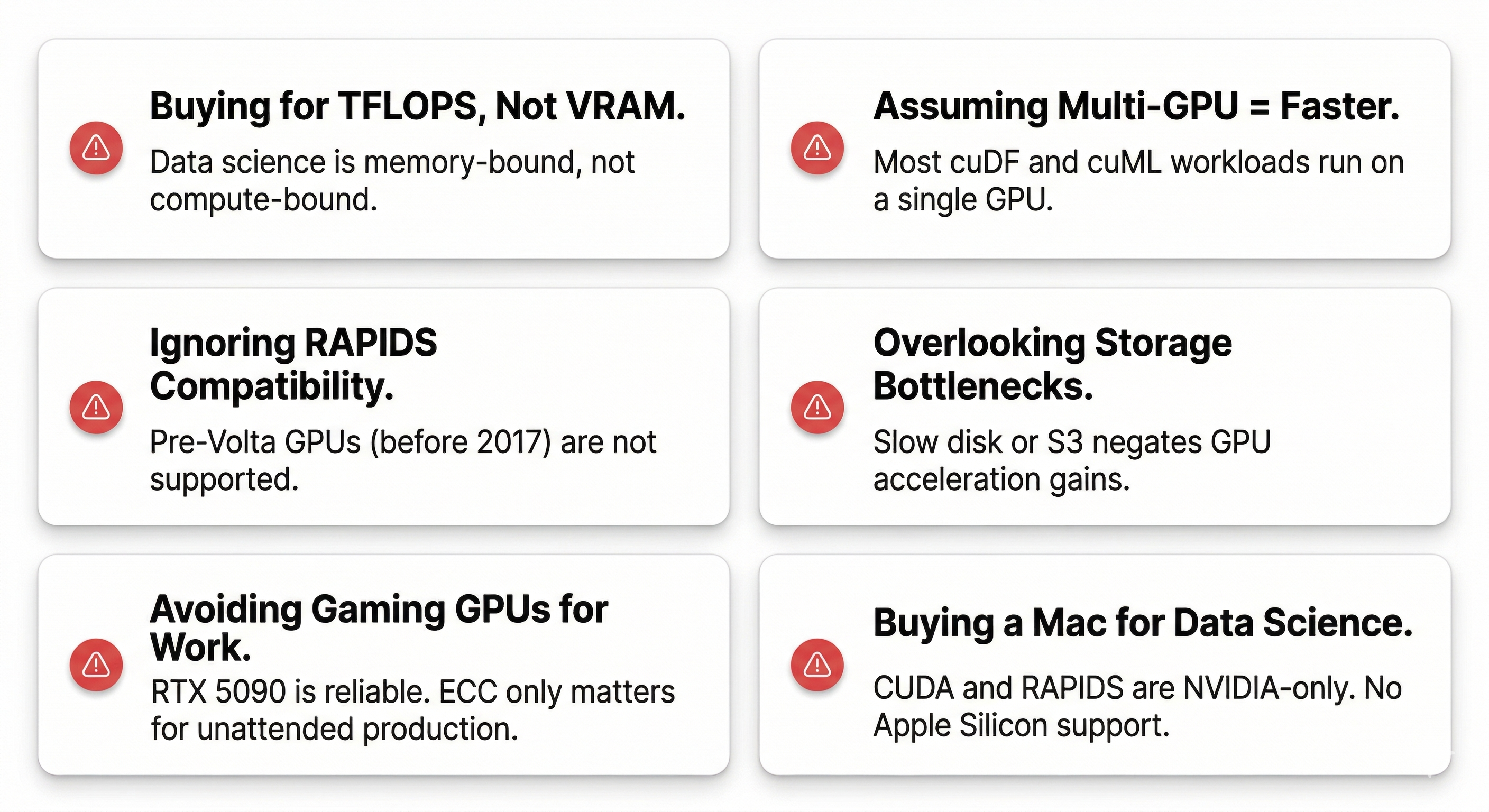
Buying based on TFLOPS instead of VRAM. Data science is memory-bound. A GPU with massive compute but insufficient VRAM will spill to CPU and lose its advantage.
Assuming multi-GPU means faster. Most cuDF and cuML workloads run on a single GPU. Two GPUs don't automatically double your speed for data science the way they might for training neural networks.
Ignoring RAPIDS compatibility. Pre-Volta GPUs (before 2017) are not supported. If you're buying used hardware, make sure it's Volta generation or newer.
Overlooking storage bottlenecks. A blazing-fast GPU won't help if your data loads from a slow hard drive or a congested S3 bucket. Fast NVMe storage is the minimum.
Thinking gaming GPUs are unreliable for work. The RTX 5090 runs data science workloads just fine. ECC only matters for unattended production pipelines. For interactive work, consumer GPUs are perfectly reliable.
Buying a Mac for data science. CUDA is NVIDIA-only. RAPIDS doesn't run on Apple Silicon. The M-series chips are excellent for many things, but GPU-accelerated data science isn't one of them. We cover this tradeoff in detail in our Mac Studio vs NVIDIA comparison.
Buying a GPU when you don't need one yet. You probably don't need a GPU if your datasets are under 2-5 GB, you're fully in Snowflake or BigQuery, or you're mostly writing SQL against a data warehouse. Start with what you have. Buy when the wait times get painful.
Recommended BIZON Workstations for Data Science
Every BIZON system ships with a pre-installed AI stack (RAPIDS, PyTorch, CUDA, Docker, SLURM), custom cooling options for sustained GPU workloads, a 3-year warranty, and lifetime technical support. Here's how to match your budget and workload to the right tier.
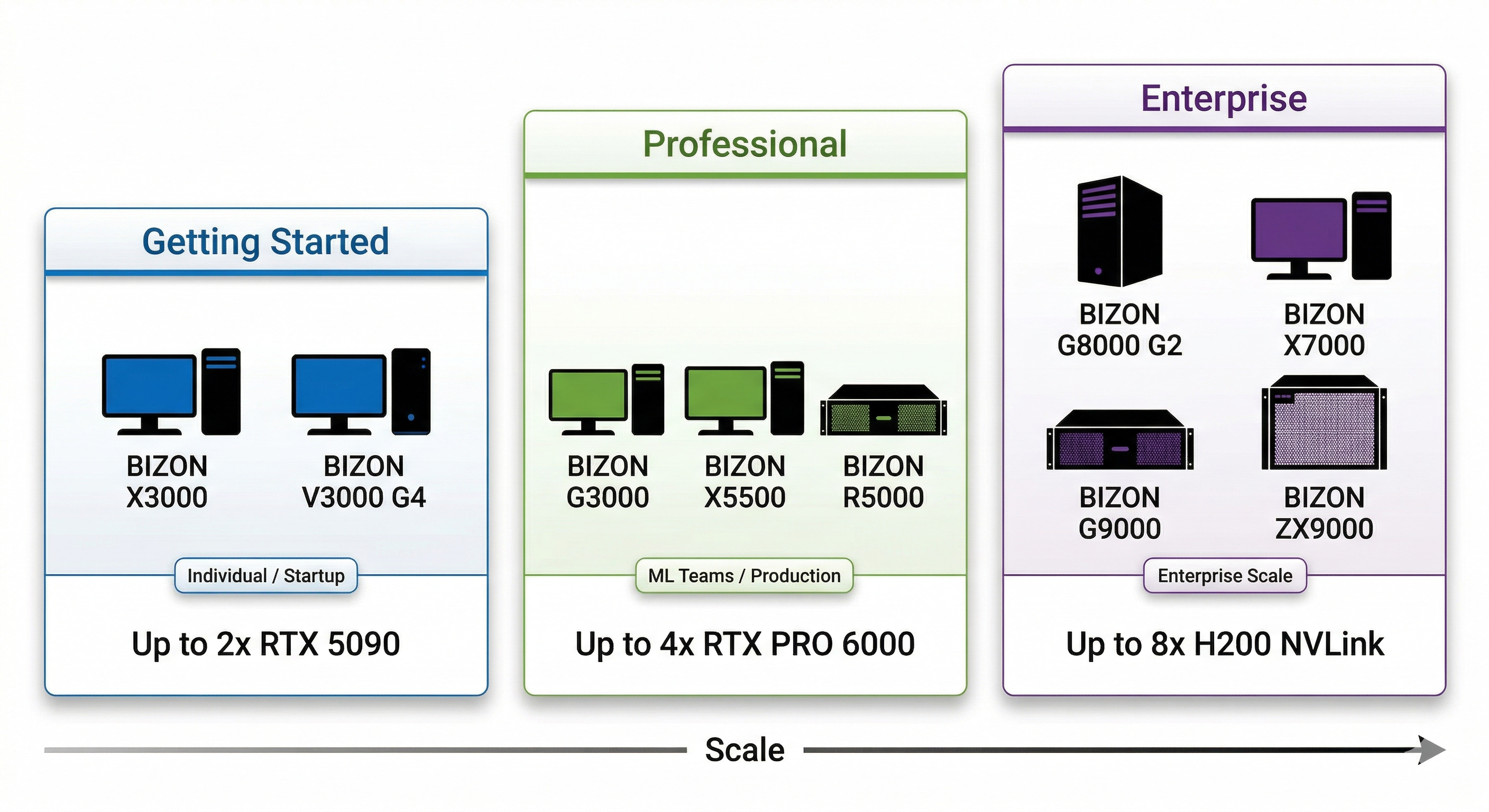
Getting Started (1-2 GPU)
For individual data scientists, research labs, and startups with budgets under $8K and datasets under 32 GB.
BIZON X3000 - Dual-GPU AI Workstation
- GPUs: Up to 2x RTX 5090
- CPU: AMD Ryzen 9000 Series
- Use case: cuDF acceleration, EDA, classical ML training, local LLM inference
- Starting at: $3,744
Prefer Intel? The V3000 G4 is the same class of machine on Intel Core Ultra.
BIZON V3000 G4 - Dual-GPU AI Workstation (Intel)
- GPUs: Up to 2x RTX 5090
- CPU: Intel Core Ultra Series
- Use case: cuDF acceleration, EDA, small-to-mid dataset processing
- Starting at: $3,506
Professional Workstation (2-4 GPU)
For ML engineering teams of 3-10, production pipelines, datasets in the 32-200 GB range, and workloads that need ECC memory. Budget range is $5-15K.
BIZON G3000 - Quad-GPU Intel Xeon Workstation
- GPUs: Up to 4x RTX PRO 6000 (Blackwell)
- CPU: Intel Xeon
- Use case: Large-scale cuDF, production cuML pipelines, Dask-cuDF distributed processing
- Starting at: $5,126
BIZON X5500 - Multi-GPU Threadripper PRO Workstation
- GPUs: Up to 2x RTX 5090 or 4x RTX PRO 6000 Blackwell
- CPU: AMD Threadripper PRO
- Use case: Mixed data science and ML training, multi-model experiments
- Starting at: $7,797
Need rackmount? The R5000 fits 4 GPUs in a 5U chassis with Threadripper PRO, ideal for data center deployments.
BIZON R5000 - 5U Rackmount GPU Server
- GPUs: Up to 4x RTX 5090 or RTX PRO 6000
- CPU: AMD Threadripper PRO
- Use case: Production batch processing, multi-GPU RAPIDS, shared team resource
- Starting at: $8,136
Enterprise Scale (4-8 GPU)
For enterprise data platforms processing 200 GB+ datasets, 24/7 production workloads, and teams that need compliance-grade infrastructure. Budget starts at $10K and scales with GPU count.
BIZON G8000 G2 - Quad H100/H200 Workstation
- GPUs: Up to 4x H100/H200/RTX PRO 6000
- CPU: Single Intel Xeon
- Use case: Enterprise RAPIDS pipelines, large-scale distributed cuDF
- Starting at: $11,570
BIZON X7000 - 8-GPU Dual EPYC Server
- GPUs: Up to 8x H200
- CPU: Dual AMD EPYC
- Use case: Maximum GPU density, petabyte-scale data processing
- Starting at: $20,783
BIZON G9000 - 8-GPU NVLink Server
- GPUs: Up to 8x H100/H200 NVLink
- CPU: Dual EPYC or Dual Xeon
- Use case: NVLink-connected enterprise data and ML pipelines
- Starting at: $26,924
For sustained thermal performance on multi-GPU workloads, the ZX9000 adds water cooling across all GPUs.
BIZON ZX9000 - Water-Cooled Multi-GPU Server
- GPUs: Up to 8x water-cooled H100/H200/RTX PRO 6000
- Use case: Sustained 24/7 enterprise workloads, maximum thermal headroom
- Starting at: $35,159
For workloads that have crossed from data science into LLM training at scale, BIZON also builds B200 configurations (X9000 G4, from $422,059) and B300 configurations (X9000 G5, from $467,659). See our LLM GPU guide for details on those systems.
How to Get Started with GPU-Accelerated Data Science
Getting RAPIDS running takes two minutes. Install with pip.
pip install cudf-cu12
Then add two lines to the top of your Python script.
%load_ext cudf.pandas
import pandas as pd
That's it. Your existing pandas code now runs on GPU. No rewriting, no new API. If you want to try before buying hardware, Google Colab has cuDF pre-installed on GPU instances for free.
BIZON workstations ship with the full stack pre-installed. RAPIDS, PyTorch, CUDA, Docker, SLURM, Jupyter. Open the box, power it on, start processing. No driver debugging, no dependency conflicts, no wasted first day.
The tools caught up to the hardware. cuDF, cuML, Polars GPU, and the rest of the GPU-native stack turned every NVIDIA GPU into a data processing accelerator. The 10-minute pandas wait that used to be part of the job? It doesn't have to be. The hardware is ready. The software is ready. Now it's about matching the right GPU to the work you actually do.
Ready to configure a system? Browse our AI workstations or GPU servers and build to your exact specs.