Table of Contents
- The Data Pipeline Is the Bottleneck
- Which GPU to Pick for Data Science?
- The GPU-Native Data Stack
- Getting Started with RAPIDS
- What Makes a GPU Good for Data Science
- GPU Comparison Table
- How Much VRAM Do You Actually Need?
- When to Add a Second GPU
- Match the GPU to the Workflow
- EDA and Feature Engineering
- Classical ML and Small Deep Learning
- Production Pipelines and Batch Processing
- GPU vs CPU Cost Efficiency
- GPU Buying Mistakes
- BIZON Workstations for Data Science
- Picking Your Data Science GPU
What is the Best GPU for Data Science in 2026?
Last verified: May 2026. Specs and RAPIDS benchmarks confirmed against official NVIDIA sources, RAPIDS release notes, and bizon-tech.com.
GPU-accelerated tabular processing turns a 9-minute pandas wait into 1.2 seconds with no rewrites required. One import line. A pandas groupby on 100 million rows finishes before your hand leaves the mouse, and cuDF ships as a drop-in pandas replacement. The bottleneck has shifted from compute to memory, and the GPU pick follows from where your dataset sits in that shift.
GPU-accelerated data science differs sharply from GPU-accelerated LLM work. ETL and feature engineering bottleneck on memory bandwidth, not tensor compute, so VRAM ceiling and bandwidth weight ahead of TFLOPS. Polars, DuckDB, Snowflake, Databricks, and Apache Spark all added GPU-native processing in the last two release cycles. The right card maps dataset size to its memory ceiling, then matches bandwidth to the iteration target.
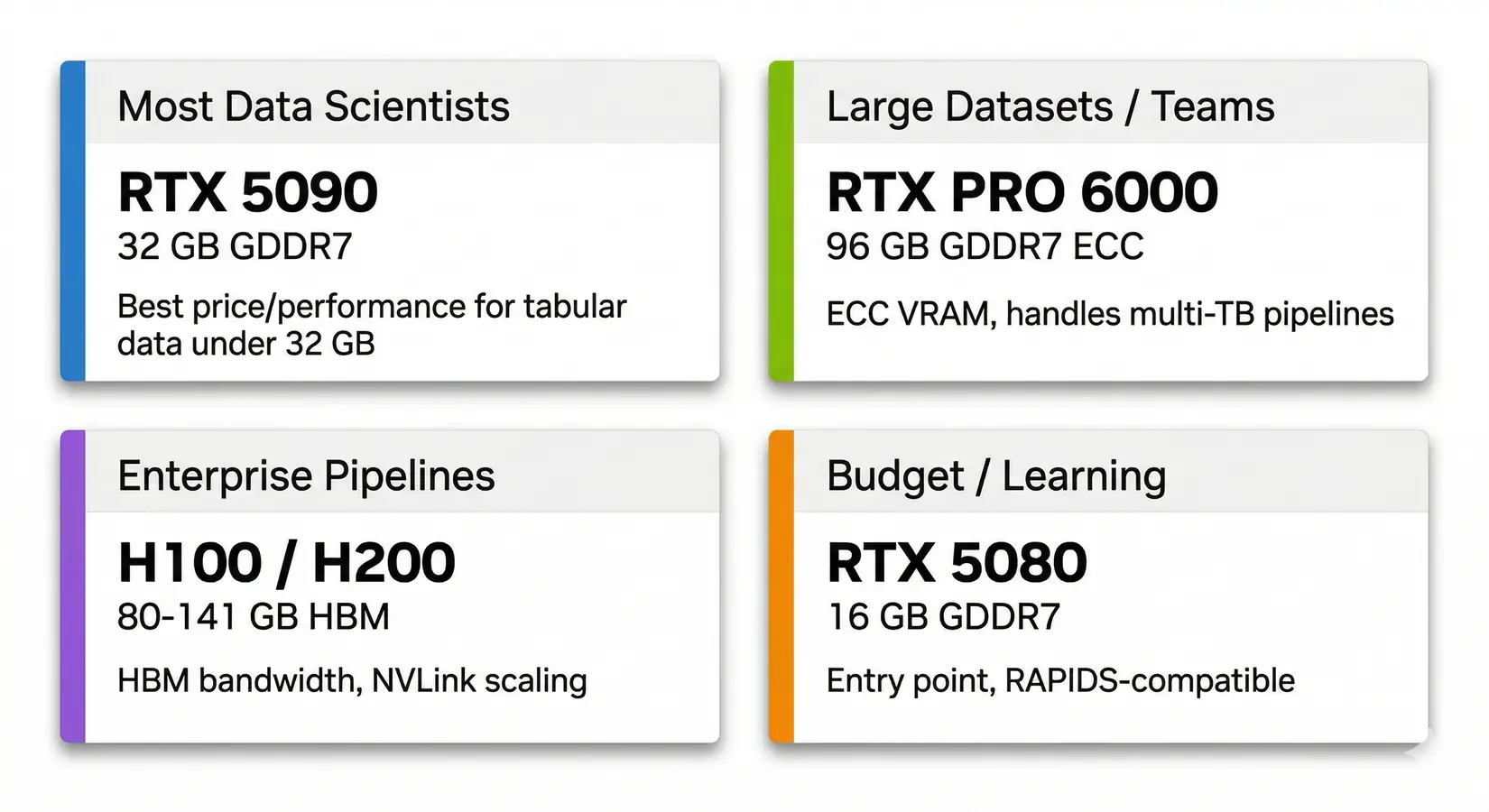
GPU recommendations by data science use case. RTX 5090 covers most professionals. PRO 6000 handles enterprise datasets.
Most data scientists spend 80% of their time on data prep, not training. The wait was unavoidable. Mainstream pandas-style ETL, joins, and aggregations only became practical to GPU-accelerate in recent cycles. Polars ships with a GPU engine. DuckDB, Snowflake, and Databricks all announced GPU-native processing at GTC 2026.
Most teams misjudge where they sit on that line. Teams that think they need an H100 often run better on a single RTX 5090. Teams that pick the 5090 to save money hit the VRAM cliff three months in and pay the upgrade cost twice.
Which GPU to Pick for Data Science?
The RTX 5090 with 32 GB GDDR7 is the best GPU for most data scientists. Its 1,792 GB/s memory bandwidth covers tabular pipelines, classical ML training, and small deep learning experiments. Teams that hit the 32 GB ceiling step up to RTX PRO 6000 for ECC and 96 GB. Enterprise pipelines land on H100 or H200 for HBM bandwidth and NVLink.
| Use Case | GPU | VRAM | Why |
|---|---|---|---|
| Most data scientists | RTX 5090 | 32 GB GDDR7 | Best price/performance for tabular data under 32 GB |
| Large datasets / teams | RTX PRO 6000 | 96 GB GDDR7 ECC | ECC VRAM handles multi-TB pipelines |
| Enterprise pipelines | H100 / H200 | 80-141 GB HBM | HBM bandwidth and NVLink scaling |
| Budget / learning | RTX 5080 | 16 GB GDDR7 | Entry point and still RAPIDS-compatible |
Key Takeaway
For most data science workloads, the RTX 5090's 32 GB GDDR7 at 1,792 GB/s is the price-performance sweet spot. Only step up to RTX PRO 6000 (96 GB ECC) if your datasets exceed 32 GB or you need ECC VRAM for multi-TB enterprise pipelines.
The software stack that turns those tier picks into real speedups shifted hard in recent release cycles. Library choice drives the delta between a fast GPU and one running slow software.
The GPU-Native Data Stack
NVIDIA's RAPIDS 26.02 release notes document dramatic acceleration across tabular operations. The library is a drop-in pandas replacement. Existing code runs on GPU memory without rewrites. cuDF.pandas auto-routes to the GPU when supported and falls back to CPU when not, keeping partially-supported workloads running.
| Operation | Your existing code | Pandas (CPU) | cuDF (GPU) | Speedup |
|---|---|---|---|---|
| Switch libraries | import cudf as pd | Done | Done | One line |
| GroupBy (100M rows) | df.groupby("col").agg(...) | 47 sec | 1.2 sec | 39x |
| Join / Merge (5 GB) | df.merge(df2, on="key") | 267 sec | 1 sec | 267x |
| Advanced GroupBy | df.groupby().transform(...) | Baseline | 137x faster | 137x |
| K-Means / Random Forest | KMeans().fit(X) | Baseline (scikit-learn) | 100x+ faster (cuML) | 100x+ |
| Parquet read (Blackwell) | pd.read_parquet("file.parquet") | Baseline | 35% faster end-to-end | +35% |
Methodology. Code is identical between pandas and cuDF. Figures are benchmarked on an RTX 5090 against pandas 2.x per NVIDIA's documented methodology, reflecting NVIDIA-published and internally reproduced workloads under GPU-friendly operations. Speedups vary substantially with data shape, cardinality, storage layer, CPU bottlenecks, unsupported operations, and host-to-device transfer overhead. Parquet speedup comes from Blackwell hardware decompression. The framework runs on any NVIDIA GPU at compute capability 7.0+ (Volta or newer), supporting CUDA 13.2 and out-of-core spill.
cuML brings the same acceleration to machine learning. Random Forest, K-Means, and K-Nearest Neighbors see 100x or greater speedups versus scikit-learn at scale. Most other algorithms land in the 3-27x range. On a single RTX 5090, Random Forest compresses overnight batch training into runs that finish before stand-up.
The whole data stack moved with cuDF and cuML. Polars ships with a GPU engine powered by cuDF. Per NVIDIA's RAPIDS case studies, Nestle reported roughly 5x faster data pipelines after migrating ETL to cuDF, and Snap cut compute costs by 76%. The GPU data stack is increasingly becoming the production path.
NVIDIA Developer on getting started with RAPIDS for GPU-accelerated data science. NVIDIA Developer channel.
Beyond the headline numbers, the case studies show what the stack actually delivers in production. Install takes two minutes on a CUDA-ready system, but environment debugging on a fresh box can stretch to a half-day. The video below walks the install path that avoids the common dependency traps.
Getting Started with RAPIDS
Install cuDF with pip and add two lines to your script. Existing pandas code then runs on GPU memory with no rewrites. Most teams hit a snag on CUDA driver mismatches, not on the cuDF install itself. The screenshot below shows the 100M-row groupby speedup after the two-line change.
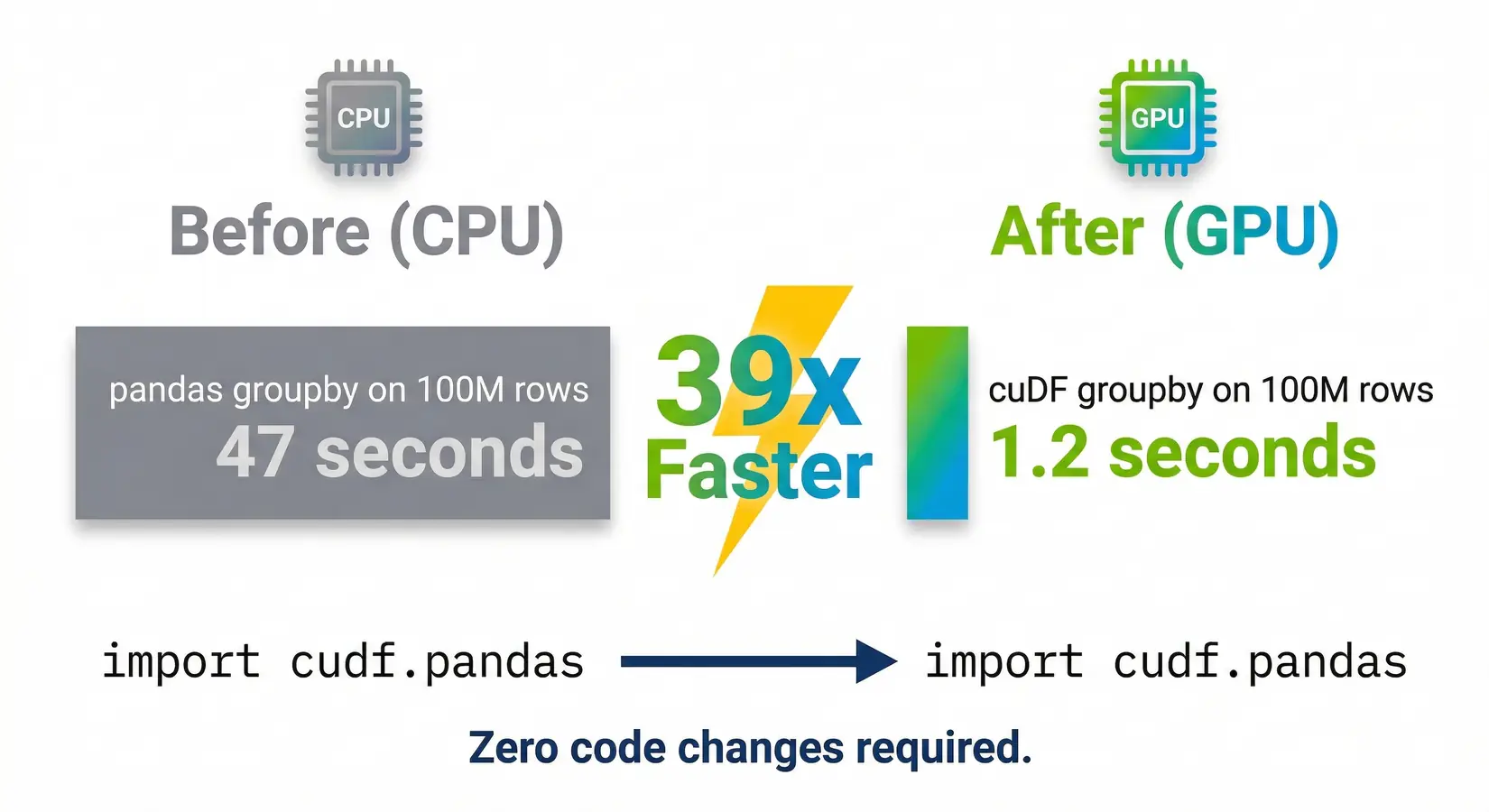
39x faster with zero code changes. A 100M row groupby in pandas (47 seconds) vs cuDF (1.2 seconds).
Krish Naik on cuDF and RAPIDS for pandas acceleration. Krish Naik channel.
Install cuDF with pip: pip install cudf-cu12, then add %load_ext cudf.pandas and import pandas as pd. Your existing pandas code runs on GPU memory with no rewrites. Google Colab has cuDF pre-installed on GPU instances, so you can validate the speedup before buying hardware. On a BIZON workstation, CUDA is pre-installed and matched to the GPU at the factory, skipping the environment-debug step that trips up fresh setups. Once cuDF is loaded, ETL, joins, groupbys, and aggregations run against VRAM bandwidth instead of system RAM bandwidth. That is where the order-of-magnitude speedups live. Buyers who weight TFLOPS first end up with the wrong card for tabular work because tensor cores see almost no use until the pipeline reaches model training.
What Makes a GPU Good for Data Science
VRAM capacity and memory bandwidth matter more than TFLOPS for data science. Joins, groupbys, sorts, and rolling aggregates spend most of their cycles moving data through VRAM, not multiplying matrices. VRAM size decides whether a dataset fits at all. Bandwidth decides how fast it finishes once it does. The five specs below rank against that reality.
1. VRAM capacity comes first - Your dataset needs to fit in GPU memory. If it doesn't, the operation spills to CPU over PCIe and you lose most of the advantage. VRAM is the single most important spec for RAPIDS workloads.
2. Memory bandwidth determines throughput - Once data fits in VRAM, bandwidth controls how fast the GPU processes it. Per NVIDIA's specs, the RTX 5090 and RTX PRO 6000 both run at 1,792 GB/s. The H200 pushes 4,800 GB/s with HBM3e.
3. FP16 and FP32 tensor performance matters less than you'd think - ETL and feature engineering don't use tensor cores the way neural network training does. TFLOPS matters for cuML training, but it's third on the list for most data science work.
4. ECC vs non-ECC depends on your workflow - Interactive data exploration doesn't need ECC. Unattended production batch jobs where a silent bit flip could corrupt results do. The RTX PRO series includes ECC. Consumer RTX does not.
5. Software compatibility is non-negotiable - RAPIDS requires Volta or newer (compute capability 7.0+, 2017 forward). Pre-Volta cards lost support in RAPIDS 24.02. Our LLM GPU guide covers multi-GPU scaling for large model training.
GPU Comparison Table
Data science GPUs span from the RTX 5080 (16 GB) to the H200 (141 GB). VRAM and bandwidth predict performance better than TFLOPS. TFLOPS matters for cuML training and deep learning, but for ETL and feature engineering it sits behind the other two. The 4,800 GB/s to 960 GB/s gap between H200 and RTX 5080 explains most real-world ETL performance spread.
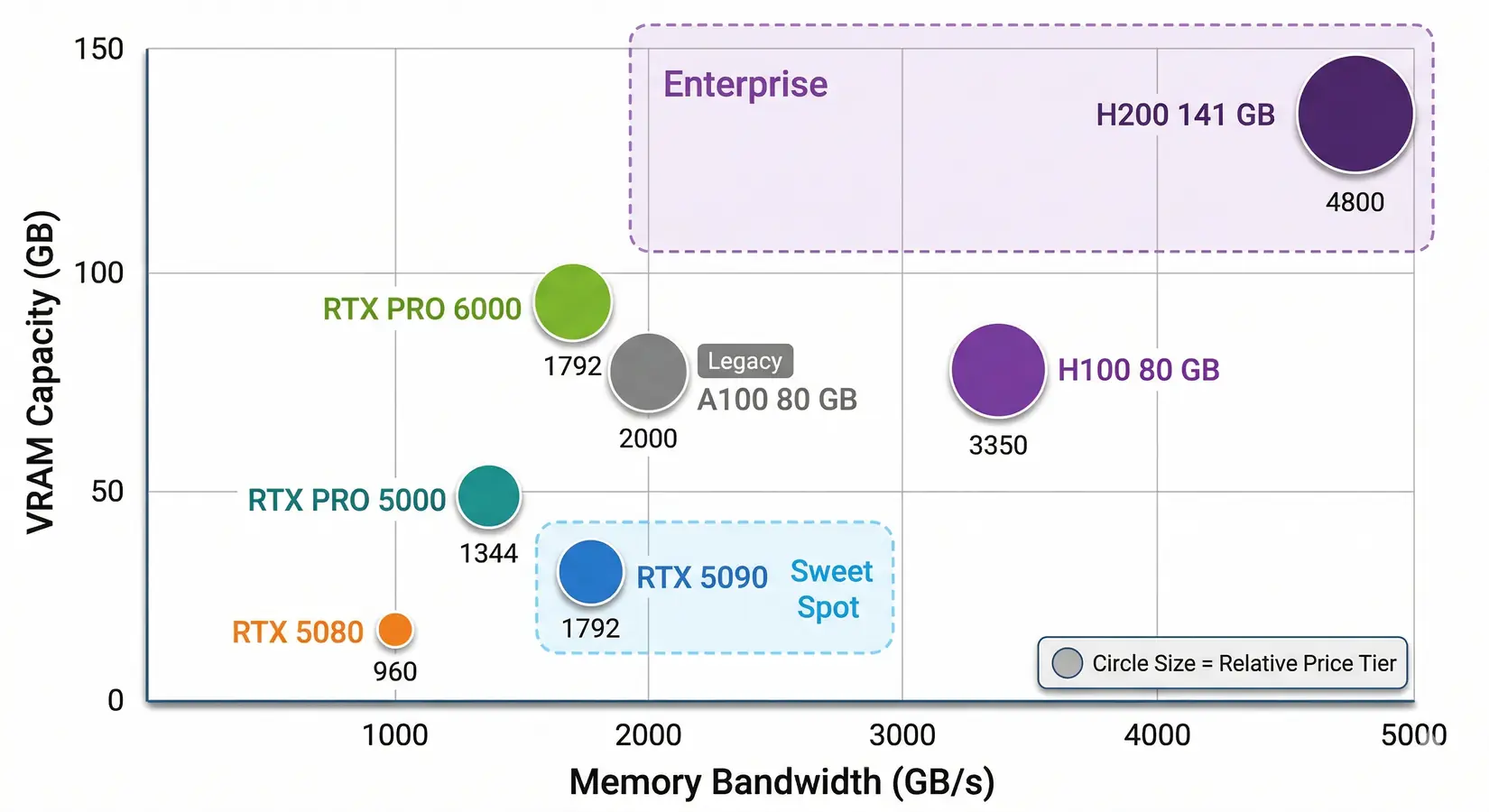
GPU options for data science. VRAM and bandwidth are the axes that matter most. The RTX 5090 sits in the sweet spot for most professionals.
Each row in the table below pairs raw FP16 TFLOPS with the two metrics that actually drive RAPIDS performance, plus a one-line workload fit. From our build floor, single-card workstations weight VRAM heaviest, then bandwidth, with TFLOPS the third axis. The widest VRAM-to-bandwidth gap on the table is the one most ETL pipelines feel hardest.
| GPU | FP16 TFLOPS (non-sparse) | VRAM | Bandwidth | Best For |
|---|---|---|---|---|
| RTX 5080 | ~113 | 16 GB GDDR7 | 960 GB/s | Budget entry, small datasets |
| RTX 5090 | ~209 | 32 GB GDDR7 | 1,792 GB/s | Best value, datasets under 32 GB |
| RTX PRO 5000 | ~130 | 48/72 GB GDDR7 ECC | 1,344 GB/s | Mid-tier professional |
| RTX PRO 6000 | ~250 | 96 GB GDDR7 ECC | 1,792 GB/s | Large datasets, ECC for production |
| A100 80 GB | ~312 | 80 GB HBM2e | ~2,000 GB/s | Still in many labs |
| H100 80 GB | ~989 | 80 GB HBM3 | 3,350 GB/s | Raw compute + NVLink scaling |
| H200 141 GB | ~989 | 141 GB HBM3e | 4,800 GB/s | Memory bandwidth king |
Methodology. FP16 TFLOPS are non-sparse Tensor Core figures from NVIDIA's official datasheets and waredb.com. VRAM and bandwidth come from NVIDIA's published spec sheets, confirmed against the BIZON catalog.
The H100 and H200 share the same compute die at ~989 TFLOPS FP16. The H200's advantage is entirely in memory: 141 GB of HBM3e at 4,800 GB/s versus 80 GB of HBM3 at 3,350 GB/s. Memory is everything here. Above this tier, the B200 and B300 are LLM training cards, not data science cards. Our LLM GPU guide covers those workloads.
How Much VRAM Do You Actually Need?
Groupby and join operations create intermediate buffers that expand memory mid-operation, so size VRAM to roughly four times your largest DataFrame. A frame of 100 million rows and 50 float32 columns takes about 20 GB in GPU memory, fitting the RTX 5090's 32 GB with headroom. Larger frames scale predictably from there. Buy for next quarter's dataset size, not what is on disk today.
16 GB (RTX 5080) is the learning tier. 32 GB (RTX 5090) covers most professional tabular workloads, including 100M-row groupbys and multi-table joins up to roughly 8 GB. 48-72 GB (RTX PRO 5000) handles large pipelines past consumer-card capacity. 96 GB (RTX PRO 6000) runs production-scale data with ECC for overnight batch jobs. 141 GB+ (H200) processes enterprise datasets at full HBM3e bandwidth.
Data scientists increasingly run a local LLM alongside their data pipeline on the same machine. A 70B model at INT4 needs roughly 35 GB of VRAM, which means running it alongside a 20 GB dataset pushes past the 5090's 32 GB ceiling. Dual-use workloads need at least 48-96 GB. The RTX PRO 5000 (48 GB) handles this class, and the RTX PRO 6000 (96 GB) leaves room for dataset growth.
The VRAM Cliff
GPU operations that exceed available VRAM don't slow gradually. They crash. Performance falls off a cliff. RTX 5090 memory bandwidth is 1,792 GB/s versus PCIe 5.0 at 64 GB/s, a 28x bottleneck that turns a 1-second operation into 28 seconds, slower than the CPU. Size the card to the dataset growth ahead, not what's on disk today.
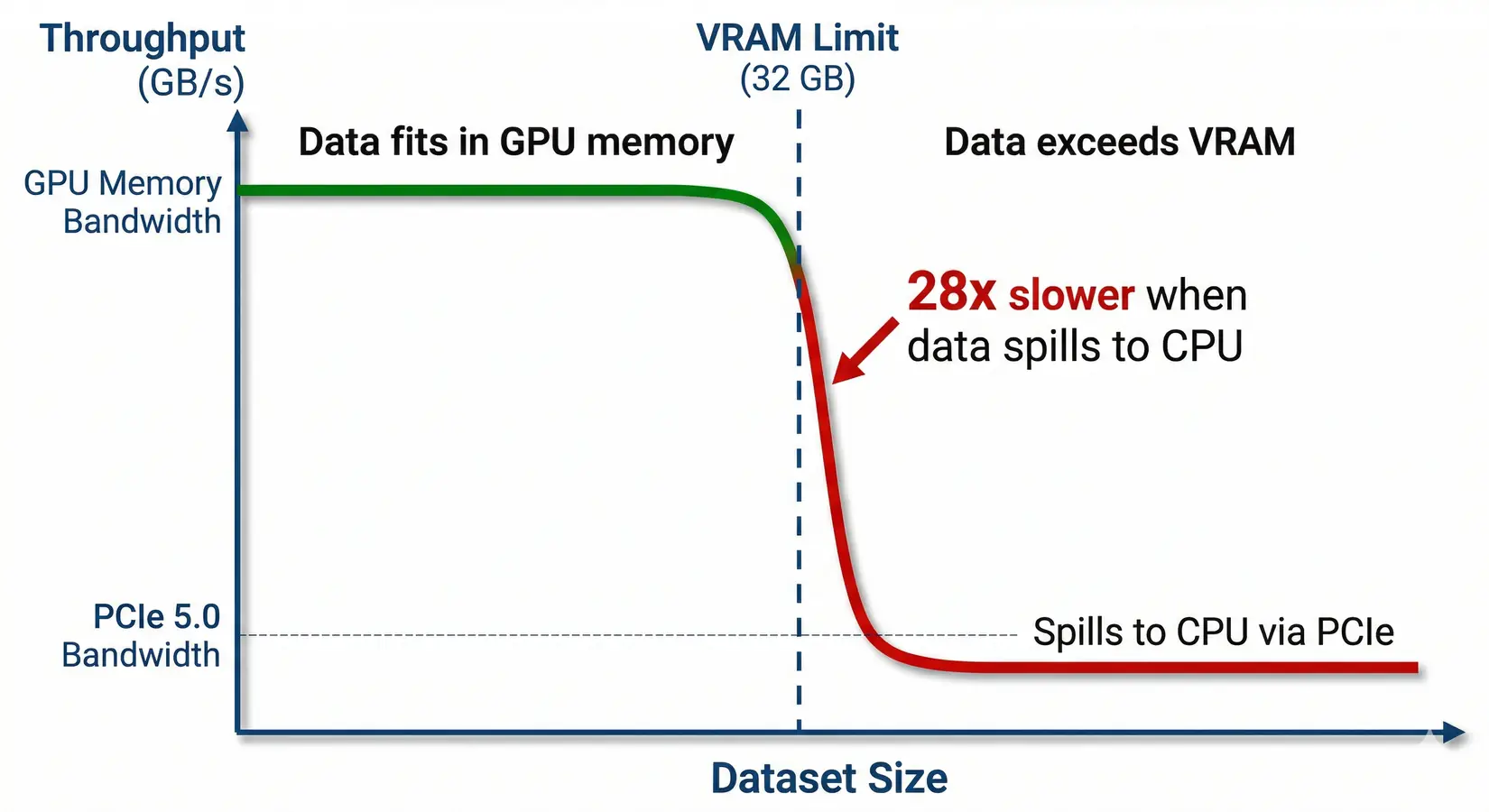
The VRAM cliff. Performance drops 28x when data spills from GPU memory to system memory over PCIe.
Watch Out
A dataset that fits a 32 GB RTX 5090 but spills to system memory over PCIe 5.0 ends up slower than running on the CPU. Always buy for 2x your current dataset size at minimum.
VRAM sizing covers most single-card workloads. The moment a dataset crosses the single-card ceiling, or a team needs concurrent jobs, the calculation flips to multi-GPU. RAPIDS does not pool VRAM across cards by default, so adding a second GPU often helps less than expected on tabular workloads.
When to Add a Second GPU
Most cuDF and cuML workloads run on a single GPU. One 96 GB RTX PRO 6000 beats two 32 GB RTX 5090s for data science. NVLink does not pool VRAM for most data science frameworks. Two RTX 5090s do not give you a unified 64 GB memory space. Each card sees its own 32 GB, and RAPIDS assumes one device per worker. The per-card VRAM ceiling is the deciding constraint, not aggregate GPU count.
Dask-cuDF can distribute work across multiple GPUs, but coordination overhead on every shuffle and join often erases the throughput advantage. One big GPU beats two small ones. Multi-GPU wins for parallel hyperparameter sweeps, ensemble training across independent submodels, and Spark RAPIDS workloads designed for distributed processing. The decision rule is dataset size first, GPU count second.
Buy for the dataset you have next quarter, not the one you have today.
Single-versus-multi-GPU sizing is one fork in the buying decision. Workflow type is the other. Name the workflow class first. A pure cuDF pipeline weights specs differently than a deep learning training run, and a mixed pipeline that hands data between RAPIDS and PyTorch needs both.
Match the GPU to the Workflow
Workflow class beats team size and budget when picking the right GPU. EDA needs VRAM headroom, production pipelines need ECC memory, and ML training rewards tensor core throughput when model size justifies it.
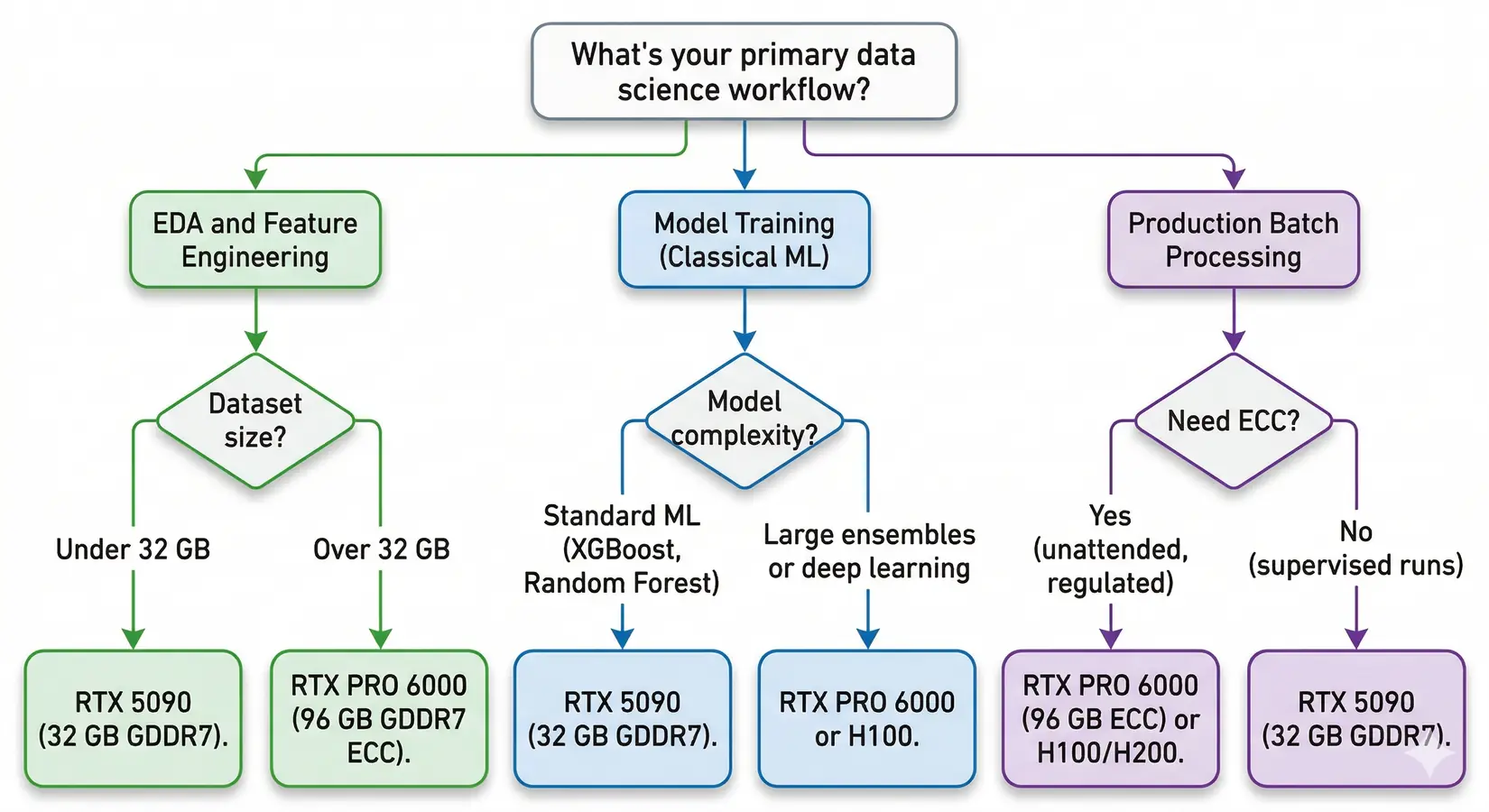
Which GPU fits your workflow? Follow the branches to find your match.
The tree splits on dataset size first, then workload type. EDA on 30 GB datasets needs the same RTX 5090 tier as production jobs at the same scale. Workload class then decides supporting features: VRAM headroom for joins, tensor compute for cuML, and ECC for unattended batches.
EDA and Feature Engineering
This is where cuDF's pandas accelerator shines brightest. Groupby, merge, pivot, and filter operations run hundreds of times a day. VRAM caps every one. The working dataset needs to fit in GPU memory. Bandwidth sets iteration speed once it does. For most tabular workloads, the RTX 5090's 32 GB handles datasets up to 100 million rows by 50 columns. Size to your widest join, not your average query.
Classical ML and Small Deep Learning
cuML accelerates the models most data scientists actually use. XGBoost GPU training is now standard, and RAPIDS 25.x added out-of-core support for datasets that exceed VRAM. For models up to about 3 billion parameters, the RTX 5090's 32 GB handles training at FP16. The PRO 6000's 96 GB covers larger multi-model experiments and ensemble methods without hot-swapping weights between iterations.
Production Pipelines and Batch Processing
Production changes the equation. ECC stops being optional once pipelines run unattended overnight or process regulatory data. A silent bit flip can corrupt results with no obvious error, just bad numbers downstream. The RTX PRO 6000 (96 GB ECC) and RTX PRO 5000 (48 GB ECC) are the right tier for this class of work. In our experience with regulated customers, finance, healthcare, and defense teams choose local workstations over cloud GPU instances because proprietary datasets cannot leave the organization under client contracts, regulatory requirements, or internal security policy. A BIZON workstation with RTX PRO 6000 GPUs keeps data on premises, removes per-GPU-hour billing, and eliminates upload latency on multi-TB datasets.
GPU vs CPU Cost Efficiency
At multiple runs per day, the time savings from GPU acceleration compound fast. Three to four hours of daily cloud GPU usage carries a monthly bill that often matches the workstation cost inside a year. Faster compute changes what experiments you're willing to run.
GPU Buying Mistakes
These nine mistakes cost data scientists thousands in wasted hardware spend. Most trace back to LLM-training instincts misapplied to a memory-bandwidth-bound workload. A card chosen for tokens-per-second often underperforms on groupby because data science rewards VRAM and bandwidth, the opposite of LLM training's compute-bound profile.
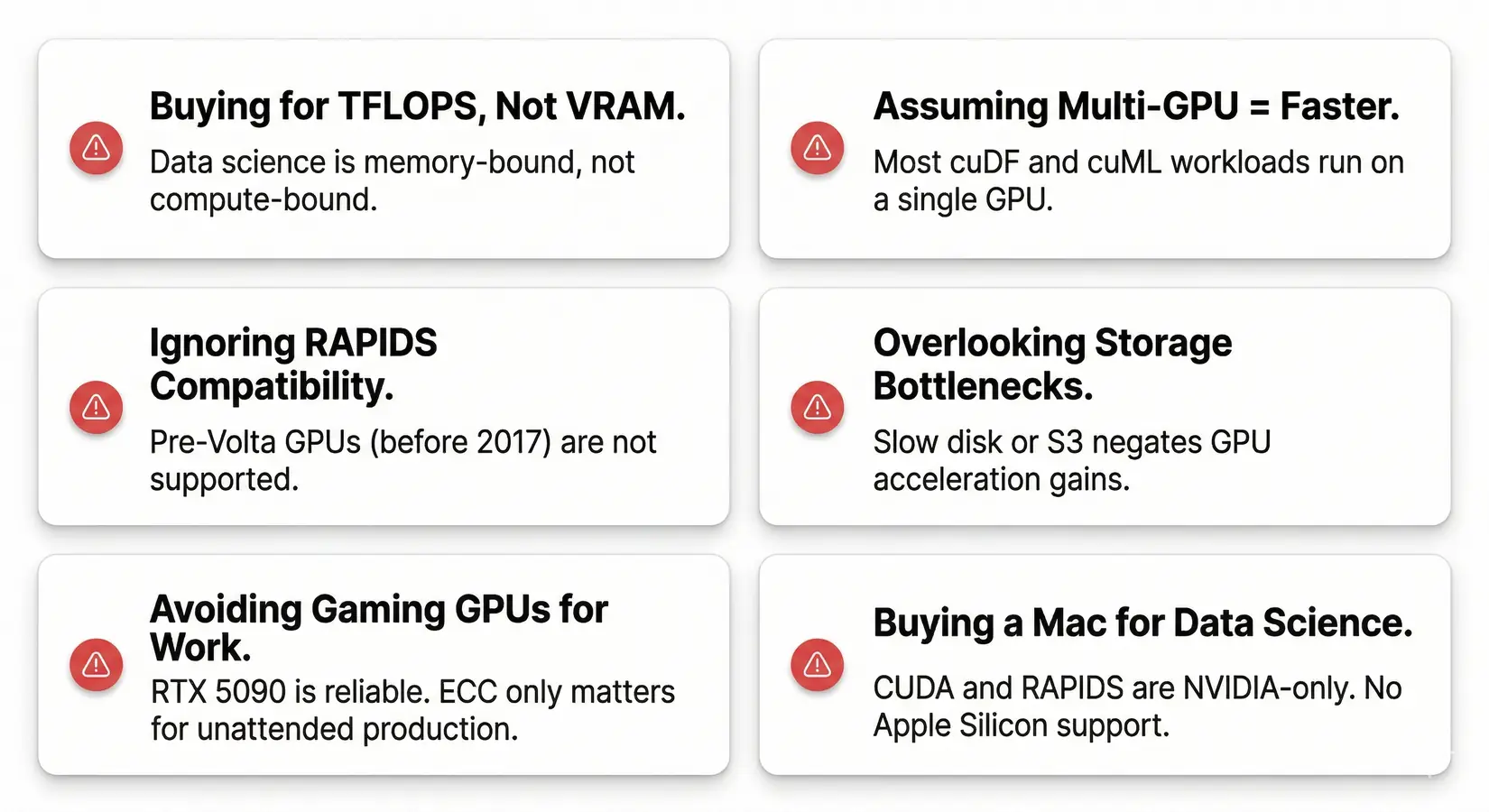
The most common GPU buying mistakes for data science. Avoid these and you'll save money and frustration.
Buying based on TFLOPS instead of VRAM - Data science is memory-bound. A GPU with massive compute but insufficient VRAM spills to CPU and loses its advantage.
Assuming multi-GPU means faster - RAPIDS workloads typically run on a single device. cuDF and cuML assume one GPU per worker. Two cards don't automatically double speed for data science the way they do for neural network training.
Ignoring RAPIDS compatibility - Pre-Volta GPUs (before 2017) are not supported. Verify Volta generation or newer before buying used hardware.
Overlooking storage bottlenecks - A fast GPU won't help if data loads from a slow drive or congested S3 bucket. Fast NVMe is the minimum.
Forgetting that joins and groupbys expand mid-operation - Intermediate buffers can balloon a 10 GB DataFrame into 30 GB during a multi-key join. Size VRAM to four times your largest frame, not the raw size.
Assuming every pandas operation is GPU-accelerated - cuDF.pandas covers most operations but not all. Custom apply functions, certain string methods, and a few exotic dtypes still fall back to CPU. Profile your pipeline before sizing for the headline 100x number.
Thinking gaming GPUs are unreliable for work - The RTX 5090 runs data science workloads just fine. ECC only matters for unattended production pipelines. Consumer GPUs are reliable for interactive work.
Buying a Mac for data science - CUDA is NVIDIA-only. RAPIDS doesn't run on Apple Silicon. M-series chips are excellent for many things, but GPU-accelerated data science isn't one of them. See our Mac Studio vs NVIDIA comparison.
Buying a GPU when you don't need one yet - You probably don't need a GPU if your datasets are under 2-5 GB or you're mostly writing SQL against a data warehouse. Buy when the wait times get painful.
From our build-floor experience, a flagship card in a chassis that throttles runs slower than a tier-down card in a properly built system. The chassis matters. PSU undersizing, undersized cooling, and PCIe lane starvation each cap real-world throughput. BIZON builds to the GPU count and workload pattern, not to a generic configuration.
BIZON Workstations for Data Science
In our experience building data science systems, BIZON configurations span dual-GPU Intel and AMD workstations through 8-GPU water-cooled servers. Every system ships with the pre-installed AI stack, including RAPIDS, PyTorch, CUDA, Docker, and Jupyter, with 3-year warranty and lifetime support.
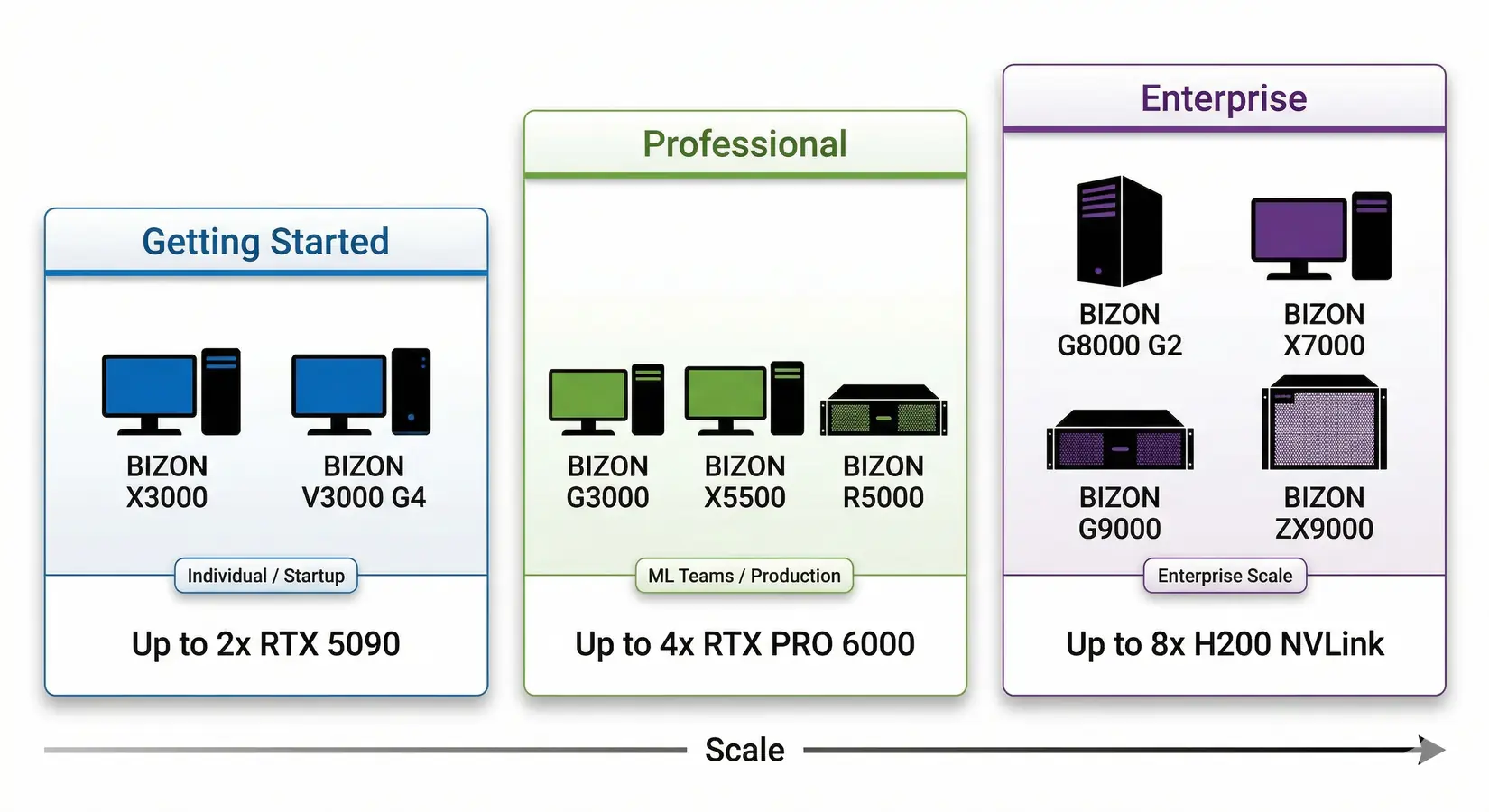
BIZON data science workstation tiers. From dual-GPU desktops to 8-GPU NVLink servers.
From the BIZON Build Floor
Water-cooled multi-GPU configurations sustain boost clocks through continuous RAPIDS workloads on multi-GPU RTX PRO 6000 cards. Equivalent air-cooled builds may thermal-throttle under sustained load. For teams running 24/7 ETL pipelines, that gap translates to a measurable throughput difference on the same hardware.
Match the tier to your dataset size and team scope. Entry suits analysts on datasets under 32 GB. Professional covers teams on 32 to 200 GB datasets with multi-GPU RAPIDS and ECC. Enterprise handles 200 GB+ datasets and 24/7 production on 8-GPU NVLink rackmount.
Entry Tier (1-2 GPU)
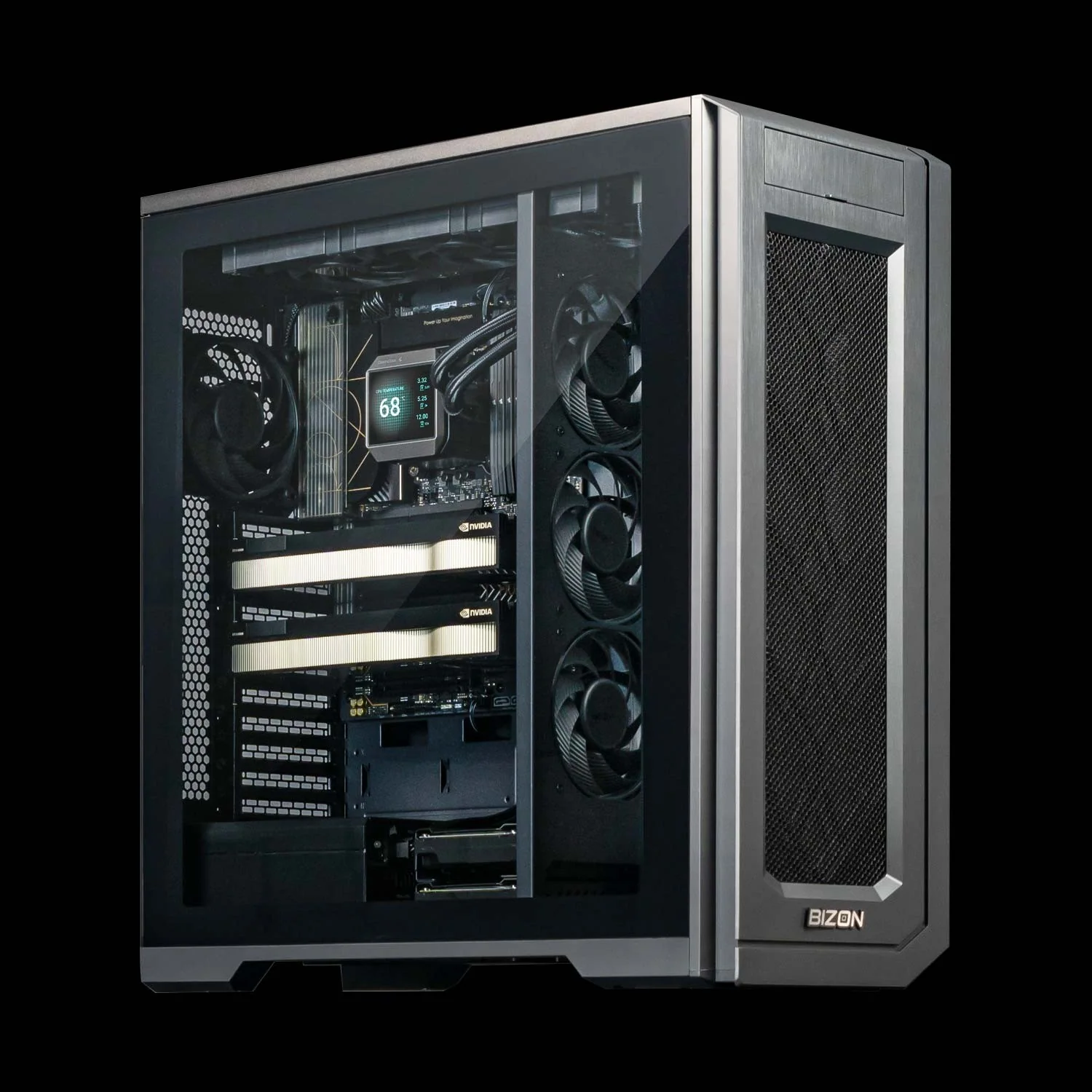
BIZON X3000 G2 Desktop Workstation
- Best for: cuDF acceleration, EDA, classical ML training, local LLM inference
- GPUs: Up to two GPUs. Compatible with the full RTX Blackwell and Ada workstation lineup
- VRAM: Up to 192 GB total (two RTX PRO 6000 at 96 GB ECC each)
- CPU: AMD Ryzen 9000 Series
- RAM: Up to 256 GB DDR5, dual-channel
- Connectivity: 1 GbE built-in plus Wi-Fi/Bluetooth, up to 25 GbE (Dual-Port SFP28).
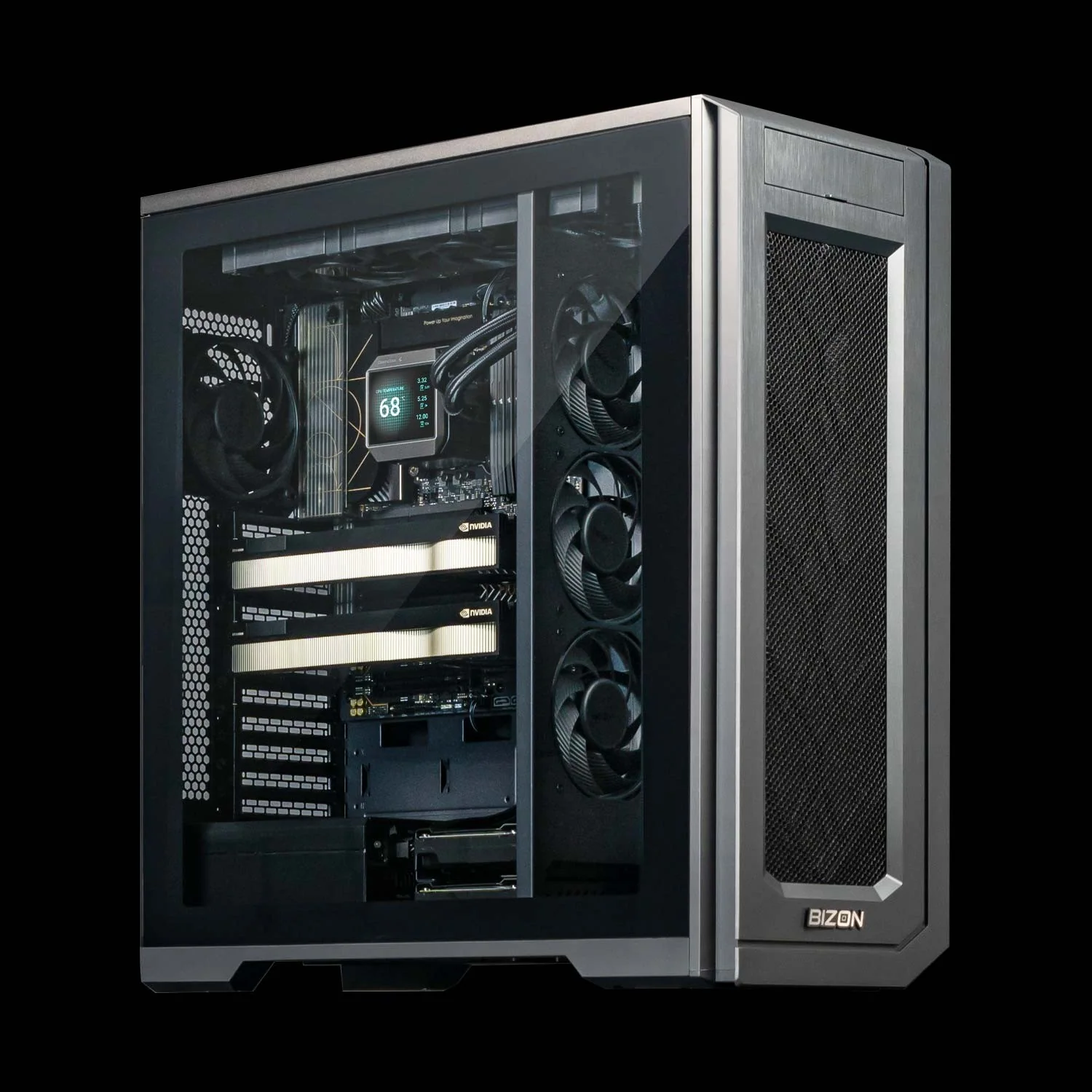
BIZON V3000 G4 Desktop Workstation
- Best for: cuDF acceleration, EDA, small-to-mid dataset processing
- GPUs: Up to two GPUs. Compatible with the full RTX Blackwell and Ada workstation lineup
- VRAM: Up to 192 GB total (two RTX PRO 6000 at 96 GB ECC each)
- CPU: Intel Core Ultra Series
- RAM: Up to 192 GB DDR5, dual-channel
- Connectivity: 1 GbE built-in plus Wi-Fi/Bluetooth, up to 25 GbE (Dual-Port SFP28).
Professional Tier (2-4 GPU)
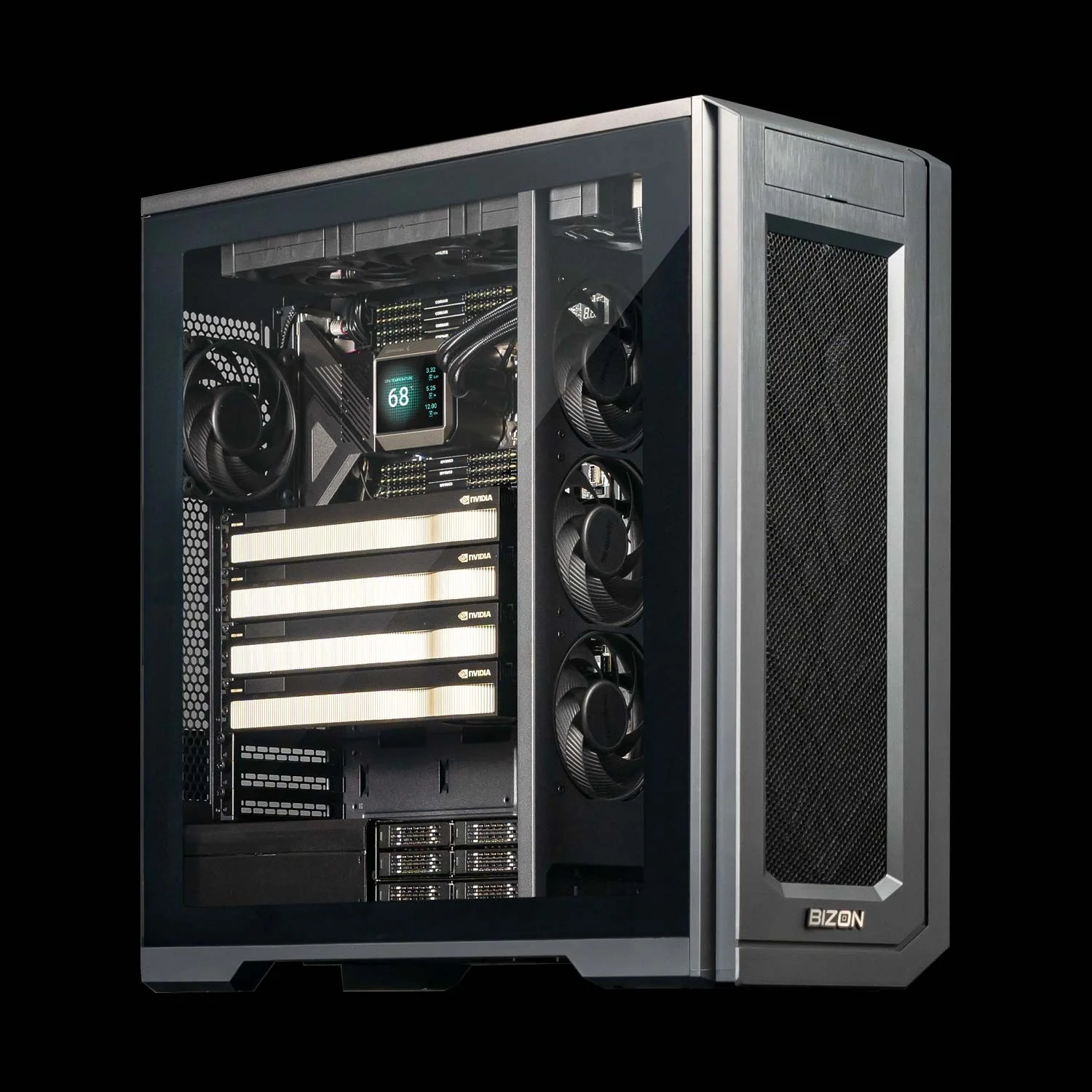
BIZON G3000 Gen2 Desktop Workstation
- Best for: Large-scale cuDF, production cuML pipelines, Dask-cuDF distributed processing
- GPUs: Up to four GPUs. Compatible with the full RTX Blackwell and Ada workstation lineup
- VRAM: Up to 384 GB total (four RTX PRO 6000 at 96 GB ECC each)
- CPU: Intel Xeon W-3500 / W-2500
- RAM: Up to 1,024 GB DDR5 ECC Buffered, quad-channel
- Connectivity: 1 GbE built-in plus Wi-Fi/Bluetooth, up to 100 Gbps InfiniBand EDR (Mellanox ConnectX).
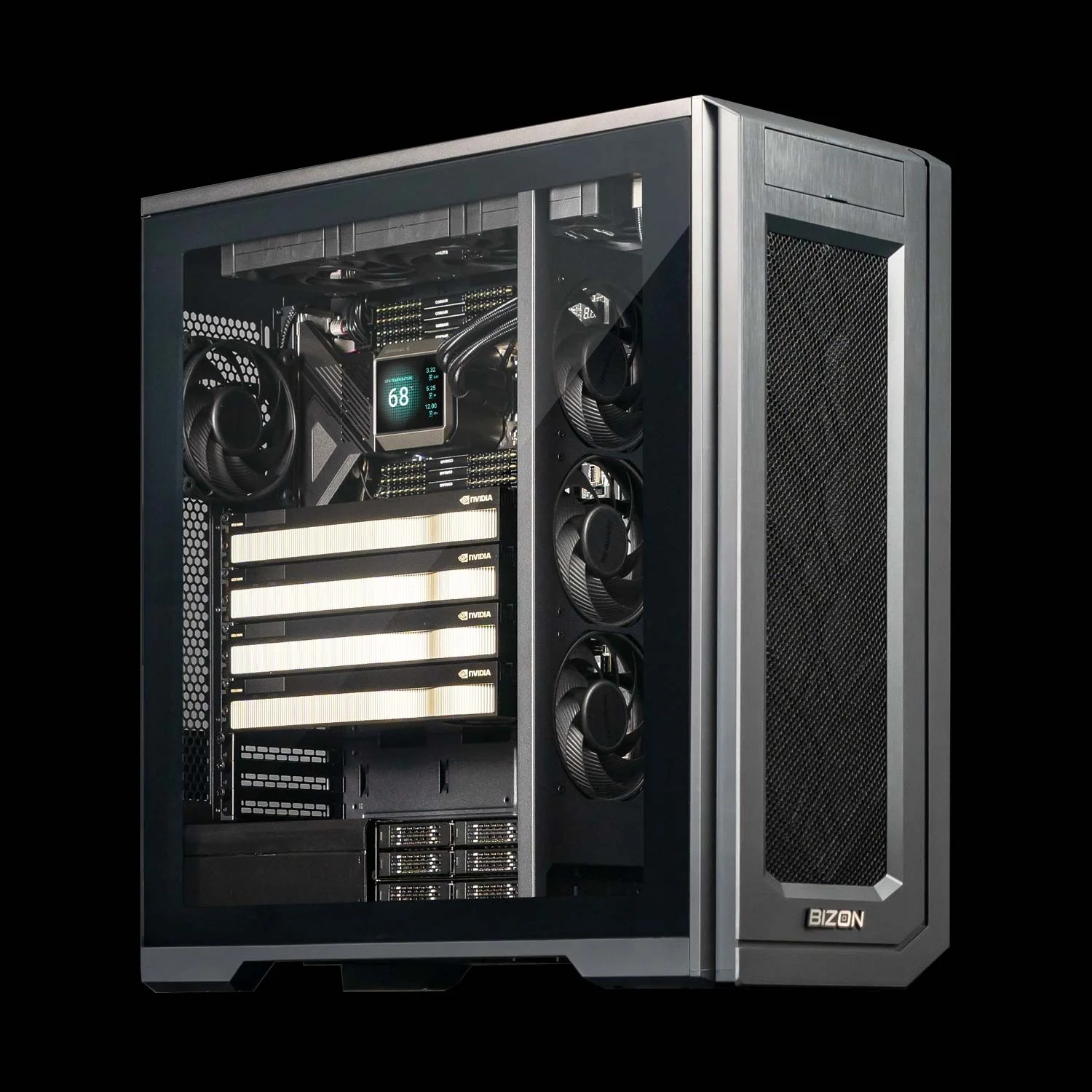
BIZON X5500 G2 Desktop Workstation
- Best for: Mixed data science and ML training, multi-model experiments
- GPUs: Up to four GPUs. Compatible with the full RTX Blackwell and Ada workstation lineup
- VRAM: Up to 384 GB total (four RTX PRO 6000 at 96 GB ECC each)
- CPU: AMD Threadripper PRO
- RAM: Up to 1,024 GB DDR5 ECC, 8-channel
- Connectivity: 1 GbE built-in plus Wi-Fi/Bluetooth, up to 200 Gbps InfiniBand HDR (Mellanox ConnectX-6).
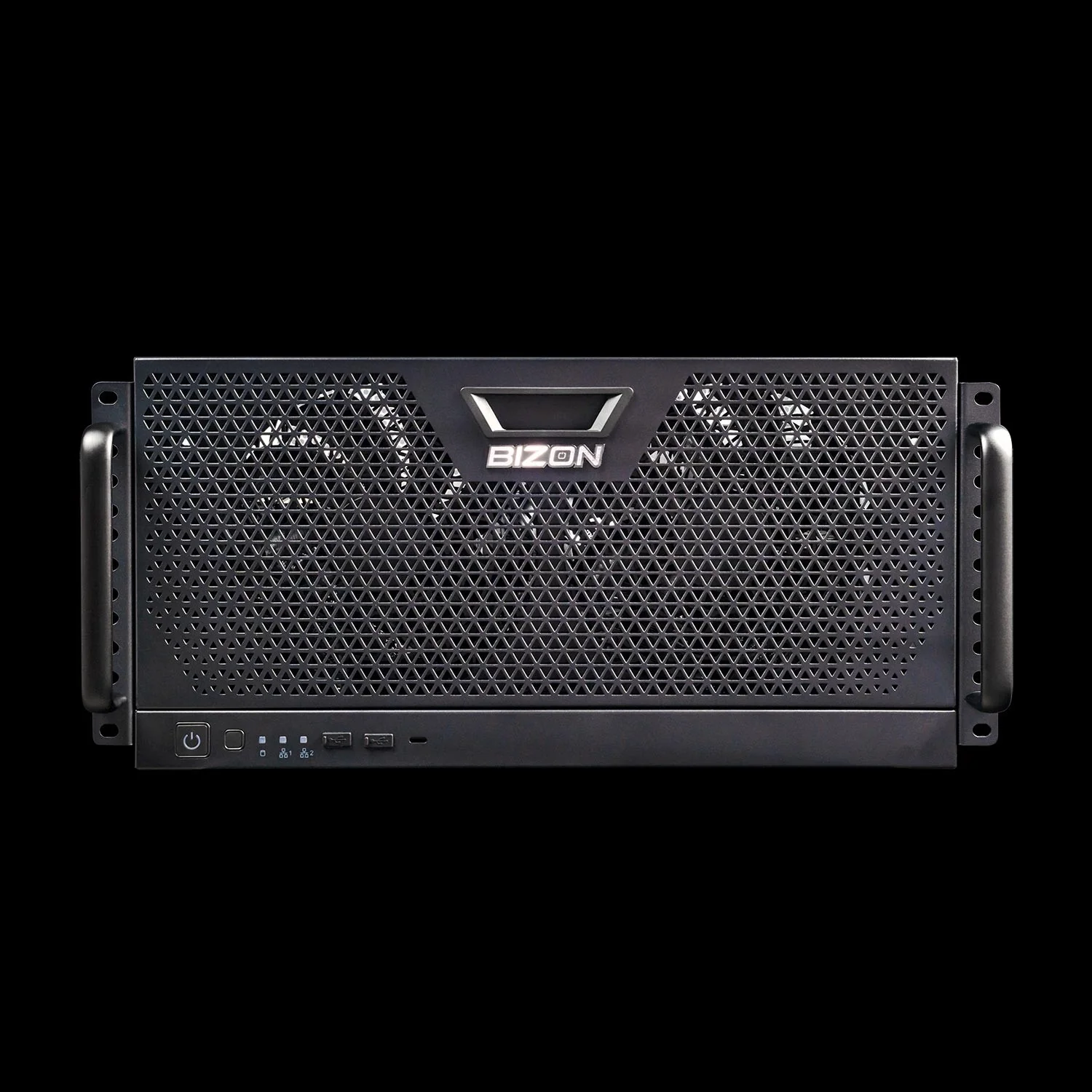
BIZON R5000 Rackmount Workstation
- Best for: Production batch processing, multi-GPU RAPIDS, shared team resource
- GPUs: Up to four GPUs. Compatible with the full RTX Blackwell and Ada workstation lineup
- VRAM: Up to 384 GB total (four RTX PRO 6000 at 96 GB ECC each)
- CPU: AMD Threadripper PRO
- RAM: Up to 1,024 GB DDR5 ECC, 8-channel
- Connectivity: 1 GbE built-in plus Wi-Fi/Bluetooth, up to 100 Gbps InfiniBand EDR (Mellanox ConnectX).
Enterprise Tier (4-8 GPU)
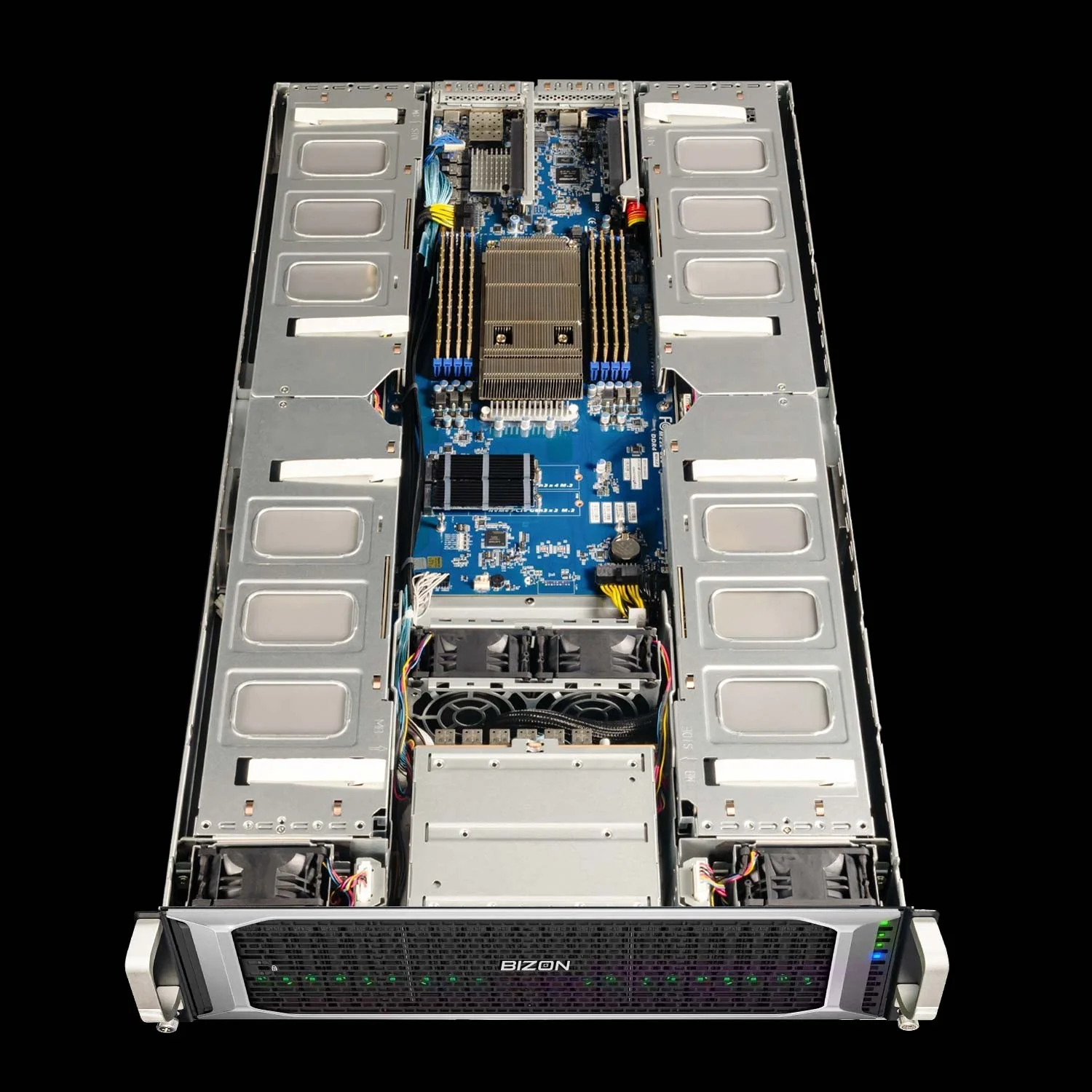
BIZON G8000 G2 Rackmount Server
- Best for: Enterprise RAPIDS pipelines, large-scale distributed cuDF
- GPUs: Up to four GPUs. Supports RTX A1000, RTX 6000 Ada, RTX PRO 4000/4500/5000/6000, L40s, A100 80GB, H100 94GB NVL
- VRAM: Up to 384 GB total (four RTX PRO 6000 at 96 GB ECC each)
- CPU: Single Intel Xeon Scalable 4th/5th Gen
- RAM: Up to 4,096 GB DDR5 ECC Buffered, 8-channel
- Connectivity: 10 GbE dual port (two RJ45) integrated, up to 400 Gbps InfiniBand NDR (Mellanox ConnectX-7), NVLink Bridge available for paired GPUs.
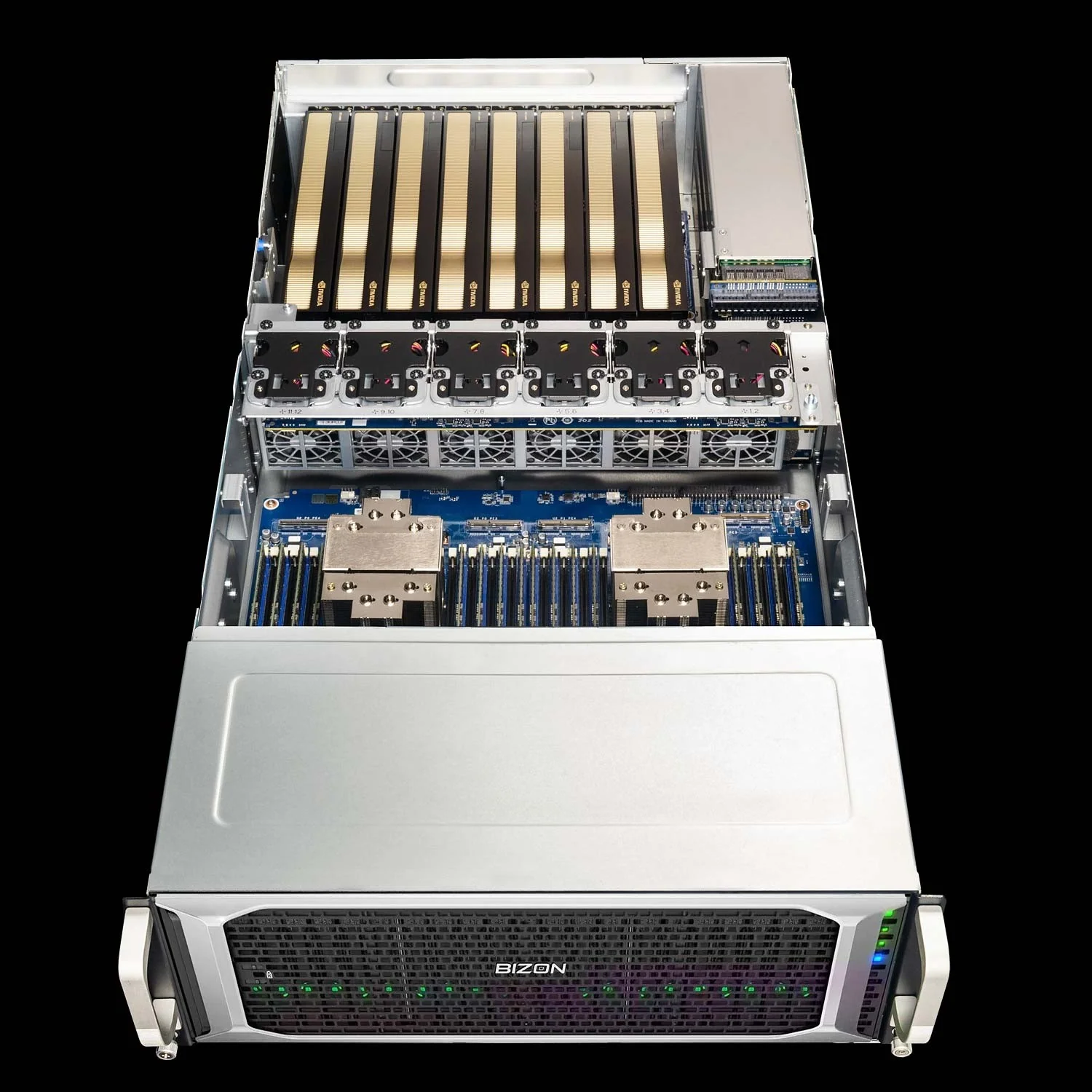
BIZON X7000 G3 Rackmount Server
- Best for: Maximum GPU density, petabyte-scale data processing
- GPUs: Up to eight GPUs. Supports RTX A1000, RTX 6000 Ada, RTX PRO 4000/4500/5000/6000, L40s, A100 80GB, H100 94GB NVL, H200 141GB NVL
- VRAM: Up to 1,128 GB total (eight H200 at 141 GB HBM3e each)
- CPU: Dual AMD EPYC 9004/9005
- RAM: Up to 3,072 GB DDR5 ECC Buffered, 12-channel per CPU
- Connectivity: 10 GbE dual port (two RJ45) integrated, up to 400 Gbps InfiniBand NDR (Mellanox ConnectX-7), NVLink Bridge available for paired GPUs.
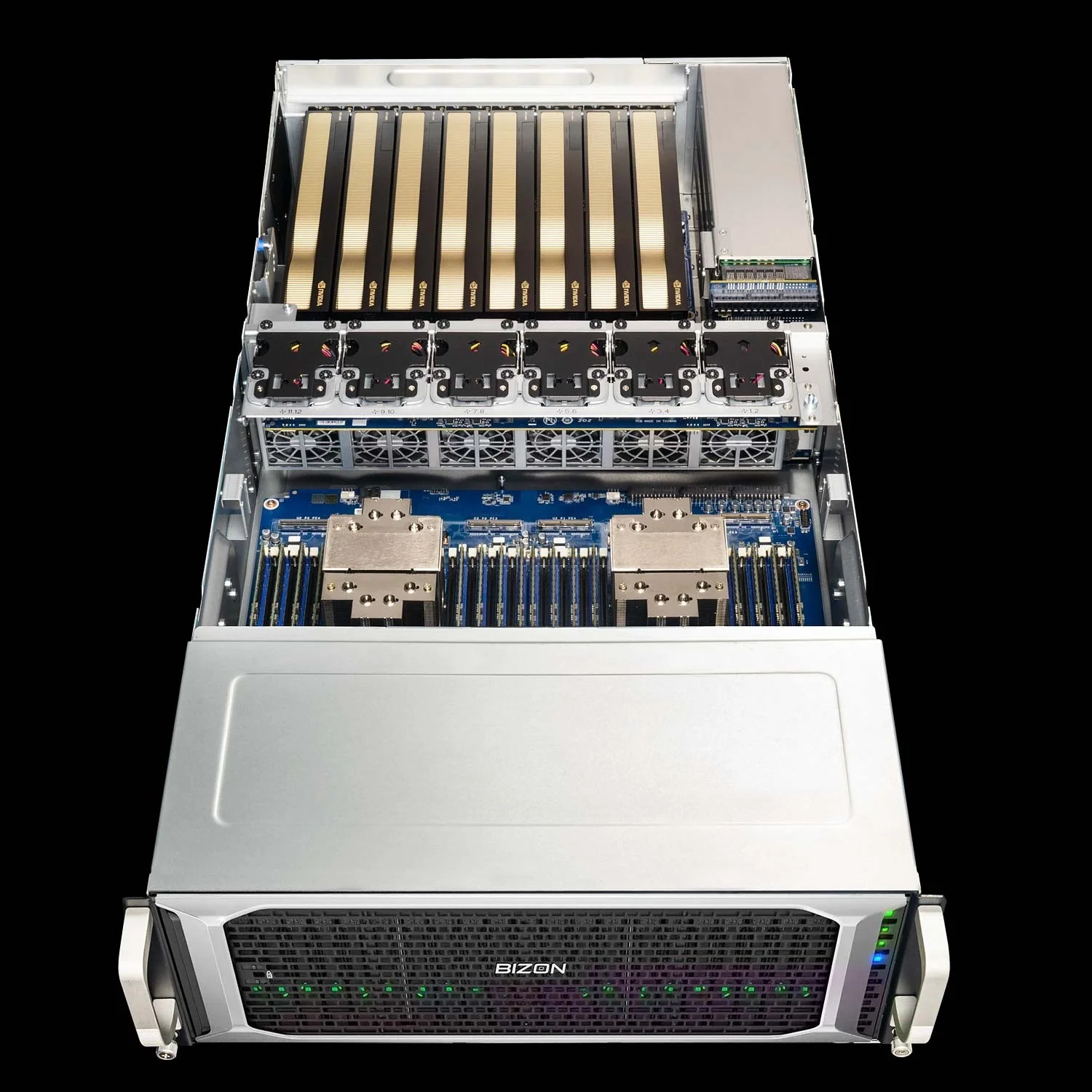
BIZON G9000 Gen 2 Rackmount Server
- Best for: 8-GPU NVLink data science clusters with Hopper-class HBM bandwidth
- GPUs: Up to eight GPUs. Supports A100 40/80GB, H100 94GB NVL, H200 141GB NVL
- VRAM: Up to 1,128 GB total (eight H200 at 141 GB HBM3e each)
- CPU: Dual AMD EPYC 9004/9005 or dual Intel Xeon Scalable 4th/5th Gen
- RAM: Up to 6,144 GB (AMD) or 8,192 GB (Intel) DDR5 ECC, 12-channel (AMD) or 8-channel (Intel)
- Connectivity: 10 GbE dual port (two RJ45) integrated, up to 400 Gbps InfiniBand NDR (Mellanox ConnectX-7).
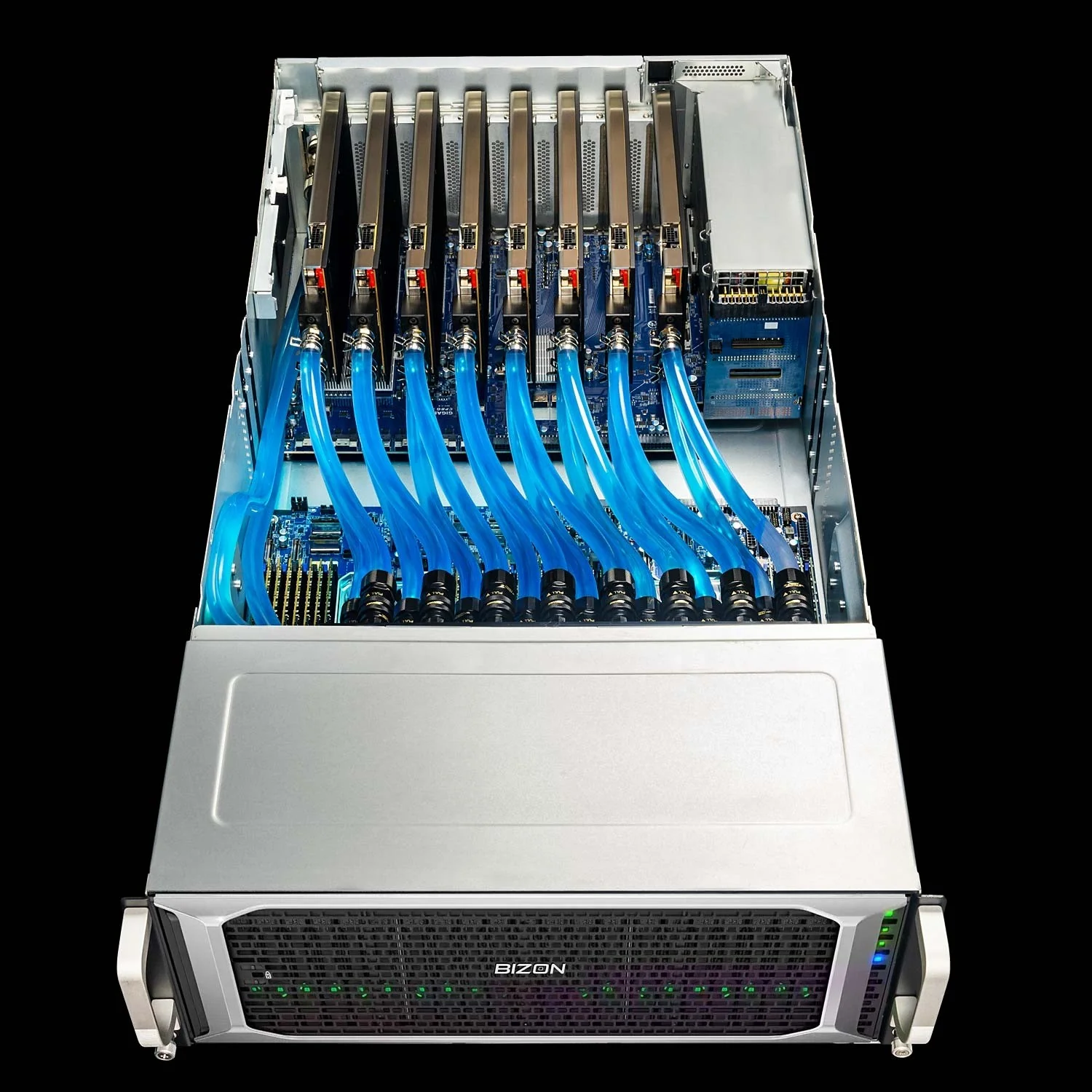
BIZON ZX9000 Water-Cooled Rackmount Server
- Best for: Sustained 8-GPU production data science where air-cooled chassis throttle
- GPUs: Up to eight water-cooled GPUs. Supports RTX A1000, RTX 6000 Ada, RTX PRO 6000 Blackwell, A100 80GB, H100 94GB NVL, H200 141GB NVL
- VRAM: Up to 1,128 GB total (eight H200 at 141 GB HBM3e each)
- CPU: Dual AMD EPYC 9004/9005
- RAM: Up to 3,072 GB DDR5 ECC Buffered, 12-channel per CPU
- Connectivity: 10 GbE dual port (two RJ45) integrated, up to 400 Gbps InfiniBand NDR (Mellanox ConnectX-7).
Picking Your Data Science GPU
Memory beats compute. Data science is bottlenecked by data preparation, not model training. The cuDF and cuML stack delivers roughly 100x speedups on tabular work with one import line. VRAM capacity and ECC define most GPU selection decisions for data science.
Most professionals working under 32 GB land on an RTX 5090 in an X3000 G2 or V3000 G4 desktop. Team-scale work with ECC or 32-to-200 GB datasets steps up to the RTX PRO 6000 in a G3000 Gen2 or X5500 G2 chassis. Enterprise pipelines run on H100 or H200 NVL in the X7000 G3, where HBM bandwidth and NVLink carry distributed RAPIDS work the rest of the way.
The 10-minute pandas wait does not have to be part of the job. Stop waiting. Browse data science workstations or see the LLM GPU pillar for the deep-learning side of the same decision.
BIZON manufactures the workstations and servers discussed in this article. Benchmark figures and product specifications reflect published vendor sources (NVIDIA RAPIDS release notes, official NVIDIA datasheets) and BIZON build-floor experience. Our editorial recommendations follow the engine-first, workload-first analysis shown above. They are not constrained by inventory or commercial considerations.